

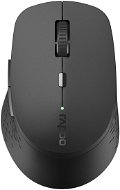
Reviews Rapoo M300 Silent Multi-mode, Dark Grey
Interested in reviews of Rapoo M300 Silent Multi-mode, Dark Grey? It got 4.4 out of 5 stars from our customers. Find specific customer reviews of Rapoo M300 Silent Multi-mode, Dark Grey below. We will appreciate if you also share your experiences with Rapoo M300 Silent Multi-mode, Dark Grey after purchasing.
User Reviews

Petr, Frýdek-Místek 1
Rated 07/06/2023, variant Rapoo M300 Silent Multi-mode, Light Grey
Verified purchase
I've had the mouse for 3 years, some edges on the bottom of the mouse needed to be sanded down a bit with a new sandpaper to make it ride better on the carpet/couch/bed. I recently bought an M650 from Logitech, so I'll be comparing mainly to that. I originally wanted to give it 4 stars, but after my experience with the Logi M650 I give it more like 4.5.
Silent left/right button.
The side buttons are not similarly quiet, but compared to the Logi M650 I think they are quieter.
The wheel is quiet, at very fast spinning it is already rattling gently audible.
Ergonomically very comfortable.
BT/ 2.4 GHz dongle (with storage space in the mouse).
I've only changed the battery maybe once every 3 years.
Feels significantly lighter than the Logi M650.
The rubber processing on the sides still holds without signs of wear.
Compared to the Logi M650, it could use a better sensor, sometimes it behaves a bit non-standard, but I didn't get it to play 3D shooters anyway.
The mouse does have a program to change the action settings on the button, but it lacks the option to set the "Letters(A, B, C,. )/Keys(Ctrl, Enter,. )" when the button is pressed. Only windows operations/double clicks/app launches, etc. The program must also be running all the time, otherwise the personal settings do not work.
0 ×Report
Automatic translation

Anonymous customer
Rated 04/12/2022, variant Rapoo M300 Silent Multi-mode, Light Grey
Verified purchase
Great! I really recommend it. Quiet, functional, responsive and comfortable. It has very nice material and nice colour.
I have also tried the Rapoo M100 model, but for me this model is much better
Connects easily to MacBook and Windows
0 ×Report
Automatic translation

Roman, Pardubice 5
Rated 03/07/2021, variant Rapoo M300 Silent Multi-mode Blue
Verified purchase
Silent main buttons,
Exact
Nothing
0 ×Report
Automatic translation

Miloš, Turnov
Rated 02/12/2020, variant Rapoo M300 Silent Multi-mode, Light Grey
Verified purchase
Ergonomics
I don't know, I'll see how the battery lasts
0 ×Report
Automatic translation

Pavel, CHUDEROV
Rated 12/06/2020, variant Rapoo M300 Silent Multi-mode, Light Grey
Verified purchase
Works with iPad Pro
Profile switching (BT 3/4/Radio connection type) is impractical and confusing
0 ×Report
Automatic translation
