
Prosím nepodporujte nové šmejdské praktiky Synology a nekupujte jejich novou sérii x25+, která podporuje jen jejich 3x předražené disky, které si jen přelepují u výrobců. Stačí, že na stanicích už zablokovali usb příslušenství, zrušili Video Station a kodek HEVC a recyklují 8 let starý hardware. Zkuste QNAP nebo UGREEN.


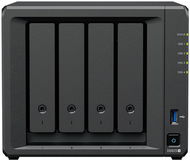
Questions and answers: Synology DS925+
This page contains frequently asked questions about Synology DS925+. If you are considering buying this product, you may want to read the discussion or ask more questions about Synology DS925+. They will be answered by our specialists.
Prosím nepodporujte nové šmejdské praktiky Synology a nekupujte jejich novou sérii x25+, která podporuje jen jejich 3x předražené disky, které si jen přelepují u výrobců. Stačí, že na stanicích už zablokovali usb příslušenství, zrušili Video Station a kodek HEVC a recyklují 8 let starý hardware. Zkuste QNAP nebo UGREEN.
Customer,
10. 6. 2025,
1
answer
Zařízení nelze nyní používat bez disků od Synology.
Zařízení nelze nyní používat bez disků od Synology.
Customer,
7. 5. 2025,
1
answer
Takže nyní už jen jejich vlastní HDD? Tak to se mohou jít vycpat... Jen by to tedy mělo být výrazně napsané v popiscích.
Takže nyní už jen jejich vlastní HDD? Tak to se mohou jít vycpat... Jen by to tedy mělo být výrazně napsané v popiscích.
Customer,
1. 7. 2025,
1
answer
Tedy jen Synology disky? Dekuji, nekupuji.
Tedy jen Synology disky? Dekuji, nekupuji.
Antonín Gažák,
2. 6. 2025,
1
answer
čítal som tento článok: Synology zařadilo zpátečku, jejich NAS se otevřou diskům třetích stran - 1. JE TO PRAVDA ? 2. ak áno, tak aké disky si viem kúpiť okrem značky Synology? Prosím o urgentnú odpoveď.
čítal som tento článok: Synology zařadilo zpátečku, jejich NAS se otevřou diskům třetích stran - 1. JE TO PRAVDA ? 2. ak áno, tak aké disky si viem kúpiť okrem značky Synology? Prosím o urgentnú odpoveď.
Customer,
18. 10. 2025,
1
answer
Vypnutí kontroly kompatibilních disků: (1) Použijte libovolný 2.5" SATA SSD disk - na ten vám zařízení umožní nainstalovat systém DSM. (2) Povolte přístup přes SSH a připojte se do zařízení. Zde upravte soubor synoinfo.conf ve složce etc.defaults tak, že na řádku support_disk_compatibility="yes" přepíšete hodnotu na "no" (Jak na to? Ai chatbot...). (3) Restartujte zařízení. (4) Vložte jeden z vašich disků 3.5" SATA a vytvořte na něm Storage Pool a Volume (stačí Basic) - tím dojde i zrcadlení systémových oddílů DSM. (5) Volume a Storage Pool na 3.5 disku můžete smazat, stejně tak můžete smazat Storage Pool a Volume na 2.5 SSD, pokud byly vytvořeny. (6) Vyjměte 2.5 SSD a vložte zbývající 3.5" disky. (7) Vytvořte Storage Pool dle potřeby (SHR, RAID 5, 6 atd.) a Volume. Záruku na hardware u prodejce neztrácíte, Synology vám ale může odepřít podporu na svém support portálu.
Vypnutí kontroly kompatibilních disků: (1) Použijte libovolný 2.5" SATA SSD disk - na ten vám zařízení umožní nainstalovat systém DSM. (2) Povolte přístup přes SSH a připojte se do zařízení. Zde upravte soubor synoinfo.conf ve složce etc.defaults tak, že na řádku support_disk_compatibility="yes" přepíšete hodnotu na "no" (Jak na to? Ai chatbot...). (3) Restartujte zařízení. (4) Vložte jeden z vašich disků 3.5" SATA a vytvořte na něm Storage Pool a Volume (stačí Basic) - tím dojde i zrcadlení systémových oddílů DSM. (5) Volume a Storage Pool na 3.5 disku můžete smazat, stejně tak můžete smazat Storage Pool a Volume na 2.5 SSD, pokud byly vytvořeny. (6) Vyjměte 2.5 SSD a vložte zbývající 3.5" disky. (7) Vytvořte Storage Pool dle potřeby (SHR, RAID 5, 6 atd.) a Volume. Záruku na hardware u prodejce neztrácíte, Synology vám ale může odepřít podporu na svém support portálu.
Customer,
30. 5. 2025,
5
answers
Zdar, prosím o radu a předem děkuji za slušné reakce. Budu kupovat Synology DS925+ a chtěl bych přidat WD Red SSD SN700 1TB NVMe na Cache. Vezme to, nebo musím hledat Synology SSD
Zdar, prosím o radu a předem děkuji za slušné reakce. Budu kupovat Synology DS925+ a chtěl bych přidat WD Red SSD SN700 1TB NVMe na Cache. Vezme to, nebo musím hledat Synology SSD
Ladislav Plavec,
26. 5. 2026,
1
answer
Dobrý den, rád bych si potvrdil, že NAS lze již použít s non Synology disky, konkrétně WD60EFPX (WD Red 6 TB). Děkuji.
Dobrý den, rád bych si potvrdil, že NAS lze již použít s non Synology disky, konkrétně WD60EFPX (WD Red 6 TB). Děkuji.
Customer,
4. 4. 2026,
1
answer
Dobrý den. Jakou doporučíte paměť RAM při rozšíření od jiných výrobců než je Synology? Děkuji.
Dobrý den. Jakou doporučíte paměť RAM při rozšíření od jiných výrobců než je Synology? Děkuji.
David Habán,
20. 2. 2026,
1
answer
Dotazy k Synology DS925+: Lze použít disky WD Red Pro nebo je potřeba disky Synology? Jaká je maximální kapacita 1 ks disku? Děkuji
Dotazy k Synology DS925+: Lze použít disky WD Red Pro nebo je potřeba disky Synology? Jaká je maximální kapacita 1 ks disku? Děkuji
Customer,
8. 2. 2026,
1
answer
