Try our cookies Alza.cz a. s., Company identification number 27082440, uses cookies to ensure the functionality of the website and with your consent also to personalisage the content of our website. By clicking on the “I understand“ button, you agree to the use of cookies and the transfer of data regarding the behavior on the website for displaying targeted advertising on social networks and advertising networks on other websites.
Alzak icon
Catalogue
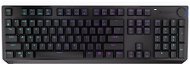
Endorfy Thock Wireless Brown - US - Gaming Keyboard

Reviews Endorfy Thock Wireless Brown - US

Interested in reviews of Endorfy Thock Wireless Brown - US? It got 5.0 out of 5 stars from our customers. Find specific customer reviews of Endorfy Thock Wireless Brown - US below. We will appreciate if you also share your experiences with Endorfy Thock Wireless Brown - US after purchasing.

User Reviews

Jakub, Brnoflag
Rated 12/07/2025, variant Endorfy Thock Wireless Brown - US
Verified purchase - review from a price comparison website
Compact and robust. Met expectations according to the parameters in the description
0 ×Report
Automatic translation
Martin, Sokolov 1flag
Rated 24/03/2025, variant Endorfy Thock Wireless Brown - US
Verified purchase
I purchased the keyboard after several other unsuccessful attempts at a full (100%) wireless keyboard. I originally wanted to buy wireless. from Rapture (8000mAh battery), unfortunately Rapture has opaque keycaps, so the keyboard backlight is there to just shine in your face and annoy you with the experience. So the choice fell on this one. It may seem quite light to some, but the keyboard does not slide on the table. The only complaint I have is practically on charging, where it is written in the manual that the space bar should be red (0-99%) when charging the keyboard off, after 100% it should go off. Unfortunately my space bar is still off when charging the keyboard no matter how many % the keyboard has. Which at first confused me a lot if the keyboard was really charging. I may have missed it, but even in the keyboard SW it doesn't say the battery level in % anywhere, so the only status indicator is the LED on the keyboard. Otherwise, the keyboard really is the perfect choice for mid-range wireless. Especially if you want 100%.
Precision keyboard processing
Nice keycaps and especially translucent letters
The battery lasts really long, even after a whole weekend of playing on the wireless the battery still glows green
the volume crown is really the perfect thing
Switches are quiet, easy to write and play with
Up to 3 BT devices can be remembered by the keyboard + 1x 2.4G dongle, you can switch between 4 devices in total
Full-fat (100%)
I didn't notice any response in the controls even when playing CS2
Even when the keyboard is "asleep", just press it and it will register immediately without delay
The supplied keyboard cable is a high quality braided cable.
The charger cable is nicely hidden underneath the keyboard and has its own "tunnel" for the wire, so you don't have a connector sticking out of the keyboard that could be easily tripped over
If you don't like the US keyboard, it is practically shaped like all other gaming keyboards on the market, you can swap keycaps from other keyboards with CZ.
Charging the keyboard is some strange, in the instructions it says that when the keyboard is off the space bar should be lit to indicate charging, unfortunately for me the space bar does not light when charging the keyboard off. Indicates charging only in on mode by flashing battery LED
If you're a better CS2 player and are used to quick-peking with AD, for some reason quick-peking on this keyboard doesn't go as fast as on cheaper keyboards, the character really only moves millimetres when quick-peking AD, on other keyboards it was (for some) considerably more. I don't know whether to write this as an advantage or disadvantage, as for some it may mean much more precise control, for some it will be a quick-peek need to re-learn to that "different" control, probably due to the brown switches I got for the first time.
Keyboard settings can only be made when the cable is connected to the PC
Not every USB-C you can find at home goes into the keyboard, although the cable is very good quality, be careful with it, because it may happen that you can't charge the keyboard
The backlighting of the keys is quite weak, beautifully visible at night, but weak
Too bad that the Czech keyboard layout is not made in a wireless version with these brown switches.
0 ×Report
Automatic translation
Tomáš, Brnoflag
Rated 11/02/2025, variant Endorfy Thock Wireless Brown - US
Verified purchase
nice keys
backlight
keyboard setup via cable only
too much sensitivity in turning the crown
0 ×Report
Automatic translation
Customer, Praha 4flag
Rated 23/02/2024, variant Endorfy Thock Wireless Brown - US
Verified purchase
battery life (± 14 days)
pleasant buttons and quiet
programmable buttons
the rotation of the crown is set to volume (the squeeze can be changed, that's cool)
keyboard management in the app is only possible when connected by cable to the computer
0 ×Report
Automatic translation
P-DC1-WEB03