Try our cookies Alza.cz a. s., Company identification number 27082440, uses cookies to ensure the functionality of the website and with your consent also to personalisage the content of our website. By clicking on the “I understand“ button, you agree to the use of cookies and the transfer of data regarding the behavior on the website for displaying targeted advertising on social networks and advertising networks on other websites.
Alzak icon
Catalogue
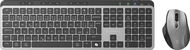
Eternico Wireless set KSB4350 CZ/SK - Keyboard and Mouse Set

Reviews Eternico Wireless set KSB4350 CZ/SK

Interested in reviews of Eternico Wireless set KSB4350 CZ/SK? It got 4.2 out of 5 stars from our customers. Find specific customer reviews of Eternico Wireless set KSB4350 CZ/SK below. We will appreciate if you also share your experiences with Eternico Wireless set KSB4350 CZ/SK after purchasing.

User Reviews

David, Praha 9 - Hostaviceflag
Rated 03/03/2025, variant Eternico Wireless set KSB4350 CZ/SK
Verified purchase
Good price/performance ratio
Everything works as expected on Windows
The keyboard is massive, heavy
Ubuntu is having problems with the mouse connected via bluetooth, which is stuttering. However this seems like a general Ubuntu problem with Bluetooth mice.
The space bar will occasionally skip, but it's not common
0 ×Report
Automatic translation
Customer, Praha 12flag
Rated 02/03/2025, variant Eternico Wireless set KSB4350 CZ/SK
Verified purchase
Processing quality 0
0 ×Report
Automatic translation
Foglab s.r.o., Prahaflag
Rated 23/02/2025, variant Eternico Wireless set KSB4350 CZ/SK
Verified purchase
Great enthusiasm when unpacking, great disappointment after trying it out. The set has too many unfinished details that are not compatible with professional use (even without frequent switching between devices). After 30 minutes of testing, it was clear that we would be returning this product.
Looks good.
Pleasant to the touch
The keyboard is heavy - it does not run
Mouse tilt wheel
USB-C cable charging during normal use
Mouse and keyboard go to sleep quickly - just a few seconds and you wait for the result of the next task - unpleasantly jerky experience even with simple activities - it's really not for professional work
the button for switching the connected device on the mouse is on the bottom - if you want to work with two computers simultaneously and quickly switch between them, then only with the keyboard, you can't switch the mouse quickly
some keys apparently send non-standard codes - for example, it doesn't write a slash - neither on the alphanumeric nor on the numeric part of the keyboard
instead of the right CTRL key, a dubious key - in Linux it shuts down the computer, in Windows it opens a kind of Start submenu, which I never needed in my life
Fn-lock is turned off with each switch of the device, with the F1-F12 keys without Fn pressed, respectively. with Fn-lock on, have mostly useless functions. I really don't need an extra key for Select All - Cut - Copy - Paste - Save when I have Ctrl+A, Ctrl+X, Ctrl+C, Ctrl+V, Ctrl+S, but I need F1-F12 almost all the time
enter too narrow
non-standard numeric keypad layout
0 ×Report
Automatic translation
David, Praha 9 - Kyjeflag
Rated 21/02/2025, variant Eternico Wireless set KSB4350 CZ/SK
Verified purchase
I am absolutely thrilled with the keyboard. It's a great product
The layout\layout of the buttons suits me perfectly, at most Enter could be a little wider. I don't have the space bar problem that other reviews have mentioned.
That. having an integrated battery is absolutely the best thing. No need to deal with flashlights. Just plug the charging cable into your computer and work for a while as with the wired version. The keyboard will charge and then you just unplug and you're done. Perfect.
The keyboard is beautifully heavy, so it doesn't move at all on the desk and I don't have to keep adjusting its position. It wasn't until I saw this keyboard where it wasn't happening that I realized how annoying it was.
Many useful and not typical functions either directly via dedicated multimedia buttons or via Fn key (lock computer, windows smileys, copilot button, clipping, etc. )
Connecting up to three devices works perfectly. We have two computers and a tablet connected to the keyboard and mouse, so we don't have to deal with constantly swapping the receiver from one device to another. Just press the button.
The dedicated DPI button on the mouse is great because you can adjust the cursor speed to the job.
I'm a big hater, but I really have nothing to bitch about here. If the mouse or keyboard doesn't break down quickly, it's a perfect product for me. I applaud ❤
0 ×Report
Automatic translation
Alexandr, Tismiceflag
Rated 11/02/2025, variant Eternico Wireless set KSB4350 CZ/SK
Verified purchase
betel keyboard and maus
also works with a baking machine
USB charging is fine
forichtung is similar to Logitech MX, it still works, because I have it on my shift
Good fucking choice.
a little maglajs in the buttons around the keyboard
the space bar is a cyp
0 ×Report
Automatic translation
Anonymous customerflag
Rated 04/02/2025, variant Eternico Wireless set KSB4350 CZ/SK
Verified purchase
Excellent price vs performance ratio, but this combo has one absolutely incomprehensible shortcoming for me. The mouse has a toggle button on the bottom of the mouse like a microscopic button. It's impossible that someone could invent such a non-ergonomic stupidity. If the person who designed this mouse had ever worked on more than one computer at the same time, he would immediately understand that the ability to quickly switch from one computer to another is important for efficient work. This has been correctly solved by the keyboard, where the transition from one feeling to another is done by pressing the button corresponding to the connected computer. This is not the case with the mouse, they could have put this switching button at least instead of the unnecessary side extras. So when I want to switch from one device to another I have to use this procedure, which eliminates any advantage of using one mouse for more devices: 1. pick up the cape and turn it 2. find and hit the microplate in the base mouse 3. press once or twice depending on how many devices I have connected and check by the other microscopic lights which computer to activate. 4. turn the mouse, put it down
heavy keyboard
metal keyboard
there is no sufficient manual to explain some non-standard keys
complicated mouse switching
0 ×Report
Automatic translation
Václav, Kadaňflag
Rated 03/02/2025, variant Eternico Wireless set KSB4350 CZ/SK
Verified purchase - review from a price comparison website
Keyboard silence
Keyboard and mouse rechargeable power supplies
Too many mouse buttons for the layperson
The mouse is too big
0 ×Report
Automatic translation
Customer, Praha 4flag
Rated 20/01/2025, variant Eternico Wireless set KSB4350 CZ/SK
Verified purchase
my son is thrilled
the connection to the computer was supposedly automatic (bluetooth)
looks very nice
0 ×Report
Automatic translation
Lukáš, Praha 5flag
Rated 17/01/2025, variant Eternico Wireless set KSB4350 CZ/SK
Verified purchase
Pleasantly soft keyboard and comfortable mouse
0 ×Report
Automatic translation
Václav, Duchcovflag
Rated 07/12/2024, variant Eternico Wireless set KSB4350 CZ/SK
Verified purchase
A nice little keyboard with an awkward key layout, for occasional use I would probably keep it, but as a professional I would definitely return it. If the manufacturer would work on it more, it could be a very nice product, well thought out, but unfinished - the internal receiver and bluetooth works, but over bluetooth uses some non-standard communication (maybe it solves the driver of the operating system, which is not in linux) and the extended keys send different codes (I can not use e.g. F1-F12 and others, 2 of the keys just turn off my computer).
The keyboard fits perfectly in place (small but heavy) - much better than I expected
Spacebar responds well only in the middle
Useless key instead of right CTRL, which sends the sequence ShiftL+WinR
Non-standard numeric keypad layout
It sends different hotkey codes over bluetooth (probably solves the driver in Windows, doesn't work in Linux)
Mouse has sometimes "choppy" movements, poorly responsive
The mouse is unnecessarily too light (especially compared to the keyboard)
Keyboard and mouse disconnect too quickly (probably to save battery)
0 ×Report
Automatic translation
11 - 20 from 20
P-DC1-WEB03