Try our cookies Alza.cz a. s., Company identification number 27082440, uses cookies to ensure the functionality of the website and with your consent also to personalisage the content of our website. By clicking on the “I understand“ button, you agree to the use of cookies and the transfer of data regarding the behavior on the website for displaying targeted advertising on social networks and advertising networks on other websites.
Alzak icon
Catalogue
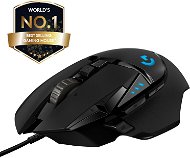
Logitech G502 Hero - Gaming Mouse

Reviews Logitech G502 Hero

Interested in reviews of Logitech G502 Hero? It got 4.7 out of 5 stars from our customers. Find specific customer reviews of Logitech G502 Hero below. We will appreciate if you also share your experiences with Logitech G502 Hero after purchasing.
54.90 € 49.90 €
In stock > 5 pcs
Add to Cart More Information

User Reviews

Tomáš, Praha 6flag
Rated 29/12/2025, variant Logitech G502 Hero
Verified purchase
After 21 years of heavy use of the great Logitech MX 520 mouse (I'm surprised it still holds the nice rubberized scroll wheel. and that it still works at all after all this time), I tried an upgrade. I'm a little embarrassed so far. Sure, it's a hi-tech mouse, it takes some getting used to. But. The old MX fits perfectly in the hand, the buttons are exactly where they should be. Perfectly accessible, yet it almost never happened that a person pressed them by mistake instead of another button or when "flicking" the mouse. Versus the G 502 Hero: Buttons, ergonomics: G Hero has more buttons, so it's a problem where to put them all. Unfortunately for me, it didn't turn out ideally. The G7 and G8 buttons follow smoothly and closely on the left side of the left button, easily interchangeable with it. There is no clearer tactile separation (the only difference is that they are made of glossy plastic, whereas the main left button is a bit matte - but this is not enough to distinguish them). By default, I was increasing the DPI every so often (and confusingly for me). The G6 button (typically the "shift" button to change the functions of the other buttons or temporarily lower the DPI - "sniper mode") is too far forward and hard to reach. The thumb has to stretch more. If it's used as shift + some other button, the hand kind of cramps up. Most of the buttons cannot be shifted with it: definitely not G9 on the top of the mouse back, hardly G7 on the back of the top left edge, and certainly not G4, G5 on the side of the thumb - most people have only one thumb, and that's the one holding the G-shift. G4, G5 buttons on the side for the thumb (typically: browser back and forward) are again too far back and big, so especially because of the rear G4 the thumb has to wiggle a lot. Also, the tactile differentiation (both between the buttons and the buttons on the side edge of the mouse) could be better. But it's a better situation than the G7 and G8. Scroll wheel for vertical scrolling The scroll wheel is a bit too large for my taste and has a bit of a "jerky and jerky" operation in stepping mode (it's also noisier). The button press could also be softer. But the switching between "stepping" and "smooth running" mode (where the wheel's flywheel behaviour is fully applied) is great. The side-to-side wheel wobble is cool and can be shifted (so you can introduce vertical and horizontal scrolling). It's just a pity that you can't use G-shift to give new functions to rotate the wheel (such as scrolling sideways or zooming). The only thing missing for complete satisfaction is not having to switch between stepping and continuous mode with an extra mechanical button. Ideally, the wheel could switch modes according to acceleration and acceleration force. Software, customization The great thing is that you can assign a lot of functions to the buttons (including shortcuts and macros). And that the number of functions can be increased by using a "shifter" - a button that can be defined as a G-shift" (typically a button on the front left side for the thumb). You can switch up to 5 different DPI sensitivities in the profiles (and each profile can have a different number of DPIs and different values). The active DPI level is indicated by backlit "dashes" on the side of the mouse. It took me quite a while to understand some of the basics (nowhere is it mentioned). In general - with such a "top of the range" mouse it is a shame that there is no proper user manual or at least well written help. At first I was confused about the profile switching and DPI (why does the mouse suddenly have a different sensitivity and why does it change color? ). Also, it's pretty crazy that there are "hardware" profiles stored in the mouse (there are 5 of them, but the outdated sketchy documentation only talks about 3 that were in the previous firmware version). And secondly, there are software profiles. A profile that includes color and lighting effects, a set of DPI sensitivities, DPI switching options, button function loading. And that you can't combine the SW and HW profiles. That HW profiles are automatically activated if the Logitech G Hub control software is not running. With the Logitech G Hub software running, you can switch between HW and SW profiles (switched by an inconspicuous and incomprehensible icon on the mouse image in the dashboard of installed devices. and it's cryptically called "On-board memory mode on/off"). Turning off Logitech G-Hub always crashes on those HW profiles. In Logitech Hub you can set the behaviour of SW profiles, but not HW ones. You must use the Onboard Memory Manager for these. Well, and to make things worse, the profiles can somehow switch spontaneously depending on what application (game) is running at the moment. I'm still in the dark. Conclusion: It lacks little things to make it perfect, but there are quite a few missing little things.
Lots of buttons
Customization options
Two wheel modes (stepping and smooth running with flywheel)
Tilting the wheel sideways
Functional backlight - status indication (profile, DPI)
Worse ergonomics (button placement, shape, materials - can be subjective)
Complex setup concept (different types of profiles)
Due to the complexity, there is no proper documentation
Two different software packages of monstrous size for setup (each managing something different) + a third unnecessary package
"Trap" when setting the buttons - by inappropriately assigning the left mouse button function with "G-shift", it is possible to get into a situation where it is not possible to continue the setting and the only way back is to reinstall the "G Hub" utility.
Missing the ability to use "Shift" to change the wheel rotation function (sideways scrolling would be useful)
The weights for tuning the centre of gravity and the weight of the mouse seem to me like an unnecessary snobbery
Mouse is not disassembled (we will see if it needs to be cleaned occasionally)
0 ×Report
Automatic translation
Matouš, Praha 10 - Strašniceflag
Rated 19/12/2025, variant Logitech G502 Hero
Verified purchase
I was buying to replace an old M65. This one has too many buttons for me, it's narrower,
Ergonomics pretty good, just too narrow for me
Very loud scrolling
Accidentally pressed sniper button
0 ×Report
Automatic translation
Jan, Klášterec nad Ohříflag
Rated 17/12/2025, variant Logitech G502 Hero
Verified purchase
Great mouse, I've had it for two years but now after 2 years the scroll wheel doesn't work anymore so I'll have to buy a new one.
Super mouse to play computer games
After 2 years, my wheel came off, but it's survivable.
0 ×Report
Automatic translation
Radek, Kladnoflag
Rated 17/12/2025, variant Logitech G502 Hero
Verified purchase - review from a price comparison website
programmable buttons, scroll wheel to the side
0 ×Report
Automatic translation
Karel, Plzeňflag
Rated 14/12/2025, variant Logitech G502 Hero
Verified purchase
this is my second mouse G502 the first one was much better
possibility to choose the weight of the luggage
terribly loud wheel but extreme and if you switch it to faster mod it happens to me that it scrolls itself
no braided cable
0 ×Report
Automatic translation
Jiří, Mostflag
Rated 06/12/2025, variant Logitech G502 Hero
Verified purchase
ok
0 ×Report
Automatic translation
Michal, Kdyněflag
Rated 06/12/2025, variant Logitech G502 Hero
Verified purchase
The last one lasted over 6 years, which is a decent performance for the amount of time.
Ergonomics, button layout
Adjustable weight
The previous version of the G502 Hero had a braided cable
Loud wheel
0 ×Report
Automatic translation
Jiří, Brno Starý Lískovecflag
Rated 28/11/2025, variant Logitech G502 Hero
Verified purchase
perfect ergonomics
weight
Sensor
simple app to set up
minimal RGB backlight
shiny piano plastic on which dust particles stick.
0 ×Report
Automatic translation
Michal, Havířov - Podlesíflag
Rated 23/11/2025, variant Logitech G502 Hero
Verified purchase - review from a price comparison website
Quality of workmanship at the level of a mouse for 400kc. I don't know what costs over 1000kc here. Maybe it will oblige? I bought this cape for the first time. I have been loyal to the Bloody brand for over 10 years and I will buy Bloody again next time. The same quality for considerably less money. This product is not bad. It's just overpriced.
Fits beautifully in the hand
It works
the usb cable is rubber.
Even my 100kc replacement mouse has a better cable than this one
the mouse wheel wobbled strangely
0 ×Report
Automatic translation
Václav, Kladno 1flag
Rated 13/11/2025, variant Logitech G502 Hero
Verified purchase
Purchased, tested, returned within 30 minutes. I really wanted to give it a chance, but it just doesn't fit in a big hand, which was my biggest expectation. I tried other grips, but everything was spasmodic. The correct grip is palm grip, i.e. the whole palm on the mouse, in which case the additional buttons are easily accessible, but not for a large hand. And since the mouse is made for that grip, other grips are cramped. Personally, I'd like to have the "sniper" button on my thumb an inch further forward so I can hold the mouse with my thumb and not be afraid to press the button. When I moved my hand to avoid pressing the button, the grip was more of a "fingertip" and the hold was spasmodic. So for the hand up to about 18cm ok, more than that I personally do not recommend. Even with a cramped grip, playing was quite pleasant, but not for long. So for a smaller hand, I believe it would be a good mouse.
Quality of execution
Many programmable buttons
Weight adjustment weights for furriers
Two scroll wheel modes
"Sniper" button for short-term sensitivity reduction
FPS usage better than cheap mice
The scroll wheel volume is insane
Does not fit in large hand (20cm)
I personally found the "sniper" button difficult to grip and pressed it by mistake
0 ×Report
Automatic translation
11 - 20 from 220
P-DC1-WEB14