Try our cookies Alza.cz a. s., Company identification number 27082440, use cookies and other data to ensure the proper functioning of the website and, with your consent, also, among other things, to personalize advertising and the content of our websites. By clicking on the “I understand“ button, you agree to the use of cookies and the transfer of data regarding the behavior on the website for displaying targeted advertising on social networks and advertising networks on other websites.
Alzak icon
Catalogue
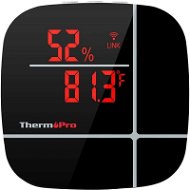
ThermoPro TP90 - Weather Station

Reviews ThermoPro TP90

Interested in reviews of ThermoPro TP90? It got 2.7 out of 5 stars from our customers. Find specific customer reviews of ThermoPro TP90 below. We will appreciate if you also share your experiences with ThermoPro TP90 after purchasing.
32.90 €
In stock > 5 pcs
Add to Cart More Information

User Reviews

Roman, Srnojedyflag
Rated 26/06/2026, variant ThermoPro TP90
Verified purchase
The company has changed its name from ThermoPro to TempPro, so you may come across both names; they are interchangeable. The app mentioned in the guide is still available on Google Play: ThermoPro Home. I find it easier, and it’s a shame it’s no longer available from Apple. Instead, the updated manual on the manufacturer’s website mentions the SmartLife app – an unnecessarily large app just for that thermometer, but it works. I was having trouble connecting to my Wi-Fi network; the specifications only mention the 2.4 GHz frequency, but when I asked, the manufacturer confirmed that it supports WPA2-PSK with AES. I can confirm that it can connect even when set to automatically select WPA/WPA2-Personal with TKIP+AES and a hidden SSID, provided the device has already been successfully paired in the app. It turned out that the biggest problem with pairing is the presence of a new router with Wi-Fi 6; the device then fails to pair even with the old router, which only has a 2.4 GHz network. I had to switch off the new Wi-Fi 6 completely and pair the devices using the simplified setup. Another problem was with the length of the SSID; the maximum was 8 characters. It can handle lower-case and upper-case letters, numbers and some special characters. The password can be longer too; I haven’t tested the limit, but it can handle 10 characters. Once the device has been paired, you can set the same SSID on a newer router, for example, as a guest network reserved exclusively for the 2.4 GHz band. It can be run on a single modern router alongside Wi-Fi 6 (I haven’t tested Wi-Fi 7); the only issue arises during the initial pairing, so if you reset the device or want to add another device, you’ll need to repeat the process. (ASUS routers used: (the new AX with Wi-Fi 6 and the old AC with the 5GHz radio switched off) I’d also like to add that the updated manual on the manufacturer’s website mentions the SmartLife app for Android as well. I tried it on a Chromebook and it works. Although the screen is optimised for mobiles, the narrow strip in the middle of the Chromebook’s display – which simulates a mobile – is perfectly adequate for showing the required information. The advantage is that I can log in to the app using the same details I used when registering on my iPhone, and any devices that are already connected will be loaded, so I don’t have to go through the hassle of pairing them again. So the newer app does have some advantages after all.
wide temperature range: -50 °C to +70 °C
The Wi-Fi connection to the cloud allows you to monitor the temperature from anywhere, even without a special smart hub
powered by a mains adapter; the battery probably wouldn’t last very long for this sort of use
After a power cut, the device switches itself on and reconnects
Unfortunately, the automatic restart following a power cut resets the display settings to their defaults; having the display switch on wouldn’t be too much of a problem, but having it switch to Fahrenheit is a bit of a nuisance – as you can’t change this remotely via the SmartLife app, you have to use the physical button on the device
0 ×Report
Automatic translation
Václav, České Budějoviceflag
Rated 28/11/2025, variant ThermoPro TP90
Verified purchase
Works great for indoor use. The application is simple and clear.
Multiple weather stations can be added to one application.
Temperature curve with record up to one week back.
°F and °C can be switched.
I think the app only works on Iphone/IOS.
Noisier fan but not significantly so.
0 ×Report
Automatic translation
ERON X s.r.o., Třebívliceflag
Rated 02/12/2024, variant ThermoPro TP90
Verified purchase
small handy with screen adapter
no battery operation, I haven't cracked the connection software
0 ×Report
Automatic translation
Michal, Kralupy nad vltavouflag
Rated 22/07/2024, variant ThermoPro TP90
Verified purchase
only for older version of android. cannot be paired with the phone.
0 ×Report
Automatic translation
Jiří, Rokycany 1flag
Rated 26/08/2023, variant ThermoPro TP90
Verified purchase
I need to measure the temperature online so I can turn the heating on and off remotely. the control app is only available in Google play for older android devices. Unfortunately the app is not available for Android 13 on my S22 ultra.
can be connected to wifi and checked online
simple configuration
does exactly what one would expect
the app doesn't work on android 13 which is what I need
0 ×Report
Automatic translation
Michal, Jablonec nad Nisouflag
Rated 17/03/2023, variant ThermoPro TP90
Verified purchase
Because I liked the product, I ordered it, but the measured temperature is completely different than the real one. Measured on multiple devices, which showed a temperature 1.5°c lower, thus unusable.
Noisy fan
It shows a completely different temperature than the other instruments, a difference of 1.5°c
0 ×Report
Automatic translation
Václav, Berounflag
Rated 11/03/2023, variant ThermoPro TP90
Verified purchase
Only for wifi 2.4 GH
0 ×Report
Automatic translation
Michal, Prahaflag
Rated 24/10/2022, variant ThermoPro TP90
Verified purchase
temperature and humidity measurement
indicator in the chart
loud fan
minimum and maximum values cannot be set
0 ×Report
Automatic translation
P-DC1-WEB17