Try our cookies Alza.cz a. s., Company identification number 27082440, uses cookies to ensure the functionality of the website and with your consent also to personalisage the content of our website. By clicking on the “I understand“ button, you agree to the use of cookies and the transfer of data regarding the behavior on the website for displaying targeted advertising on social networks and advertising networks on other websites.
Alzak icon
Catalogue
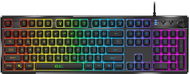
Genius GX Gaming Scorpion K7 Plus - CZ/SK - Gaming Keyboard

Reviews Genius GX Gaming Scorpion K7 Plus - CZ/SK

Interested in reviews of Genius GX Gaming Scorpion K7 Plus - CZ/SK? It got 4.4 out of 5 stars from our customers. Find specific customer reviews of Genius GX Gaming Scorpion K7 Plus - CZ/SK below. We will appreciate if you also share your experiences with Genius GX Gaming Scorpion K7 Plus - CZ/SK after purchasing.
17.90 €
In stock > 10 pcs
Add to Cart More Information

User Reviews

David, Ústí nad Labem-Neštěmiceflag
Rated 12/08/2025, variant Genius GX Gaming Scorpion K7 Plus - CZ/SK
Verified purchase
The keyboard looks pretty nice, but it came all twisted up in a propeller and dancing on the table. I forcibly straightened it a bit, but it still wobbled when I typed on the numeric part. After about a week it straightened itself out. I appreciate the volume control button. Large spaces between keys at the expense of key size, frequent typos, spaces illuminated more than the characters on the keys, but readable characters are. Rubber pads on the bottom of the keyboard, the keyboard sits nicely on the desk and does not move. Overall, for this price a good keyboard, I do not regret the purchase and I recommend it to those who want a cheap backlit keyboard. For those who don't need backlighting, I would recommend another, e.g. Dell KB-216
The backlighting can be freely set using the program ( even one colour for the whole keyboard)
price
volume control
one-button switch-off
Czech diacritics
The backlighting is clearer between the keys, (but the characters are still legible)
Quality of workmanship (ok for the price)
On button. /Off. the lighting itself is not illuminated, moreover, it is located next to the sleep button (sometimes I get confused and put the PC to sleep)
Keys are small, frequent typos
0 ×Report
Automatic translation
Dana, Jindřichův Hradecflag
Rated 11/06/2025, variant Genius GX Gaming Scorpion K7 Plus - CZ/SK
Verified purchase - review from a price comparison website
The keys are easy to see.
So far, no
0 ×Report
Automatic translation
Petr, Pačlaviceflag
Rated 07/06/2025, variant Genius GX Gaming Scorpion K7 Plus - CZ/SK
Verified purchase
the keyboard works perfectly. writing and playing without problems.
the letters are lit so it is easy to use in the evening
control wheel for volume control
backlight selectable
0 ×Report
Automatic translation
Adam, Jirkovflag
Rated 02/05/2025, variant Genius GX Gaming Scorpion K7 Plus - CZ/SK
Verified purchase
We'll see how long it lasts otherwise a blast.
I'd say for the price, a lot of quality
Not so noisy
0 ×Report
Automatic translation
Tomáš, Stolanyflag
Rated 19/01/2025, variant Genius GX Gaming Scorpion K7 Plus - CZ/SK
Verified purchase
My son is happy: )
0 ×Report
Automatic translation
Tomáš, Praha 6flag
Rated 16/01/2025, variant Genius GX Gaming Scorpion K7 Plus - CZ/SK
Verified purchase
A well-equipped and ergonomically decent keyboard (for those. who like more stroke and tactilely separated keys) with minor reservations. The ergonomics could be improved, but that's a very individual thing. So far I'm typing with more typos than before. This may be due to the slightly different geometry of the key layout on the Microsoft Comfort Curve 2000, which I've been typing on until now (the rows of keys bend into a wave and some keys are wider there). I love the control wheel! I don't rate the features for gaming (antighosting, use of macros). I haven't tried disassembling the keyboard, so I don't know how it will clean up.
standard keyboard layout (no experiments) exactly as it should be. except for the unnecessary Copilot key (fortunately, it can be redefined to a context menu to get exactly what I want): long left shift, standard cursor block, function keys of the same size and shape as the classic keys, nicely grouped in groups of 4, Alt Gr on the bottom right, (extra important FN instead of the useless Win), context menu, Ctrl.
lifting feet, rubberized for use flat and upright (keyboard does not slip)
quite pleasant, soft operation of the keys (membrane with higher stroke), a bit audible plastic clicking. Slightly roughened surface of the keys. it's acceptable, but it could be "velvetier"
sufficiently separated cursor and numeric block (they are not crowded, they can be distinguished tactilely). The individual keys are well separated (conical shape) and have a slightly recessed upper profile
12 multimedia and special control keys (unfortunately not separate, but via the FN switch on the F1 - F12 keys). Their functions can be predefined, 17 options can be selected
great dial with home control (standard setting for volume and mute control, can be redefined for backlight control. I personally changed the crank to start-stop)
Backlighting between and through the keys, aesthetic and easy to read font on the keys
Wide range of backlight settings (brightness, colours, blink style and speed, blinking according to the music played) - a lot can be controlled by keyboard shortcuts, everything through the service application
Extensive keyboard redefinition options (swapping letters, macros, selecting multimedia and control functions) from the operator application
Creating Profiles in the operator application - creating different variants of keyboard layout and lighting settings
For players: option to disable the Win key or all keys (from both the keyboard and the operator application)
separate key for switching the backlight on and off
separate and securely placed key to put the PC to sleep
Czech QWERTY and QWERTZ localization
compact dimensions (minimum margins)
missing palm rest, keyboard edges are sharper. Personally, I would welcome a larger keyboard with rounded edges and more space around the keys, especially at the bottom.
the media control keys (start-stop, forward and back) work confusingly in WinAmp, but OK in other applications; -) This is more of a WinAmp problem.
The multimedia and special control keys are not separate, but switchable via Fn on the function key block. However, the (for me) most important things can be brought out on the rotary and squishy wheel (volume control, start-stop).
Personally, I would have liked a slightly smaller and quieter key stroke (I liked the Microsoft Comfort Curve 2000, for example) and less sharp edges on the upper key surfaces. so far on the new one I'm typing with more typos.
the keys are a bit plastic "roaring" (but nothing terrible)
The control wheel is tight near the numeric keys, it is harder to reach. Its running is stiffer, graduated in steps with clicking, the squeezing of the wheel also shows more than necessary resistance. It just feels like a cheap controller here, but the function is otherwise great.
There is a delay of a few seconds before changes to keyboard settings are "pushed" to the keyboard and take effect.
There is no documentation for the operator application (some things are not clear at first glance, some not even at second glance - how does the backlight style differ between Comet Tail, Single Water and Flow Water? )
Key labels are harder to read without backlighting (tax for being backlit)
Caps, Num and Scroll lock controls are atypically placed one above the other, with almost illegible descriptions (it is necessary to get used to and remember which is which)
0 ×Report
Automatic translation
11 - 16 from 16
P-DC1-WEB22