Try our cookies Alza.cz a. s., Company identification number 27082440, uses cookies to ensure the functionality of the website and with your consent also to personalisage the content of our website. By clicking on the “I understand“ button, you agree to the use of cookies and the transfer of data regarding the behavior on the website for displaying targeted advertising on social networks and advertising networks on other websites.
Alzak icon
Catalogue
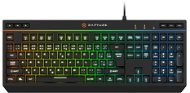
Rapture Cadet K-573 black - CZ/SK - Gaming Keyboard

Reviews Rapture Cadet K-573 black - CZ/SK

Interested in reviews of Rapture Cadet K-573 black - CZ/SK? It got 4.6 out of 5 stars from our customers. Find specific customer reviews of Rapture Cadet K-573 black - CZ/SK below. We will appreciate if you also share your experiences with Rapture Cadet K-573 black - CZ/SK after purchasing.
19.90 €
In stock > 10 pcs
Add to Cart More Information

User Reviews

Dušan, Děčínflag
Rated 30/05/2023, variant Rapture Cadet K-573 black - CZ/SK
Verified purchase
quiet
nice
there are two numbers on the accented keyboard, why
0 ×Report
Automatic translation
Anonymous customerflag
Rated 19/05/2023, variant Rapture Cadet K-573 black - CZ/SK
Verified purchase
great effects, lots of settings, possibility to set custom mode, which the keyboard remembers what even some more expensive gaming keyboards can't do
0 ×Report
Automatic translation
Martin, Náměšť na Hanéflag
Rated 23/04/2023, variant Rapture Cadet K-573 black - CZ/SK
Verified purchase - review from a price comparison website
Very nice keyboard !
RGB mode control
0 ×Report
Automatic translation
Rostislav, Praha 6 - Lysolajeflag
Rated 20/03/2023, variant Rapture Cadet K-573 black - CZ/SK
Verified purchase
Good multimedia
You can't choose one colour, so the colours are going round and round like a merry-go-round
I have a relatively good new calculator and it keeps having a problem connecting the keyboard. About twice a day it reports a non-functioning unrecognizable peripheral
often does not respond to keystrokes
0 ×Report
Automatic translation
Filip, Miloviceflag
Rated 17/03/2023, variant Rapture Cadet K-573 black - CZ/SK
Verified purchase
For the money, it's a great thing that is not problem-free, but its problems are understandable for cheap gaming keyboards and are mostly cosmetic, not functional.
Comfortable for typing and playing (and I was transitioning from a low-profile one)
Physical multimedia keys, instead of multimedia keys "hidden" behind Fň and F1-12 and yet proclaimed in the menu, which I consider a minor quirk.
Without pardoning the stupid rainbow backlighting that is set into the keyboards just to see how many colours it can do and because it's in mode it can be switched to something usable without any trouble, I didn't notice a problem with resetting the settings, although I did manage to trigger it (see negatives)
It can be locked, which is awesome if you have a small child.
The colors are bright and colorful, which is awesome if you have a small child.
Seriously, a keyboard like this for under five hundred?
I found that the reset occurs when the keyboard is unplugged. I have it connected to my laptop via a permanently powered usb hub, so I don't suffer from this problem. For desktops, this problem WILL occur.
The usability of each backlight mode:
1: at lower transition speeds, it's just fine
2: NO
3: NO
4: monochrome backlight with the option to select the colour. Hooray, this is an essential feature.
5: NO
6: at lower transition speeds, it's just fine
7: NO
8: No, and I'm probably having a seizure, even though I'm not epileptic.
9: backlight with the possibility to select the colour for several segments separately. Beautiful and usable crap, just a shame it can't remember more settings and there's that reset problem.
0: identical effect to 8. so NO now I'm having black eyes on top of that.
0 ×Report
Automatic translation
Filip, Brnoflag
Rated 20/11/2022, variant Rapture Cadet K-573 black - CZ/SK
Verified purchase
stable
pleasant key surface
it is easy to write on
setting the backlight with FN + numbers (1 - 9. i 0) and then using FN + up/down arrows to change the colours (on FN + 9 there is an option to change the colours in individual columns)
lots of settings despite the lack of an app
long braided cable
it doesn't happen to me that the original flashing colour is set every time I turn on the computer
although it can do a large number of colors (as seen in the basic setup), you can actually only set 7 colors
dual function keys - with FN + F1-F12 the same functions are available as can be found on the keyboard under separate keys
0 ×Report
Automatic translation
Roman, Olomouc 9flag
Rated 12/11/2022, variant Rapture Cadet K-573 black - CZ/SK
Verified purchase
Despite the long list of negatives, I give it four stars and am happy with my purchase. None of them are essential for me - it's more about things that could have been a bit better/more important - and unfortunately they are not. Otherwise, I still got a solid backlit keyboard for my money for work and play, but I consider the lack of last settings memory to be its biggest real drawback. Fortunately, the settings are relatively easy and quick to change, so it's easy to get used to. I wouldn't recommend it only if you insist on "tweaking" your backlighting and logically want the keyboard to remember your settings - this one doesn't.
Just the size (no pointless "gamer" protrusions, etc. )
Does not slip on the table
Multimedia keys
Optimum stroke and resistance
Backlight adjustment options (though - see cons. )
High quality and long braided cable
I finally found a relatively quick and easy way to set up a nice (non-flashing! ) rainbow transition - after turning on the keyboard, press and hold the FN key and keep pressing: "9" (above the letters), "Up", "Left", "Up", "Up". Unfortunately, you have to repeat it every time you turn on the computer, but it is quite easy to remember and you can type it out in a few seconds.
It doesn't remember the last backlight setting and every time you turn it on it starts a frantic rainbow effect that may look nice for a while, but is definitely not usable for work or play (it can be solved with one double-touch, but it's a bit of a pain to do it over and over again).
Unfortunately, the same is true of most of the nine different backlight modes - I really don't know who (gamers included) wants the keyboard to flash under their hands - I'd rather have a choice of three modes and a keyboard that remembers the last setting.
Related to this is the limited usability of probably the most interesting backlight mode, where you can have the keyboard vertically divided into 8 zones and set a different colour for each of them - sounds great, right? So imagine setting the colours on the entire keyboard exactly to your liking (which can take a few minutes), and the next time you turn on your computer you can do it all over again! "Great. "
I can't set the colour of the NUM/CAPS/SCROLL LOCK LEDs - they shine in a sharp blue colour, so even one of them is quite dazzling in the dark. Too bad - if the colour and intensity of these LEDs changed along with the surrounding keys, it would be much better. Solved like this with black spirit.
The description says it's quiet. It's not: ) The volume of the keys is perfectly normal for this type of keyboard.
According to the manual, only the keys that have a secondary function together with the FN key should light up when you press it - it doesn't work.
At first glance, it has a lot of FN + F1-F12 shortcuts, but if you look closely, you'll see that 9 of them are found as separate keys, so you'll probably never use them - there could have been 9 other functions instead (for example, adjusting monitor brightness, launching Notepad, Undo/Redo, etc. )
0 ×Report
Automatic translation
Petr, České Budějoviceflag
Rated 08/11/2022, variant Rapture Cadet K-573 black - CZ/SK
Verified purchase
the keyboard looks quite massive
separate buttons for sound control
backlit, choice of colours
pretty decent design (doesn't scream gamer)
does not slip on the table
the light disco starts every time I start the computer (via the docking station), so I always have to change the effect and colour
0 ×Report
Automatic translation
161 - 168 from 168
P-DC1-WEB12