


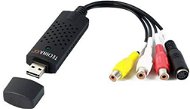
Reviews TECHNAXX USB 2.0 Video Grabber TX-20
Interested in reviews of TECHNAXX USB 2.0 Video Grabber TX-20? It got 4.1 out of 5 stars from our customers. Find specific customer reviews of TECHNAXX USB 2.0 Video Grabber TX-20 below. We will appreciate if you also share your experiences with TECHNAXX USB 2.0 Video Grabber TX-20 after purchasing.
User Reviews

Filip, Suchá nad Parnou
Rated 23/01/2015, variant TECHNAXX USB 2.0 Video Grabber TX-20
Verified purchase
Works under windows 8.1
The included software works quickly and reliably and easily.
For the best video quality, you need to use VirtualDub instead of the supplied software, followed by deinterlace filters and more to achieve better video quality. Then convert via handbrake to H.264.
The included software can use the quality of the original video at 85-90% depending on the video quality on VHS.
After installing the included driver from the CD, VirtualDub caused BOSD on both win8 and win8.1 (after uninstalling and then installing the driver using the automatic installation of windows, VirtualDub works again).
0 ×Report
Automatic translation

Martin, Nemčice
Rated 17/11/2014, variant TECHNAXX USB 2.0 Video Grabber TX-20
Verified purchase
is enough to watch TV on a PC through a set top box
The bundled software is only for recording, I watch TV through KM Player
0 ×Report
Automatic translation

Jozef, Kvačany pri LM
Rated 16/10/2014, variant TECHNAXX USB 2.0 Video Grabber TX-20
Verified purchase
Easy operation
0 ×Report
Automatic translation

Ivan, Příbram VIII
Rated 31/10/2026, variant TECHNAXX USB 2.0 Video Grabber TX-20
Verified purchase
Tested programmes OBS and Guvcview
100% functional in Linux
Supports up to 1080p@60
Stereo sound
Quality of workmanship
0 ×Report
Automatic translation
Václav, Trutnov
Rated 18/10/2026, variant TECHNAXX USB 2.0 Video Grabber TX-20
Verified purchase
I have a 27-year-old SAMSUNG VP A-34 analogue video camera (8mm-MONO). It's simple to connect and transfer to a PC (WINDOWS 11 PRO) with an MP4 or MKV output format. 20 years ago, I used to transfer to PC using a Pinnacle DAZZLE (which doesn't support 64-bit systems) and it took tens of hours to convert to MPEG2. Now it's significantly faster.
Easy to connect after installing the drivers
Perfect price
Compatibility with both WINDOWS 10 and WINDOWS 11 operating systems
works perfectly via OBS studio software (free-in Czech), you can set the quality and the output format
The included software is not localised in Czech and can only create DVDs; the output format cannot be set.
0 ×Report
Automatic translation

Jakub, Chomutov
Rated 25/08/2026, variant TECHNAXX USB 2.0 Video Grabber TX-20
Verified purchase
It works for getting old tech up and running at home. Probably not for anything more than that.
Works via OBS under Windows 11
Only sends mono sound to the PC
0 ×Report
Automatic translation
Petr, České Budějovice
Rated 11/08/2026, variant TECHNAXX USB 2.0 Video Grabber TX-20
Verified purchase - review from a price comparison website
Super
0 ×Report
Automatic translation

Anonymous customer
Rated 28/05/2026, variant TECHNAXX USB 2.0 Video Grabber TX-20
Verified purchase
It doesn't work under Win10/11
0 ×Report
Automatic translation

Jiří, Prostějov
Rated 19/05/2026, variant TECHNAXX USB 2.0 Video Grabber TX-20
Verified purchase - review from a price comparison website
I needed to transfer videos from a Hi8 camera to a computer and this product seems to be a good choice. Easy to install, the video storage program is simple, clear and works well. The only problem was with the connection via cinch and s-video, where there are females on the device and the camera, so I had to buy cables. The male-to-male s-video cable isn't exactly a commonly available item, but they finally had it on Mironet.
0 ×Report
Automatic translation
Anonymous customer
Rated 15/05/2026, variant TECHNAXX USB 2.0 Video Grabber TX-20
Verified purchase
Functional, acts like a webcam
The picture is probably not the best quality, but it fulfills the function
0 ×Report
Automatic translation
