
Catalogue

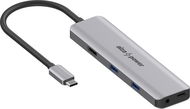
AlzaPower Metal USB-C Dock Station 5in1 (140W) Space Grey

4.0 38 ratings
Docking Station - connection using USB-C USB 3.2 Gen 2 (3.1), power delivery 140 W
Variants
Buy with code ALZADNI20
32.72 €
Great price 40.90 €
Price Guarantee
Shop faster with pickup at AlzaBox or in-store.
AlzaPower Metal USB-C Dock Station 5in1 (140W) Space Grey 40.90 € In stock > 5 pcs
Buy

AlzaPower Metal USB-C Dock Station 5in1 (140W) Space Grey

AlzaPower

A Docking Station Suitable Even for High-Performance Laptops

This docking station gives you several extra connectors – 1× HDMI 2.0, 2× USB-A with a transfer speed of up to 10Gb/s, and 1× 3.5mm jack. Of course, there's also a USB-C port for powering your laptop with up to 128W. The AlzaPower Metal allows you to expand your laptop's connectivity with additional essential interfaces in a single compact device. Simply plug it into a spare USB-C port, and you can immediately use all the available connectors for your peripherals – from external monitors to fast USB drives and other devices. To ensure optimal functionality and stable data transfer, it is recommended to connect the docking station to a power source with a minimum output of 140W.

AlzaPower Metal USB-C Dock Station 5-in-1 (140W)

up to 128W

Charging power for your laptop
AlzaPower Metal USB-C Dock Station 5-in-1 (140W)

max. 10Gb/s

Data transfer speed
AlzaPower Metal USB-C Dock Station 5-in-1 (140W)

4K/60Hz

HDMI 2.0
AlzaPower Metal USB-C Dock Station 5-in-1 (140W)

34×133×11.5mm

Compact dimensions

Enjoy a Perfect Picture in 4K Ultra HD

Thanks to the HDMI 2.0 connector, you can connect an external monitor to your laptop and enjoy resolutions up to 4K Ultra HD at 60Hz. In Windows, it allows for extending your desktop, while with macOS, only screen mirroring is available. The AlzaPower Metal docking station supports DP 1.4 Alt Mode (backward compatible with DP 1.2).

AlzaPower Metal USB-C Dock Station 5-in-1 (140W)

Charge Quickly and Safely with Power Delivery 3.1

The AlzaPower Metal docking station uses a USB-C (female) connector for its power supply, supporting Power Delivery 3.1 with an output of up to 140W. 12W is used to run the station, while the remaining 128W is used to power the laptop – just connect a mains adapter or another power source with a minimum output of 140W. Power Delivery is completely safe – the docking station only draws as much power as it actually needs from the connected source, so there's no risk of overloading or overheating.

Please note:
Most adapters only provide 67W (e.g., those included with laptops), which is not sufficient for the optimal performance of the docking station.

AlzaPower Metal USB-C Dock Station 5-in-1 (140W)

Everything You Need for Your Daily Work

For connecting peripherals such as a mouse, keyboard, printer, or external drive, or for powering other devices, there are two USB-A ports available – each with a data throughput of up to 10Gb/s and a power output of up to 7.5W (5V/1.5A). The ports are suitable for fast data transfer and convenient connection of common accessories. The docking station also includes a 3.5mm audio jack, which allows you to connect headphones or external speakers, so you can work comfortably and listen to music without needing another adapter.

AlzaPower Metal USB-C Dock Station 5-in-1 (140W)

The AlzaPower Metal Impresses with its Quality Design

The AlzaPower Metal docking station supports Plug & Play technology, so it's ready to use immediately after connecting to your computer, without the need to install drivers or software. Moreover, it impresses with its lightweight yet very durable metal construction made of aluminium alloy. Its compact dimensions guarantee easy portability and that it will take up minimal space on your desk. The cable has a flexible PVC sheath and is 15cm long.

AlzaPower Metal USB-C Dock Station 5-in-1 (140W)

Detailed Specifications of the AlzaPower Metal USB-C Dock Station 5-in-1 (140W), Space Grey

  • Elegant aluminium design, including the connector
  • Flexible 15cm PVC cable
  • 1× USB-C 3.2 Gen 2 (male) for connecting a laptop (max. 85W) with support for DP1.4 Alt mode. For maximum bandwidth, the connected device must support DP1.4 mode (this protocol is used by laptops from 2019 onwards)
  • 1× HDMI 2.0 with support for max. 4K/60Hz video output, up to 12-bit colour depth, HDCP 2.3, and HDR
  • Only screen duplication in macOS
  • 2× USB-A 3.2 Gen 2 with a maximum data transfer speed of 10Gb/s and charging up to 10W (5V/2A) when both ports are used
  • 1× USB-C PD (female) with Power Delivery 3.1 (max. 140W); 12W is reserved for the operation of the docking station, the remaining 128W is reserved for charging the connected device
  • 1× 3.5mm jack with DAC (44.1/48/96kHz, 16/24-bit), ADC (44.1/48kHz, 16-bit) support and automatic CTIA and OMTP detection
  • Suitable for all laptops with USB-C (Thunderbolt)
  • Samsung DeX support (Samsung Galaxy S8 and newer)
  • Compatible with macOS X v10.8 and higher and Windows 7/8/10/11
  • Plug & Play installation
  • Must be connected to a power source with a minimum output of 140W
  • We recommend verifying your laptop's compatibility to ensure it supports all the docking station's features

The AlzaPower Product Family

We designed AlzaPower products to meet the highest standards. Thanks to this, we can guarantee the top quality of each individual product and provide superior services. That's why, in case of a defect, we offer an immediate replacement with a new item for most of our products, available at all our branches.

The AlzaPower Product Family

Specifications

Power supply (cable)
Through USB (integrated)
Laptop power port
USB-C
Maximum power output for laptop
128 W
Standard male connector
USB 3.2 Gen 2 (3.1)
Max. Power Delivery value
140 W

Laptop power port

Power supply (cable)
Through USB (integrated)
Laptop power port
USB-C
Maximum power output for laptop
128 W
Standard male connector
USB 3.2 Gen 2 (3.1)
Max. Power Delivery value
140 W

Most common ports

Common data ports
USB-A
Common graphics ports
HDMI

Data ports - Number and standards

USB-A standards
3.2 Gen 2
USB-C standards
3.2 Gen 2
USB-A 3.2 Gen 2 (3.1)
2 ×

Power ports for electrical devices

USB-A
3.2 Gen 2
USB-C
3.2 Gen 2

Graphics ports - Number and standards

HDMI standards
2.0
HDMI 2.0
1 ×

Audio ports

Audio ports
Jack 3,5mm

Compatibility

Type
Alternative

Dimensions and weight

Width
13.3 cm
Height
1.15 cm
Depth
3.4 cm
Weight
0.08 kg
More Specifications
Alza.cz a.s., Jankovcova 1522/53, 170 00 Praha 7 - Holešovice, +420 225 340 111, [email protected]

A 36-month / 3-year or 48-month / 4-year warranty refers to the total duration of the warranty from the date of receiving the goods. Compared to standard statutory rights, this gives you an additional 12 months / 1 year or 24 months / 2 years, respectively, to file a claim.

Note:

Specifications can be changed without notice. Images are for illustrative purposes only.

Dobrý den, od dokovací stanice čekám, že mi bude dobíjet i notebook - tedy jedním kablíkem připojím napájení a všechny periferie. Power delivery 140W by mělo notebooku stačit, ale na obrázcích není nikde vidět kabel z dockovací stanice do elektrické sítě. Umí tento produkt dobíjet notebook, případně jaký jiný produkt by splňoval to, co popisuji? Děkuji za odpověď

Dobry den, preco dock nezacne nabijat laptop ked ho pripojim s uz pripojenym pd nabijackou? Musim po pripojeni laptopu aj odpojit a pripojit pd nabijanie aby nabijal. Makes no sense ked to ma byt stable dock ku ktoremu len podla potreby pripajam laptop.

Dobry den, pri pouzivani Windows bude ,,extended,, obraz alebo pojde len o zrkadlenie obrazovky ako pri Mac?

jack 3.5 je jen vystup na sluchatka nebo je mozne pripojit i sluchatka s mikrofonem?

Dobrý den, bude tento dok fungovat se stanicí HP ZBook Power 15 G10? Děkuji

Dobrý den, jakou nejvyšší obnovovací frekvenci monitoru hub podporuje při rozlišení 1080p? Také max 60 Hz?

Dobrý den, koupila jsem si model 5v1 a zapojila jsem do něj originální nabíječku k novému NTB Dell Latitude 5450. Počítač se nabíjí, ale vyskakuje mi systémová hláška ""Pomalá nabíječka, použijte nabíječku s vyšším příkonem" a i Dell Support Assist mi po každém zapnutí píše upozornění na nízký příkon. Z popisu dokovací stanice jsem pochopila, že je díky PowerDelivery pro jakékoli napájení uzpůsobená. Jak mám problém řešit? Děkuji

Dobrý den, zvládne tento hub DQHD (2x1440p) rozlišení prosím? Pokud ne, prosím o doporučení jiného hubu.

Questions and answers: AlzaPower Metal USB-C Dock Station 5in1 (140W) Space Grey
Accessories for AlzaPower Metal USB-C Dock Station 5in1 (140W) Space Grey
Try our cookies Alza.cz a. s., Company identification number 27082440, use cookies and other data to ensure the proper functioning of the website and, with your consent, also, among other things, to personalize advertising and the content of our websites. By clicking on the “I understand“ button, you agree to the use of cookies and the transfer of data regarding the behavior on the website for displaying targeted advertising on social networks and advertising networks on other websites.
Detailed settings
Alzak icon
P-DC1-WEB24
