Try our cookiesAlza.cz a. s., Company identification number 27082440, uses cookies to ensure the functionality of the website and with your consent also to personalisage the content of our website. By clicking on the “I understand“ button, you agree to the use of cookies and the transfer of data regarding the behavior on the website for displaying targeted advertising on social networks and advertising networks on other websites.
We use 8 categories of cookies on our website:
Technical cookies
These are strictly necessary for the functioning of the website and the features you choose to use. Without them, our website would not work; you wouldn't be able to log in to your user account, for example.
Functionality cookies
These cookies allow us to remember your basic choices and improve the user experience. These include remembering your preferred language or allowing you to stay logged in permanently.
Social media cookies
These cookies allow us to easily link you to your social media profile and, for example, allow you to share products and services with your friends and family.
Content personalisation
These cookies allow us to show you content and ads according to the information we have about you to best meet your needs. This includes what content you have viewed, or on what device you are accessing our website.
Non-personalised advertising
These cookies allow us to show you general ads for products and services.
Personalised advertising
Thanks to these cookies, we and our partners can offer you relevant products and services based on your purchases, your shopping behaviour and your preferences.
Audience metrics
These cookies allow us to optimise our site for your convenience based on how you use it. The aim is to remember or anticipate your choices. This includes, for example, the use of features, their location, or the behaviour on the page.
Third party cookies
These are third party cookies, and you can find out more about them and our partners here.
By giving your consent to the processing of cookies, functionality and analytical cookies will be installed on the device you use to browse the website (click on the "I understand" button for both categories, or you can select only one of the categories by clicking on the "Settings" button). We always install technical cookies on your device, even without your explicit consent, because without them our website would simply not work.
You can revoke your consent to the processing of cookies. In connection with our company's cookie processing, you also have the following rights: the right to access cookies, delete, modify, supplement and correct them, restrict processing and the right to lodge a complaint with the Office for Personal Data Protection. Read more about your rights.
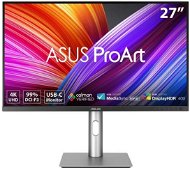
Interested in reviews of 27" ASUS ProArt PA279CRV? It got 3.9 out of 5 stars from our customers. Find specific customer reviews of 27" ASUS ProArt PA279CRV below. We will appreciate if you also share your experiences with 27" ASUS ProArt PA279CRV after purchasing.
Rated 30/04/2026, variant 27" ASUS ProArt PA279CRV
Verified purchase
4k resolution
after calibration and for the price, not bad, but!
Adobe RGB (about? )
Asus presents the monitor as calibrated, even gives a certificate, but the colors on this monitor are totally off. They stretch into greenish yellow and it is visible even to the naked eye.
When measuring with the probe it was confirmed and the deviation was huge, almost all ASUS proart monitors suffer from this, it's not just the fault of one piece (at least the cheaper ones)
It doesn't allow HW calibration, so I fixed it with a GPU level ICC profile and it's working fine, however each calibration turned out a bit different, so color reliability on this monitor is poor
If you try to put a probe and adjust the monitor manually via the monitor OSD, you will never get accurate colors, the settings in the OSD are choppy and wrong and the only option is that ICC profile
Adobe RGB does have it but I highly doubt it has 99% coverage after remeasurement
For me, this is a misleading ASUS advertisement and I would not recommend this monitor to anyone who is serious about photography and editing
I kept it as an office one, but as far as the purpose for which it is intended I give it 2 stars and I am still generous
0 ×Report
Automatic translation
David, Rychnov nad Kněžnou
Rated 22/10/2025, variant 27" ASUS ProArt PA279CRV
Verified purchase
Huge difference from my old monitor (FHD)
Position settings
charging macbook via usbc
Calibrated
0 ×Report
Automatic translation
Jindřich, Plzeň 26
Rated 14/07/2023, variant 27" ASUS ProArt PA279CRV
Verified purchase - review from a price comparison website
The picture is a class better than it was with my previous monitor.
The sound coming from the speakers is like from beyond the grave.
0 ×Report
Automatic translation
Anonymous customer
Rated 20/06/2023, variant 27" ASUS ProArt PA279CRV
Verified purchase
Graphic designers, photographers, and similar professions that prefer great color rendering and color range over other features will likely appreciate the monitor. After trying it out, I returned the monitor - some of the reasons are described in the cons I list. I was expecting a decent upgrade from the older 27'' Apple Cinema Display, but it didn't live up to my expectations.
Quality colour rendering
Suitable for graphic work
Relatively intelligent menu control (buttons, micro-joystick)
Economical stand size - takes up no desk space.
Enough power to power the MacBook Pro M1.
The audio jack output is located on the back next to the other outputs - ergonomically it would be better to have it more in front of the screen area where the USB hub is.
The Audi jack only transmits sound outwards - it can't microphone inwards from the headphones, nor can it control volume or play/pause if the headphones have these controls (tested with Apple EarPods).
The backlighting of the display seemed to me uneven, in the corners lightened in places and then at the edges of the display again dimmed (but this may be either a problem of a particular piece or a subjective perception).
I was surprised that the monitor cannot be simply rotated 90° (portrait). Apparently you need to turn it right or left on the stand first, or disconnect it from the stand, turn the VESA clip on the stand, and then place the monitor back on. In short, if the monitor is standing on a standard table, it is in landscape position, so even when raised to the maximum height it cannot be turned - the corner of the monitor stops on the stand leg.
The monitor is difficult to adjust to a horizontal position. I'm not sure if this isn't a general problem with all monitors that support screen rotation, but the screen is tricky to rotate (which is understandable), and fine-tuning the last millimeters so that the screen is truly horizontal is tricky - it always goes up or down a little more.
The monitor's sound is well below average, just so you don't say. Listening to music or watching a movie is virtually unthinkable with such speakers.
0 ×Report
Automatic translation
Ladislav, Praha 1 - Staré Město
Rated 21/05/2023, variant 27" ASUS ProArt PA279CRV