Try our cookiesAlza.cz a. s., Company identification number 27082440, uses cookies to ensure the functionality of the website and with your consent also to personalisage the content of our website. By clicking on the “I understand“ button, you agree to the use of cookies and the transfer of data regarding the behavior on the website for displaying targeted advertising on social networks and advertising networks on other websites.
We use 8 categories of cookies on our website:
Technical cookies
These are strictly necessary for the functioning of the website and the features you choose to use. Without them, our website would not work; you wouldn't be able to log in to your user account, for example.
Functionality cookies
These cookies allow us to remember your basic choices and improve the user experience. These include remembering your preferred language or allowing you to stay logged in permanently.
Social media cookies
These cookies allow us to easily link you to your social media profile and, for example, allow you to share products and services with your friends and family.
Content personalisation
These cookies allow us to show you content and ads according to the information we have about you to best meet your needs. This includes what content you have viewed, or on what device you are accessing our website.
Non-personalised advertising
These cookies allow us to show you general ads for products and services.
Personalised advertising
Thanks to these cookies, we and our partners can offer you relevant products and services based on your purchases, your shopping behaviour and your preferences.
Audience metrics
These cookies allow us to optimise our site for your convenience based on how you use it. The aim is to remember or anticipate your choices. This includes, for example, the use of features, their location, or the behaviour on the page.
Third party cookies
These are third party cookies, and you can find out more about them and our partners here.
By giving your consent to the processing of cookies, functionality and analytical cookies will be installed on the device you use to browse the website (click on the "I understand" button for both categories, or you can select only one of the categories by clicking on the "Settings" button). We always install technical cookies on your device, even without your explicit consent, because without them our website would simply not work.
You can revoke your consent to the processing of cookies. In connection with our company's cookie processing, you also have the following rights: the right to access cookies, delete, modify, supplement and correct them, restrict processing and the right to lodge a complaint with the Office for Personal Data Protection. Read more about your rights.
Interested in reviews of Lenovo Chromebook Duet 11M889 Luna Grey? It got 4.5 out of 5 stars from our customers. Find specific customer reviews of Lenovo Chromebook Duet 11M889 Luna Grey below. We will appreciate if you also share your experiences with Lenovo Chromebook Duet 11M889 Luna Grey after purchasing.
Rated 07/11/2025, variant Lenovo Chromebook Duet 11M889 Luna Grey
Verified purchase
I bought this Chromebook to replace an Android tablet, which annoy me with their security policy, meaning more and more restrictions on the user. That's why I chose a chromebook with a detachable keyboard, counting on using it mainly without a keyboard in tablet mode. But it is unfortunately a very frustrating experience. Tablet UI is poor and annoying, with what I know for example from Samsung tablets it can not be compared at all. This device cannot be recommended as a tablet replacement. Crappy virtual keyboard, crappy app switching, non-configurable desktop and generally crappy setup options, etc. Most problems disappear in PC mode with the keyboard connected. It's quite usable, but only on the table. You can't use this detachable keyboard and display stand on your lap, in bed or anywhere else. And as a desktop computer, it's also unnecessarily small. This size is suitable for handheld use. If you want to use the chromebook with a keyboard, I recommend the larger size and backlight.
LINUX: Support for Linux and Linux applications.
LINUX: Unlike Termux on Android, it is also possible to run Linux GUI applications.
ANDROID: Support for most Android apps.
LINUX: Python support is excellent, there are many packages available, TkInter works, Idle works.
CHROME: Chrome is in the desktop version, including develop tools, bookmarks, plugins (like DeepL) and other things that are missing from the Android version of Chrome.
Hardware buttons for volume control on the tablet.
A second USB-C port in addition to the power port and is located at the top.
3.5 mm Jack input for headphones.
Mechanical camera cap.
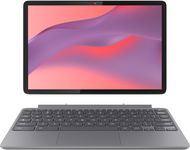
The keyboard and stand are magnetically detachable, significantly reducing the weight of the tablet when carrying.
The power port is on the left.
The display has a working aspect ratio of 16:.10.
LINUX: The terminal Vim does not work with the system clipboard, but the GUI gVim does.
CAPS: There are no labels on the keyboard for the F1 to F10 keys. The F11 and F12 keys are missing completely.
ANDROID: While most common Android apps work, and I haven't come across any that can't be installed, this is not the case with games. I was unable to install most of the games I purchased. One of the few bright exceptions was Baldur's Gate.
TABLET: Lousy clunky user interface in Tablet mode. Clearly, it is not intended that anyone would use a Chromebook in this way.
LINUX: The ARM processor is a problem for Linux application compatibility. And while many of them, like Gimp or gVim, can be installed, others are a problem. I'm most upset about Android Studio. You cannot develop Android applications on this chromebook.
CHROME: In tablet mode, it's broken. For example, the bookmarks bar still shows up even though it's turned off in the settings. On the other hand, there is no option to turn on the tab bar, which otherwise works on tablets in the Android version of Chrome. Switching tabs is handled inconveniently like on mobile phones via a button in the toolbar with the number of open pages and it is a problem to have more pages open. After connecting the keyboard, everything is as it should be. Just more proof of the tablet mode's lack of tuning.
No SD card slot.
No USB-A connector for flash drives and similar peripherals.
The sound from the speakers is not very musical.
The display is glossy.
0 ×Report
Automatic translation
Viktor, Liberec
Rated 23/08/2025, variant Lenovo Chromebook Duet 11M889 Luna Grey
Verified purchase
Tablet automatically switches between desktop modem and tablet modem when keyboard is disconnected
You can install most apps and games from Google Play
Supports multiple users (versus iPad)
Chrome OS works perfectly
For me the best tablet choice on the market - Android has limitations in that it's simply mobile oriented, iPad OS is simply limited by nature
The stylus could have some kind of context button
The stand could be part of the tablet
The keyboard could be backlit
0 ×Report
Automatic translation
Michal, Praha 5
Rated 05/08/2025, variant Lenovo Chromebook Duet 11M889 Luna Grey
Verified purchase - review from a price comparison website
Allows you to run Chrome OS, Linux and Android apps simultaneously in one environment !
Long battery life
2x USB-c
No biometric unlocking
A little heavier
The stand is not very stable
Does not have USB-A - a reduction is needed for some peripherals
0 ×Report
Automatic translation
Customer, Praha
Rated 08/06/2025, variant Lenovo Chromebook Duet 11M889 Luna Grey
Verified purchase - review from a price comparison website
The Lenovo Chromebook Duet 11M889 is a great choice for those looking for an affordable, ultra-portable and versatile work tablet. Its Surface-inspired design, complete package with keyboard and stylus, exceptional battery life, and high-quality display and cameras are a big plus. Despite the smaller size, the touchpad is quite acceptable.
However, lower stylus responsiveness, limited storage and no keyboard/wireless backlighting are to be expected. Unfortunately, the physical connection of the keyboard makes it impossible to use it in combination with the tablet in vertical mode, which is a pity, I missed it especially for loading long text or programming. For casual users who prefer the cloud and low-maintenance applications, the Chromebook Duet 11 is a powerful and near-ideal product if the keyboard offered more flexibility. But you can use an external wireless keyboard out of the way.
Excellent price: You get the complete package - tablet, keyboard, stylus and protective case - at a very attractive price.
Top design and portability: It is extremely lightweight and compact, ideal for travel. Its appearance is very close to the premium Microsoft Surface. I absolutely love the design.
Beautiful display: The display is vivid and bright, great for work and play.
Versatile stand: The integrated stand allows flexible adjustment of the position in width and height.
Excellent battery life: You can count on about 10 hours of continuous work, which is very good for such a small device.
Quality cameras: The front and rear cameras are very good for this price range, they serve for video calls and extra occasional photography.
3.5mm audio connector
Selfie camera aperture
Acceptable touchpad: Despite the smaller size, the touchpad is fully functional and for the price, its performance is very decent, not limiting the user experience. I expected it to be worse for the price.
Can run Linux
Optimised Chrome OS: The system is fast, simple and responds well to touch.
Long-term support from Google. Google provides software updates for Chrome OS for approximately 10 years, which is significantly longer than Android and ensures the longevity of the device.
Low stylus response: When using the stylus, the display response is less responsive, which can frustrate creative users.
Limited memory and storage: The RAM and internal disk are relatively small, requiring reliance on cloud or external storage. Most importantly, it can't be expanded.
Keyboard without keypad and backlight: The keyboard only works when connected to the tablet. It can't be used in wireless mode, which is a shame when trying to use the tablet with the keyboard in vertical mode, for example. In addition, there is no backlight, which makes it difficult to work in the dark.
Performance limits: Sufficient for common tasks, but more demanding applications may have performance limits.
Speakers: The sound quality is only satisfactory for occasional use. In tablet mode, they can be easily covered.
Limited number of positions due to packaging design.
It does not support non-standard resolutions for external displays: Chromebook Duet 11 does not support the use of external monitors with non-standard resolutions, such as 3840 x 1600 pixels and other resolutions with similar aspect ratios. It only works from a lower resolution unfortunately in this case.
0 ×Report
Automatic translation
Marek, Praha
Rated 19/05/2025, variant Lenovo Chromebook Duet 11M889 Luna Grey
Verified purchase
If you want to click youtube and TikTok so enough, but otherwise it is completely useless, apps do not work properly on chromeOS from google store, have a problem with the keyboard to which do not respond and touchpad ignore clicking, only touch the screen. if I wanted to pay for it so I don't buy a tablet with a keyboard and the sound is terrible, it's better to play audio from your mobile