


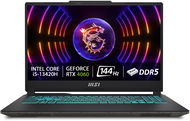
Reviews MSI Cyborg 15 A13VF-1454XCZ
Interested in reviews of MSI Cyborg 15 A13VF-1454XCZ? It got 4.4 out of 5 stars from our customers. Find specific customer reviews of MSI Cyborg 15 A13VF-1454XCZ below. We will appreciate if you also share your experiences with MSI Cyborg 15 A13VF-1454XCZ after purchasing.
User Reviews

Lukáš, Telč
Rated 27/09/2025, variant MSI Cyborg 15 A13VF-1454XCZ
Verified purchase
Keyboard
Low power consumption (heats up less)
RTX 4060 (even this 45W variant) can handle virtually all games with DLSS, FG support
I like MSI Center
Tragically few connectors and their poor placement (who thought to put all the ports on the right side where everyone has a mouse)
There is not a single space available for an M.2 SSD or any other storage
Both RAM slots are occupied
0 ×Report
Automatic translation

Daniel, Praha
Rated 26/09/2025, variant MSI Cyborg 15 A13VF-1454XCZ
Verified purchase
Top price (without WIN saved about 5.000 CZK)
Great design
Super HW
Quiet
I can't think of anything


0 ×Report
Automatic translation

Libor, Ostrava
Rated 25/08/2025, variant MSI Cyborg 15 A13VF-1454XCZ
Verified purchase
Design and processing
Backlit keyboard
Ratio/price/performance
144 Hz
Simply MSI
I was buying without OS
When installing win11 right away the problem, it doesn't see the ssd, it has a simple solution, on the MSI manufacturer support site, you search for your model and download the Intel RST/VDM F6 driver, download and save to usb flash, you don't have to unzip this file and you can copy it to the flash where you have win10/11, then run a classic install, then load the VDM driver you find on the flash where you copied it, mark and confirm, the partitions of the drive will appear, delete everything and then add or new, hooray and the ssd is up, install and done, after the install update right away to make sure you have everything complete and functional, I got very angry and I don't understand why the manufacturer hides such a thing in the bios but I gave it a go 🫡 hope this helps someone, there is a review on the same problem someone had and solved it by pressing the keys entered but I couldn't so I solved it like this
0 ×Report
Automatic translation

Petr, Sokolov
Rated 05/07/2025, variant MSI Cyborg 15 A13VF-1454XCZ
Verified purchase
No windows without disk, complaint the next day, alza never again.
Good access to the shop in Karlovy Vary
When I bought the laptop it was without windows and without a disk... although I was buying already unpacked but there will be no disk no one wrote me ... alza uz never vic
0 ×Report
Automatic translation

Jan, praha 8
Rated 28/05/2025, variant MSI Cyborg 15 A13VF-1454XCZ
Verified purchase - review from a price comparison website
Super product at a super price
0 ×Report
Automatic translation
Barbora, Velké Chvojno
Rated 26/05/2025, variant MSI Cyborg 15 A13VF-1454XCZ
Verified purchase
We've had it a short time, so far so good.
0 ×Report
Automatic translation
Customer, Praha
Rated 18/05/2025, variant MSI Cyborg 15 A13VF-1454XCZ
Verified purchase - review from a price comparison website
The computer was shutting down when it was playing something
0 ×Report
Automatic translation
Petr, Modrá
Rated 03/03/2025, variant MSI Cyborg 15 A13VF-1454XCZ
Verified purchase
The computer itself is fine, however, someone here has already mentioned problems with installing Windows (in my case 11). For those who will buy it here I will give instructions on how I finally managed to install Windows, so hopefully that will help. By default, new computers with newer generations of Intel processors have VMD Raid support enabled, but do not have a driver on the computer that needs to be installed. But the problem is that for some reason it didn't want to load from the flash drive (I tried several, even changing ports on the PC, but still an error). Without this, the main SSD drive that is in the PC will not show up when you install Windows and you will not be able to install Windows. I was looking for where the problem was, because in the bios the disk was showing up normally. So I ran into the problem described above with VMD Raid. When the driver installation didn't work, I was looking for how to disable the support in the bios, because it is on by default - in the normal settings in the bios you can't do that, you have to press the keyboard shortcut Right Ctrl (on the keyboard there is a Win Copilot icon instead) + Right Shift + Left Alt + F2 and then the other settings appear. Next go to System Agent > Intel VMD > disable. Only then, after saving the bios and rebooting, the SSD will show up during installation. It took me a while to figure it out, but I finally did - it's a bit of a work in progress, and I think this support should be turned off by default when even more drivers are required, and I understand that for perhaps less tech-savvy users this can be quite a problem. So hopefully this post will help and save time for those who will be struggling with the same problem. The support can probably be left off after installation, unless you plan to add another drive to the notebook somehow, so there is no point in dealing with this - it would be when you would actually use the "RAID disk connection". Credits here - https://forum-en.msi.com/index. php? threads/vmd-is-not-disabling.387835/page-3
Good cooling
Nice design and good workmanship for the money
Good performance
Only 2 USB
Poor quality speaker
Problems installing Windows
0 ×Report
Automatic translation
Pavel, Chomutov 4
Rated 24/02/2025, variant MSI Cyborg 15 A13VF-1454XCZ
Verified purchase
Connectors on the right side
0 ×Report
Automatic translation
Pavel, Hronov
Rated 23/02/2025, variant MSI Cyborg 15 A13VF-1454XCZ
Verified purchase
I'm sending a link to https://cz.msi.com/Laptop/Cyborg-15-A13VX/support? sub_product=Cyborg-15-A13VF, where you can download additional drivers jelikoz alza service after what was a month laptop on the service could not figure out what is the error and sent a new product with the same manufacturing error: D. So a month's wait for nothing. Since alza could not deliver the link to the driver after my phone call, I have to send it myself.
Pretty powerful laptop which runs a lot of new games at full detail
Played on maximum settings at a steady 90fps+
Stalker 2 high settings 70-80fps +-
Gta 5 max settings 100-120fps
Lower battery and charger performance
Problems installing Windows, I had to manually download drivers as the motherboard did not recognize the ssd
0 ×Report
Automatic translation
