


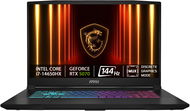
Reviews MSI Katana 17 HX B14WGK-026CZ
Interested in reviews of MSI Katana 17 HX B14WGK-026CZ? It got 4.5 out of 5 stars from our customers. Find specific customer reviews of MSI Katana 17 HX B14WGK-026CZ below. We will appreciate if you also share your experiences with MSI Katana 17 HX B14WGK-026CZ after purchasing.
User Reviews

Anonymous customer
Rated 04/07/2026, variant MSI Katana 17 HX B14WGK-026CZ
Verified purchase
Bought this laptop 6 months ago, works good it costs it's price
Really works well for it's price
No slot for SATA ssd
Only 16 gb ram, it's not enough for nowadays
0 ×Report
Anonymous customer
Rated 13/12/2025, variant MSI Katana 17 HX B14WGK-026CZ
Verified purchase
Power
Image quality
Adjustable keyboard backlighting ( even the option to turn it off)
Battery overcharge protection setting ( 60 or 80%)
Noise level of fans under load (measured by the mobile app at 50 to 60 dB)
Fans sometimes run at higher speeds even when graphics and CPU temperatures are low
Lower battery life - max 4 hours
0 ×Report
Automatic translation
Lucie, Mšené lázně
Rated 07/11/2025, variant MSI Katana 17 HX B14WGK-026CZ
Verified purchase
At the beginning problematic SOUND TUNING, after about three months when you master the little things and know a little in Win 11 I would not change, I just bother me the arrows on the keyboard blend in with the others and the numeric keypad has a stupid X / + -. Otherwise, I'd probably go for the I9 and 32GB Ram. Otherwise great
Nice graphics - it works as it should.
The I7 is running as it should.
It's not noisy.
MSI center is a nice thing.
Sound - OK
It's a nice comp.
Lightweight - but it's probably going to be a bit chubby. So it's probably not exactly a PC for some scumbag.
The backlit keyboard is simply amazing.
You can see a lot of components from underneath, I don't know if that's an advantage, more like a disadvantage, but you can see pretty quickly how the PC is dirty with dust - so yeah.
has JACK 3.5.
The charger is nicely angled and does not bother.
I probably wouldn't skimp again and go for that 32GB ram, and a number higher graphics and I9 processor. You can get it at MSI for 44.000Kč, or there is the HP Omen, which has better overall parameters in details and costs I think 38.000Kč. You can't go wrong with this MSI, but there are better machines out there.
For 37.000 Or how much it actually cost, it's a good piece and a lot depends on what you were used to last time as it will certainly affect your satisfaction. But if you miss something here, just fast for 14 days and then you will be satisfied even for bread and butter.
The switch on button is part of the keyboard, it can bother.
Enter is small on the bottom right and you press the dot as well.
The bottom of the computer seems to be made of weak honeycomb, probably about to crack.
The WSAD is made of transparent plastic and you can't see the WSAD on it.
Poor display brightness.
Don't forget to switch things off after booting - it totally lags the comp.
I would add an SD card slot, etc.
Designed in imitation of steampunk screws - looks cheaply cool to me personally.
The hinges that hold the monitor are completely on the side, any fall, the monitor goes right into the ditch.
Compared to the HP Omen PC, I find it quite backward.
JUST LIKE EVERYWHERE - I don't know how to turn on the Bluetooth icon permanently.
0 ×Report
Automatic translation
