


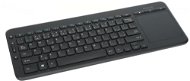
Reviews All-in-One Media Keyboard
Interested in reviews of All-in-One Media Keyboard? It got 4.4 out of 5 stars from our customers. Find specific customer reviews of All-in-One Media Keyboard below. We will appreciate if you also share your experiences with All-in-One Media Keyboard after purchasing.
User Reviews

Martin, Říčany
Rated 27/09/2015, variant All-in-One Media Keyboard
Verified purchase
Great range
It's working as it should.
0 ×Report
Automatic translation
Customer
Rated 27/09/2015, variant All-in-One Media Keyboard
Verified purchase
Microsoft knows how to do hw, works without installation at flashlights on primac, good range
Toutchpad is sensitive sometimes jumps elsewhere but this can be debugged in the operating system.
0 ×Report
Automatic translation
Customer
Rated 06/08/2015, variant All-in-One Media Keyboard
Verified purchase
It has a decent touchpad in it, I always lost the mouse
Probably the smallest lag I've ever experienced
Well crafted (within the limits of the design possibilities)
Gestures
MS HW is still relied on
Both the keyboard and the touchpad drop nicely in the BIOS
Function keys work as standard as with FN pressed, I haven't figured out how to switch it yet
0 ×Report
Automatic translation
Customer
Rated 29/07/2015, variant All-in-One Media Keyboard
Verified purchase
everything..: D
works as it should
Nothing..: D
the touchpad is a bit stuck at the beginning
0 ×Report
Automatic translation

Jan, Úštěk - Habřina
Rated 25/06/2015, variant All-in-One Media Keyboard
Verified purchase
small
cleverly designed left mouse button on the left thumb, if you have the keyboard in your hands, of course you can tap or press with your finger on the touch pad
equally accessible volume adjustment including mute
excellent solution to HTPC
if it rests on a table top, it does not have flip-up feet
due to the size and layout of the keys it is not suitable for permanent work
0 ×Report
Automatic translation
Petr, Praha
Rated 22/06/2015, variant All-in-One Media Keyboard
Verified purchase
exactly what I was looking for, you plug it in and don't have to worry about anything
not found
0 ×Report
Automatic translation
Customer, Praha 4
Rated 01/05/2015, variant All-in-One Media Keyboard
Verified purchase
price
works instantly and reliably
via the utility the possibility of setting the keys
the touchpad is more of an emergency than for longer work
it could be quieter
0 ×Report
Automatic translation

Jan, Praha 9 - Letňany
Rated 08/04/2015, variant All-in-One Media Keyboard
Verified purchase
Pretty good.
I use it as a driver for my HTPC with Kodi and it works exactly as I needed.
the touchpad buttons are so bland. it's pretty much a habit.
Small enter
0 ×Report
Automatic translation
Monika
Rated 25/03/2015, variant All-in-One Media Keyboard
Verified purchase
touchpad, left mouse button, volume control, shortcuts to interner, folders, search, putting PC to sleep,
a bit noisy keys, enter narrow F1-F12 must be used and FN,
0 ×Report
Automatic translation
Magdaléna, Plzeň
Rated 19/03/2015, variant All-in-One Media Keyboard
Verified purchase
Battery died after a month, unresponsive over obstacles (duvet)
0 ×Report
Automatic translation
