Try our cookies Alza.cz a. s., Company identification number 27082440, uses cookies to ensure the functionality of the website and with your consent also to personalisage the content of our website. By clicking on the “I understand“ button, you agree to the use of cookies and the transfer of data regarding the behavior on the website for displaying targeted advertising on social networks and advertising networks on other websites.
Alzak icon
Catalogue
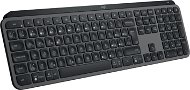
Logitech MX Keys S Graphite - CZ/SK - Keyboard

Reviews Logitech MX Keys S Graphite - CZ/SK

Interested in reviews of Logitech MX Keys S Graphite - CZ/SK? It got 4.7 out of 5 stars from our customers. Find specific customer reviews of Logitech MX Keys S Graphite - CZ/SK below. We will appreciate if you also share your experiences with Logitech MX Keys S Graphite - CZ/SK after purchasing.
104.90 €
In stock > 5 pcs
Add to Cart More Information

User Reviews

Tomáš, Strančiceflag
Rated 28/08/2025, variant Logitech MX Keys S Graphite - CZ/SK
Verified purchase
It's definitely a step (or rather a leap) backwards from logitech. After the absolutely luxurious K800, this! The K800 had really low-profile, soft keys; these, with their sharp edges, are more reminiscent of a chiclet keyboard. Some kind of positioning, a backrest...? Forget it. It's not very easy to write on, the ergonomics are very poor. Another thing is the backlight - if you play a game on it, for a while you just have your hand loosely placed on it while you look around with the mouse, the keyboard goes off and the backlight only responds when you press a random key, it just doesn't respond to zooming. And the third thing - outreach. I use it 2 meters away from the computer, where there is a direct visibility between it and the dongle without obstacles, and sometimes the keyboard does not respond to a keystroke for a second, or on the contrary, it jams and prints 20 times the key before it catches again. No, not really - a non-ergonomic werk at a totally inadequate price. Hell I used to have a backlit c-tech for three hundred it was better than this
Unfortunately, the cons totally outweigh any pros
Very poor ergonomics
Backlight is unreliable
Poor range even in direct visibility of the dongle
At most a third of the price (and that's just because of the logitech brand, it's not worth more)
0 ×Report
Automatic translation
Anonymous customerflag
Rated 27/08/2025, variant Logitech MX Keys S Graphite - CZ/SK
Verified purchase
Battery life
Intelligent backlighting
Price
0 ×Report
Automatic translation
Milan, Žatecflag
Rated 27/08/2025, variant Logitech MX Keys S Graphite - CZ/SK
Verified purchase
metal, very robust
very fast response
easy wiring
long battery life
0 ×Report
Automatic translation
Jakub, Buštěhradflag
Rated 08/08/2025, variant Logitech MX Keys S Graphite - CZ/SK
Verified purchase
I have to say I'm thrilled with it, it's beautiful to write on. The keys are low and have cut out bellies, I was a little afraid of that but it's absolutely brilliant. Much better than the apple wireless keyboard, which has stupidly sharp edges. I've replaced a few keyboards over the years, but this one is by far the best. The only bug is that it has a new receiver (bolt), which is not compatible with older logitech products (like the MX vertical mouse). A bit of schizophrenia from Logitech.
convenient
nice
top row key mapping
it's not suitable for carrying, it's quite big and quite heavy (I take it to the office when I'm there once in a while, but it barely fits in my backpack, I'm quite worried about it during the transport)
0 ×Report
Automatic translation
Tomáš, Praha 1 - Nové Městoflag
Rated 05/08/2025, variant Logitech MX Keys S Graphite - CZ/SK
Verified purchase - review from a price comparison website
I have a keyboard connected via USB Logi Bolt together with a mouse. Occasionally (1-2 times a day), the signal gets bad and the keyboard stops responding for a few seconds (which doesn't happen with a mouse) - sometimes it reboots itself, sometimes restarting it helps. Also, the automatic backlighting occasionally blinks randomly at 100% brightness. But these are the only bugs I have found so far. The keyboard is quiet and pleasant to type on. The backlighting is very nicely done for my taste and doesn't shine unnecessarily off the keys (which is a big and welcome difference from my previous mechanical keyboard). The programmable keys are also welcome, and the possibility to add the classic Print Screen instead of the perpetually dysfunctional Microsoft Cutouts was also a pleasure.
Quiet
Backlight
Programmable keys
Minor bugs
0 ×Report
Automatic translation
Jaromír, Plzeňflag
Rated 04/08/2025, variant Logitech MX Keys S Graphite - CZ/SK
Verified purchase - review from a price comparison website
Quiet
Short ENTER, I tend to press the key to the left of it
Short left Shift, but it's easy to get used to
0 ×Report
Automatic translation
Rostislav, Ostrava - Porubaflag
Rated 04/08/2025, variant Logitech MX Keys S Graphite - CZ/SK
Verified purchase
great design
ergonomic
pairing without problems
quiet
lots of features
setting options via the Logi app
maybe just the charging via cable
0 ×Report
Automatic translation
Customer, Horoměřiceflag
Rated 30/07/2025, variant Logitech MX Keys S Graphite - CZ/SK
Verified purchase
Great stuff top quality.
0 ×Report
Automatic translation
Adam, Brno 18flag
Rated 30/07/2025, variant Logitech MX Keys S Graphite - CZ/SK
Verified purchase
I really like the keyboard - I have several PCs and several keyboards and this one suits me the most - as far as the placement of the gobos is concerned, especially the stroke. When one writes with all ten, one is really able to write very quickly and efficiently thanks to the advantages mentioned above.
Perfect button travel - neither big nor small
Backlighting for some - for me a useless thing, because I write "with all ten"
Up to three devices can be connected via Bluetooth
Very quiet when typing
Batteries. Unfortunately this keyboard lasts about 2 weeks on a single charge
0 ×Report
Automatic translation
Petr, Prahaflag
Rated 22/07/2025, variant Logitech MX Keys S Graphite - CZ/SK
Verified purchase
The design decision in Logitech to write ONLY Czech labels on the keyboard and NEVER the ones from the US layout like all normal keyboards have for the last 30 years - that is a truly brilliant decision. I'm not going to glue labels on a keyboard for two and a half thousand dollars - moreover, in a situation where the keys are not straight, but bent, it might not even work properly. So I have no choice but to buy the DELL KB900 which looks normal - which again drives me crazy because then I can't have an ecosystem with the Logitech MX Master 3S. Logitech screwed this up big time.
Absence of US label
0 ×Report
Automatic translation
41 - 50 from 159
P-DC1-WEB18