Try our cookies Alza.cz a. s., Company identification number 27082440, use cookies and other data to ensure the proper functioning of the website and, with your consent, also, among other things, to personalize advertising and the content of our websites. By clicking on the “I understand“ button, you agree to the use of cookies and the transfer of data regarding the behavior on the website for displaying targeted advertising on social networks and advertising networks on other websites.
Alzak icon
Catalogue
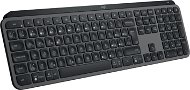
Logitech MX Keys S Graphite - CZ/SK - Keyboard

Reviews Logitech MX Keys S Graphite - CZ/SK

Interested in reviews of Logitech MX Keys S Graphite - CZ/SK? It got 4.7 out of 5 stars from our customers. Find specific customer reviews of Logitech MX Keys S Graphite - CZ/SK below. We will appreciate if you also share your experiences with Logitech MX Keys S Graphite - CZ/SK after purchasing.
104.90 €
In stock > 5 pcs
Add to Cart More Information

User Reviews

Adam, Brno 18flag
Rated 30/07/2025, variant Logitech MX Keys S Graphite - CZ/SK
Verified purchase
I really like the keyboard - I have several PCs and several keyboards and this one suits me the most - as far as the placement of the gobos is concerned, especially the stroke. When one writes with all ten, one is really able to write very quickly and efficiently thanks to the advantages mentioned above.
Perfect button travel - neither big nor small
Backlighting for some - for me a useless thing, because I write "with all ten"
Up to three devices can be connected via Bluetooth
Very quiet when typing
Batteries. Unfortunately this keyboard lasts about 2 weeks on a single charge
0 ×Report
Automatic translation
Petr, Prahaflag
Rated 22/07/2025, variant Logitech MX Keys S Graphite - CZ/SK
Verified purchase
The design decision in Logitech to write ONLY Czech labels on the keyboard and NEVER the ones from the US layout like all normal keyboards have for the last 30 years - that is a truly brilliant decision. I'm not going to glue labels on a keyboard for two and a half thousand dollars - moreover, in a situation where the keys are not straight, but bent, it might not even work properly. So I have no choice but to buy the DELL KB900 which looks normal - which again drives me crazy because then I can't have an ecosystem with the Logitech MX Master 3S. Logitech screwed this up big time.
Absence of US label
0 ×Report
Automatic translation
Robert, Prahaflag
Rated 18/07/2025, variant Logitech MX Keys S Graphite - CZ/SK
Verified purchase
it looks nice on the desk, it's easy to type on it, when I need to connect with the mouse, I have to use an external KVM because you can't switch the mouse and keyboard at the same time even when you write to Santa Claus
festive keyboard
are you planning to have a company laptop connected? you will have to negotiate with cybersec to install the application. and it still won't work because you can't negotiate the visibility of the computer on the network.
switching between computers? NOWHERE do they tell you that you have to switch the mouse separately and the keyboard separately! You just can't put it together via a button on the keyboard. The only way to do this is by using the logi+ application, but there again you need the computers in a given network segment to see each other. In the case of a work laptop, you are out of luck if the visibility of the computer on the network is disabled. Forget the bullshit about how you're going to line up your mouse and keyboard together. It's just lies before you buy that shit.
I have a keyboard that was supposed to boost my productivity. Instead, I have a keyboard where I don't even turn on the script when connecting to a meeting via Teams.
I've been wondering for a day now if I'm gonna put it back. that's my only productive result
0 ×Report
Automatic translation
TSS - MB sro, Neratoviceflag
Rated 18/07/2025, variant Logitech MX Keys S Graphite - CZ/SK
Verified purchase - review from a price comparison website
it shines adequately so that it can see the letters and does not bother, it does exactly what it is supposed to do, great
0 ×Report
Automatic translation
Jakub, Herálec pod Žákovou horouflag
Rated 10/07/2025, variant Logitech MX Keys S Graphite - CZ/SK
Verified purchase
pleasant writing
quick pairing
battery life
design
0 ×Report
Automatic translation
Vítězslav, Hradec Královéflag
Rated 03/07/2025, variant Logitech MX Keys S Graphite - CZ/SK
Verified purchase - review from a price comparison website
Everything ok as always
0 ×Report
Automatic translation
Anonymous customerflag
Rated 17/06/2025, variant Logitech MX Keys S Graphite - CZ/SK
Verified purchase
Multi-device option
It's heavy = it stays in place
Amazing ergonomics
It needs to be charged about once a week
It requires an app to configure, which of course wants to start automatically at boot and has AI features enabled by default, so who knows what all data and telemetry it takes (better to use without)
0 ×Report
Automatic translation
Anonymous customerflag
Rated 09/06/2025, variant Logitech MX Keys S Graphite - CZ/SK
Verified purchase
Backlighting at night luxury
I found no error
0 ×Report
Automatic translation
Petr, Praha 4 - Kunraticeflag
Rated 24/05/2025, variant Logitech MX Keys S Graphite - CZ/SK
Verified purchase
Pleasant running
Backlight
BT connection
nothing so far
0 ×Report
Automatic translation
Aneta, Brnoflag
Rated 21/05/2025, variant Logitech MX Keys S Graphite - CZ/SK
Verified purchase - review from a price comparison website
As the review shows, I am very satisfied with the keyboard. I like the ergonomics, it's comfortable to write on, even if you have slightly longer nails. When I type, it reminds me a lot of the MacBook keyboard. It's just a pity it's not fully programmable, that would be useful: -)
durable
excellent design and ergonomics, it is quite heavy, but holds well on the table, does not slip
it's great to write on
connects well with PC and other devices
long battery life after charging (depending on the use of keyboard lighting and how often you use it)
charges relatively quickly
the LogiOptions keyboard program is very intuitive
programmability of the upper keys, incl. differentiation into individual programmes
I like some of the buttons - to open the calculator, reader, screenshot, etc.
ability to connect multiple devices and switch between devices at the touch of a button
the backlight adjusts itself to the lighting conditions and saves the battery + it's pretty cool that it registers when the hands get close to the keyboard and then it lights it up
some people might be bothered by the fact that you can't adjust the slope (I like the slope as it is)
it's quite heavy, so it's really more for office work than dragging around libraries
personally, I would prefer if it were all programmable, not just the top row
the backlighting isn't quite perfect (in the sense that when I'm working in the dark, it doesn't always light up immediately when I bring my hand close to it, as it does other times, but that's really a detail)
0 ×Report
Automatic translation
51 - 60 from 161
P-DC1-WEB02