Try our cookies Alza.cz a. s., Company identification number 27082440, uses cookies to ensure the functionality of the website and with your consent also to personalisage the content of our website. By clicking on the “I understand“ button, you agree to the use of cookies and the transfer of data regarding the behavior on the website for displaying targeted advertising on social networks and advertising networks on other websites.
Alzak icon
Catalogue
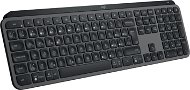
Logitech MX Keys S Graphite - CZ/SK - Keyboard

Reviews Logitech MX Keys S Graphite - CZ/SK

Interested in reviews of Logitech MX Keys S Graphite - CZ/SK? It got 4.7 out of 5 stars from our customers. Find specific customer reviews of Logitech MX Keys S Graphite - CZ/SK below. We will appreciate if you also share your experiences with Logitech MX Keys S Graphite - CZ/SK after purchasing.
104.90 €
In stock > 5 pcs
Add to Cart More Information

User Reviews

MLC s.r.o., Olšanyflag
Rated 27/09/2023, variant Logitech MX Keys S Graphite - CZ/SK
Verified purchase
For a reason not yet explained, key press combinations, e.g. CTRL+C or CTRL+V is often interpreted as pressing them separately, i.e. as if the CTRL key was pressed separately, followed by the C key, which causes very annoying errors. This usually happens if more time has passed since the last time you pressed any key on the keyboard, e.g. 10 seconds or more. If CTRL+C is pressed immediately after other keystrokes, the problem usually does not occur.
Materials used
Possibility to operate 3 devices
Big problem with pressing key combinations at the same time
Fast depletion of a fully charged battery (even within about 1 day, when working e.g. after 8 hours)
0 ×Report
Automatic translation
Jiří, Havířov 1flag
Rated 22/09/2023, variant Logitech MX Keys S Graphite - CZ/SK
Verified purchase - review from a price comparison website
quality product
I've already bought three
long battery life (more than a month) after charging
None
0 ×Report
Automatic translation
TLD Vision, s.r.o., Želečflag
Rated 15/09/2023, variant Logitech MX Keys S Graphite - CZ/SK
Verified purchase
I bought the keyboard as I have used a K750 in the past and have been very satisfied. Technically it is very well made. It's heavy and solid. From a functional point of view, however, it is completely overcomplicated. The labels are confusing and I find the key layout a bit non-standard as well. I think it's because they're trying to cover all possible platforms.
0 ×Report
Automatic translation
Ivo, Praha 1-Staré Městoflag
Rated 13/09/2023, variant Logitech MX Keys S Graphite - CZ/SK
Verified purchase - review from a price comparison website
For me the backlight
0 ×Report
Automatic translation
Oskar, Prahaflag
Rated 09/09/2023, variant Logitech MX Keys S Graphite - CZ/SK
Verified purchase
pleasant keys
lightweight and portable
good luminosity
super feature to connect multiple devices via bolt
super custom keys/adjustable
a little weaker battery
0 ×Report
Automatic translation
Lukáš, Praha 10flag
Rated 07/09/2023, variant Logitech MX Keys S Graphite - CZ/SK
Verified purchase
Quality materials, so one smiles while writing. A bunch of features that have already come in handy.
Quality materials
Pleasant writing
Customizing macros
Colour
Price
0 ×Report
Automatic translation
Petr, Lučany nad Nisouflag
Rated 31/08/2023, variant Logitech MX Keys S Graphite - CZ/SK
Verified purchase
General satisfaction, my only reservation is the position of the right option button (for use with Mac). On mac (magic keyboard) the arrangement is (left to right) space, cmd, option. On this keyboard it's spacebar, cmd, fn, option. Basically, it's all about typing the characters you type with the right option + left hand combination, in my case the very frequently used typing of the call sign. On a Mac, I press option with my right ring finger + left pinky on the 2 key. On this keyboard, I can't reach the right option with my pinky finger, so I have to move my whole hand down to the right to press the right option. In principle, it probably wouldn't be a problem to get used to this and practice it, but since I alternate typing on this keyboard with typing directly on my macbook, I have a big problem with this and will probably be getting rid of this keyboard. If you don't write with all ten, this is not a problem.
everything except the above mentioned negative
position of the right option key
0 ×Report
Automatic translation
Michal, Deblínflag
Rated 27/08/2023, variant Logitech MX Keys S Graphite - CZ/SK
Verified purchase
CZ/SK keyboard is not only English with CZ labels but really CZ. I had to replace it with the US version. I work on a US keyboard but there are always problems with the others at home. I have problems with CZ keys because some special characters from US keyboard are missing and there are CZ special characters. Otherwise, the keyboard is overall the best for working on MacOS and Windows. That is the reason for the purchase. It's been around for a while and I can't let it go.
En captions
Cz keys
0 ×Report
Automatic translation
Dalibor, České Budějoviceflag
Rated 09/08/2023, variant Logitech MX Keys S Graphite - CZ/SK
Verified purchase - review from a price comparison website
After this keyboard you will not get used to another one, it has no competition. The price is high, but if you use your computer often, it's worth it. As far as durability is concerned, the buttons are still ok on the older MX Keys after about two years of use, they all work, just some are a bit loose (they don't have a precise click-match).
Excellent keyboard
Czech labels
If you have an MX3S mouse, it connects via one Bolt
Reliable connection (Bolt/BT)
Price
0 ×Report
Automatic translation
151 - 159 from 159
P-DC1-WEB16