Try our cookies Alza.cz a. s., Company identification number 27082440, uses cookies to ensure the functionality of the website and with your consent also to personalisage the content of our website. By clicking on the “I understand“ button, you agree to the use of cookies and the transfer of data regarding the behavior on the website for displaying targeted advertising on social networks and advertising networks on other websites.
Alzak icon
Catalogue
Price
-
Availability
Order status
Processor series
Graphics card series
(211)
(51)
(133)
(4)
(212)
(1)
Model graphics cards
(5)
(17)
(30)
(44)
(25)
Graphics card memory
(5)
(12)
(109)
(1)
(55)
Storage capacity (total)
0 GB
16,000 GB
- 0 TB 16 TB
Storage Type
(605)
(3)
(13)
Wardrobe size
Size of operational RAM
0 GB
496 GB
-
Operating system
(251)
(227)
(124)
(2)
Newest orders

Desktop PCs

The motherboard ensures collaboration between individual computer components. It is an important part of every PC.

Continue

Motherboard Socket

The socket is used to connect the motherboard and the processor. The processor and the particular motherboard must have a compatible (identical) socket.

First, choose the processor, and then select a motherboard with a matching socket.

Motherboard Format

eATXATXmATXmITX
eATXATXmATXmITX

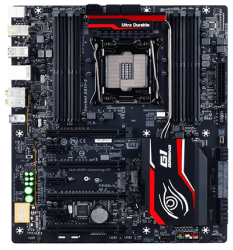
eATX (Extended ATX)

These are rare and very expensive gaming motherboards that are mainly used by people who want to install three or four graphics cards into CrossFireX or SLI. Other features are similar to what you can find on the most expensive ATX models. To install an eATX motherboard, you will need a really large PC case (Big Tower).

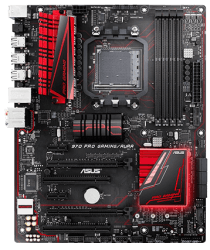
ATX (Standard ATX)

Standard ATX motherboards are suitable for powerful and well-equipped computers (either gaming or workstations) and they allow you to install multiple expansion cards, including several graphics cards in CrossFireX/SLI. On the back panel, you can expect a wide range of ports for external devices. These motherboards have plenty of connector space, so you can easily connect individual components and keep your computer cool (assuming you pick a good PC case).

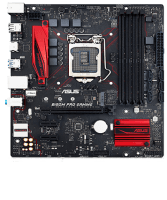
mATX (Micro ATX).

If you don’t want to spend much money on a motherboard and only need one graphics card (the most expensive mATX motherboards will give you two or three) and one or two expansion cards, a Micro ATX motherboard is exactly what you need. This type is ideal for office computers and multimedia PCs. Additionally, most mATX motherboards are spacious enough to let you install powerful CPU heatsinks. Their compact size, however, makes them suitable for Mini Tower PC cases.

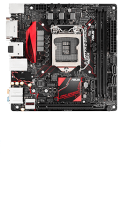
mITX (Mini ITX)

Ideal for very compact office and multimedia computers (Desktop). These motherboards are really small, so you can forget about installing any large tower CPU coolers, as well as having any expansion slots except for a single graphics card. While these motherboards do include some gaming models, keep in mind that you would need to choose the PC case very carefully in order to keep the powerful PC components cool enough. (Generally speaking, we do not recommend buying a Mini ITX motherboard if you want to build a powerful gaming PC or a workstation).

What Chipset Should You Choose?

The chipset affects how many expansion cards and peripherals you can attach to the motherboard and what types, though it also has a significant impact on performance. They also determine whether you can overclock the processor or not (assuming your processor supports overclocking).

If you plan to upgrade your computer occasionally, it pays to splurge on a model with a higher number of modern connectors and slots (in other words, a more expensive chipset). However, if you buy or build a whole new PC with each new generation of processors or you are the so-called casual user, then you don’t have to worry about this too much.

Intel Chipsets

  • H110 (socket 1151) - for office and multimedia computers, usually used in systems where the graphics card is integrated in the processor.
  • B150/B250 and H170/H270 (socket 1151) - games, amateur video and 3D graphics creation and editing, does not support overclocking.
  • Z170/Z270 (socket 1151) - games, VR, amateur video and 3D graphics creation and editing, supports overclocking.
  • X299 (socket 2066) - workstations and servers, professional gaming, VR, professional video and 3D graphics creation and editing, supports overclocking.
  • C612 (2× socket 2011-3) - specialised server motherboards with extra space for the installation of two Intel Xeon processors.

You can find a more detailed comparison of Intel chipsets in our Glossary.

AMD Chipsets

  • A320 (socket AM4), AM1 (socket AM1) - for office and multimedia, usually used in systems where the graphics unit is integrated in the processor.
  • B350, X370 (socket AM4) - games, VR, video and 3D graphics creation and editing, supports overclocking. CrossFire works on both chipssets, SLI requires X370.
  • X399 (socket TR4) - workstations and servers, professional video and 3D graphics creation and editing, supports overclocking.

You can find a more detailed comparison of AMD chipsets in our Glossary.

RAM System Memory

Motherboard specifications usually include the maximum clock speeds you can achieve by overclocking (OC). If you want to make use of everything your PC offers, get RAM modules with a higher clock speed than that of the processor memory controller – this will give you enough room for overclocking. As long as you stay below the speed listed by the manufacturer, you can use your modules without any worries. If you want to use automatic overclocking (available with some Intel processors), you should use memory modules with XMP technology.

  • Dual/Triple/Quad Channel - if you equip your system with the recommended number of multi-channel (2/3/4) modules or double it, you can increase your computer’s performance, especially when dealing with demanding computing tasks and games. For proper operation, you may have to use the same memory modules in all slots.
  • Maximum number of modules - corresponds to the number of memory slots in the motherboard.
  • Memory type (DDR3/DDR4, etc.) - the memory type must always match the motherboard or processor specifications.
  • Voltage - the RAM voltages must always be the same or lower than the maximum voltage supported by the motherboard.
  • Capacity - When installing RAM modules, you must not exceed the maximum capacity of the memory slot on the motherboard, or the total maximum capacity of all the modules counted together.

Some Mini ITX motherboards use the SO-DIMM system memory you normally find in laptops, so if you want to upgrade your PC, you must choose your RAM modules from the laptop memory category.

Motherboard Expansion Slots

  • PCI-Express ×16 - used for installing graphics cards. If you plan on installing several high-performance graphics cards, check how many PCI-Express lanes are available in each slot.
  • PCI-Express ×8/×4 - for expansions with additional cards that require exceptionally fast data bandwidth, such as network cards or RAID controllers.
  • PCI-Express ×1 - for non-demanding cards, such as sound cards, TV cards, capture cards, etc.
  • PCI - conventional output interface. If you are not planning to install any older cards, chances are that you won’t need it.
  • M.2 and U.2 - used to connect high-speed and highly compact SSDs with NVMe or SATA III interface.

The number of lanes (the number after ×) determines the maximum slot bandwidth. Keep in mind that you can install a PCI-Express x1 card into a PCI-Express x4/x8/x16 etc. slot, but not the other way around, as you would be limited by the insufficient length of the slot. To put it simply, always make sure that the number of lanes supported by your PCI slot is the same or higher than on your card.

External Connectors (I/O Ports - Back Panel)

  • Video (image) - DVI, HDMI, DisplayPort, miniDisplayPort (used by Thunderbolt 1/2), USB-C (used by Thunderbolt 3).
  • Audio (sound) - 3.5mm jacks (speakers and headphones), optical connections (TosLink - external DAC, A/V receivers, etc.).
  • Data - USB 2.0/3.0/3.1, USB-C, PS/2, RJ-45, eSATA, COM/LPT, WiFi antenna(s).
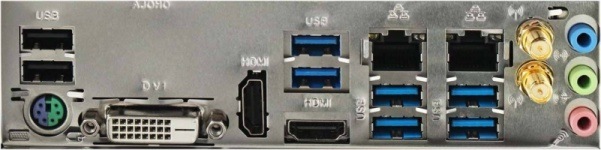
I / O ports on the back panel
Motherboard I/O connectors on the back panel of a PC case

If you're a fan of clear, undistorted sound and use high-quality speakers (Hi-Fi or studio monitors) or audiophile headphones, you should expand your motherboard with a good sound card or an external DAC.

Internal Connectors (I/O Ports)

  • Serial ATA (SATA III, SATA Express) - classic hard drives, SSHDs, and 2.5" SSDs.
  • USB - serve to feed external USB ports on the front/top/side panel of the PC case (supported by every motherboard).
  • Front audio panel - to feed the headphone and microphone connectors on the front/top/side panel of the PC case (supported by every motherboard).

I/O stands for Input and Output. I/O connectors therefore serve to provide bidirectional communication of peripherals and components with the motherboard.

Power Supply and PC Cooling Systems

Motherboards with multiple fan connectors allow you to efficiently cool even powerful PCs. Fan speed control can be done directly through the BIOS, but more powerful motherboards come with special software that makes the whole setup easier. The basic fan connector types are:

  • CPU FAN - for connecting the CPU fan. The vast majority of motherboards have two of these. The second one is usually called "CPU OPT FAN", "CPU FAN2" and so on, and is used to connect a secondary fan required by powerful CPU tower coolers.
  • Chassis FAN - for connecting additional fans to the case.
  • High AMP FAN - for connecting high-speed fans with a large power draw.
  • Hybrid FAN, W PUMP FAN, etc. - for connecting water pumps or high-speed fans with a large power draw.
  • 3-pin connector - only voltage speed control (if supported by the motherboard) is possible; the speed control range is narrower than what you get with PWM control.
  • 4-pin connector - supports PWM speed control to reduce fan speed down to a very low (almost inaudible) noise level.
  • Temperature sensors - give you the option to control fan speed and water pump performance based on the current motherboard temperature.

4-pin and 3-pin fan connectors are mutually compatible. A fan with a 4-pin connector can be controlled both through PWM and voltage control; a 3-pin fan supports voltage control only, since it does not have a PWM pin.

Motherboard BIOS

The BIOS is primarily used to boot and configure the motherboard hardware and then boot the operating system. Updating the BIOS is only needed when something “doesn’t work” (so to speak), for example, if you need to install a new processor that the old BIOS does not recognise. The motherboard manufacturer always states what new features it has added for each BIOS version.

  • UEFI/EFI BIOS - speeds up computer booting, contains a graphical interface, supports GPT boot partitions, and brings other benefits.
  • Dual BIOS - the motherboard has two BIOSes; if one fails, it automatically boots from the other. This is particularly useful for overclocking.

Other Motherboard Features

  • Bluetooth - wireless connection with keyboards, mice, phones, tablets and other Bluetooth devices.
  • WiFi - wireless connection to home or business networks. For computers that are always hooked up in one place, have a permanent network connection, and require high data rates, it is better to connect them using the more reliable Ethernet (LAN, RJ-45) connectivity. With compact PCs that you occasionally move around, WiFi would be a better choice.
  • HW buttons - usually used to reset or load the latest BIOS function, or to turn on and restart the computer (ideal if you overclock outside the PC case).
  • SW buttons (automatic overclocking) - software that comes with some motherboards; ensures safe automatic overclocking of the processor or memory.
  • NVIDIA SLI/AMD CrossFire - for connecting several graphics cards.
  • AMD Dual Graphics - allows you to connect the integrated graphics processor core with select Radeon dedicated cards for increased performance.
  • Status display - makes identifying errors much easier. Use the appropriate code to find the exact cause of the error in the manual.
  • RAID controller - allows multiple drives to be coupled to a disk array in order to increase speed, reliability, or a combination of both.

If you are planning to use WiFi or Bluetooth, you don’t have to limit yourself only to the models that have built-in Bluetooth and WiFi straight from the product line. Both of these adapters can be connected to any motherboard via a Bluetooth or WiFi USB dongle.

Hide description
Was this information useful?
This form is used only for evaluating the information in the description above.
If you have any question about our products, services, transport or any other request, please contact our customer support.
What should be improved? Is anything missing here? Is anything wrong? Share it with us.
621 Results
HP Z2 Mini G1a - Computer Free delivery
Alzaboxes and stores
HP Z2 Mini G1a
Computer , AMD Ryzen AI Max+ PRO 395 5,1 GHz, AMD Radeon 8060S, RAM 128GB LPDDR5x, SSD 2000GB, Without Optical Drive, miniDisplayPort and USB-C, 2× USB 2.0, Case Type: Desktop, Windows 11 Pro
6,079 €
Currently Unavailable
Order Code: HPBD5024c7
MSI EdgeXpert MS-C931 - Work Station Free delivery
to Alza branch
MSI EdgeXpert MS-C931
Work Station , NVIDIA GB10 2,418 GHz, NVIDIA GB10, RAM 128GB LPDDR5x, SSD 4000GB, Without Optical Drive, Wi-Fi, HDMI, Case Type: Desktop, NVIDIA DGX OS 7
Currently Unavailable
Order Code: TB237a3n38
Acer Veriton GN100 AI Mini Workstation - Work Station Free delivery
to Alza branch
Acer Veriton GN100 AI Mini Workstation
Work Station , NVIDIA GB10 2,418 GHz, NVIDIA GB10, RAM 128GB LPDDR5x, SSD 4000GB, Without Optical Drive, Wi-Fi, HDMI, Case Type: Desktop, NVIDIA DGX OS 7
Currently Unavailable
Order Code: TC32k2h9p2
MSI XpertStation WS300 - Work Station Free delivery
to Alza branch
MSI XpertStation WS300
Work Station , NVIDIA GB300, NVIDIA GB300 252GB, RAM 496GB LPDDR5x, Without Optical Drive, miniDisplayPort, 2× USB 3.1, Case Type: Midi Tower, NVIDIA DGX OS
Currently Unavailable
Order Code: NRn2020nad
GIGABYTE W775-V10-L01 - Work Station Free delivery
to Alza branch
GIGABYTE W775-V10-L01
Work Station , NVIDIA GB300, NVIDIA GB300 252GB, RAM 496GB LPDDR5x, Without Optical Drive, miniDisplayPort, 2× USB 3.1, Case Type: Midi Tower, NVIDIA DGX OS
Currently Unavailable
Order Code: NRn2015nad
Dell Pro Max with GB300 - Work Station Free delivery
to Alza branch
Dell Pro Max with GB300
Work Station , NVIDIA GB300, NVIDIA GB300 252GB, RAM 496GB LPDDR5x, no storage 16000GB, Case Type: Midi Tower, NVIDIA DGX OS
Currently Unavailable
Order Code: NRn2005nad
ASUS ExpertCenter Pro ET900N G3 - Work Station Free delivery
to Alza branch
ASUS ExpertCenter Pro ET900N G3
Work Station , NVIDIA GB300, NVIDIA GB300 252GB, RAM 496GB LPDDR5x, no storage 0GB, Case Type: Midi Tower, NVIDIA DGX OS
Currently Unavailable
Order Code: NRn2010nad
NVIDIA DGX Station - Work Station Free delivery
to Alza branch
NVIDIA DGX Station
Work Station , NVIDIA GB300, NVIDIA GB300 252GB, RAM 496GB LPDDR5x, Case Type: Midi Tower, NVIDIA DGX OS
Currently Unavailable
Order Code: NRn2001nad
AlzaPC GameBox Core - R5 / RX7600 / 32GB RAM / 1TB SSD / No OS - Gaming PC Free delivery
Alzaboxes and stores
5.0
AlzaPC GameBox Core - R5 / RX7600 / 32GB RAM / 1TB SSD / No OS
Gaming PC , AMD Ryzen 5 5500 4,2 GHz, AMD Radeon RX 7600 8GB, RAM 32GB DDR4, SSD 1000GB, Without Optical Drive, Wi-Fi, HDMI 2,1 and DisplayPort 1,4, 4× USB 3.1, 2× USB 2.0, Case Type: Midi Tower, without Operating System
1,049 €
Currently Unavailable
Order Code: AZgcr5r76a2
AlzaPC GameBox Elite - U5 / RX9070XT / 32GB RAM / 2TB SSD - Gaming PC Free delivery
Alzaboxes and stores
AlzaPC GameBox Elite - U5 / RX9070XT / 32GB RAM / 2TB SSD
Gaming PC , Intel Core Ultra 5 225F 4,9 GHz, AMD Radeon RX 9070 XT 16GB, RAM 32GB DDR5, SSD 2000GB, Without Optical Drive, Wi-Fi, HDMI 2,1 and DisplayPort 2,1, 2× USB 3.1, 4× USB 2.0, Case Type: Midi Tower, Windows 11 Home
2,329 €
Currently Unavailable
Order Code: AZgeu5r97x1
AlzaPC GameBox Elite - R7 / RTX5070Ti / 32GB RAM / 2TB SSD / No OS - Gaming PC Free delivery
Alzaboxes and stores
5.0
AlzaPC GameBox Elite - R7 / RTX5070Ti / 32GB RAM / 2TB SSD / No OS
Gaming PC , AMD Ryzen 7 9700X 5,5 GHz, NVIDIA GeForce RTX 5070 Ti 16GB, RAM 32GB DDR5, SSD 2000GB, Without Optical Drive, Wi-Fi, HDMI 2,1 and DisplayPort 2,1, 6× USB 2.0, Case Type: Midi Tower, without Operating System
2,539 €
Currently Unavailable
Order Code: AZger7r57t1
AlzaPC GameBox Prime - i5 / RTX5070 / 32GB RAM / 1TB SSD - Gaming PC Free delivery
Alzaboxes and stores
5.0
AlzaPC GameBox Prime - i5 / RTX5070 / 32GB RAM / 1TB SSD
Gaming PC , Intel Core i5 14400F Raptor Lake Refresh 4,7 GHz, NVIDIA GeForce RTX 5070 12GB, RAM 32GB DDR4, SSD 1000GB, Without Optical Drive, Wi-Fi, HDMI 2,1 and DisplayPort 2,1, 4× USB 2.0, Case Type: Midi Tower, Windows 11 Home
1,759 €
Currently Unavailable
Order Code: AZgpi5r57e1
HP ProDesk 2 G1a E AI Black
Computer , AMD Ryzen 5 8500G 5 GHz, AMD Radeon 740M, RAM 16GB DDR5-SDRAM, SSD 512GB, Without Optical Drive, HDMI and DisplayPort, 2× USB 3.1, 3× USB 2.0, Case Type: Big Tower, without Operating System
602.90 €
Currently Unavailable
Order Code: HPBD1011u11
HP ProDesk 2 G1a E AI Black - Computer Free delivery
Alzaboxes and stores
HP ProDesk 2 G1a E AI Black
Computer , AMD Ryzen 7 8700G 5,1 GHz, AMD Radeon 780M, RAM 32GB DDR5-SDRAM, SSD 1000GB, Without Optical Drive, HDMI and DisplayPort, 2× USB 3.1, 3× USB 2.0, Case Type: Big Tower, Windows 11 Pro
969.90 €
Currently Unavailable
Order Code: HPBD1011u13
HP ProDesk 2 G1a E AI Black - Computer Free delivery
Alzaboxes and stores
HP ProDesk 2 G1a E AI Black
Computer , AMD Ryzen 7 8700G 5,1 GHz, AMD Radeon 780M, RAM 32GB DDR5-SDRAM, SSD 1000GB, Without Optical Drive, HDMI and DisplayPort, 2× USB 3.1, 3× USB 2.0, Case Type: Big Tower, without Operating System
829.90 €
Currently Unavailable
Order Code: HPBD1011u12
HP Z2 Mini G1a - Computer Free delivery
Alzaboxes and stores
HP Z2 Mini G1a (3 roky ON-SITE servis)
Computer , AMD Ryzen AI Max PRO 390 5 GHz, AMD Radeon 8050S, RAM 32GB LPDDR5x, SSD 1000GB, Without Optical Drive, Thunderbolt 4, 2× USB 3.1, Case Type: Desktop, Windows 11 Pro
1,979 €
Currently Unavailable
Order Code: HPBD5024c1
Dell Pro Max Slim FCS1250 - Work Station Free delivery
Alzaboxes and stores
Dell Pro Max Slim FCS1250
Work Station , Intel Core Ultra 7 265 5,3 GHz, Intel Graphics, RAM 16GB DDR5, SSD 512GB, Without Optical Drive, DisplayPort, 6× USB 3.1, 2× USB 2.0, Case Type: Desktop, Windows 11 Pro
Amazing Deal 1,459 € Save 180 €
Currently Unavailable
Order Code: TD140s01b2
Dell Pro Max Slim FCS1250 - Work Station Free delivery
Alzaboxes and stores
Dell Pro Max Slim FCS1250
Work Station , Intel Core Ultra 7 265 5,3 GHz, NVIDIA WS RTX A1000 8GB, RAM 32GB DDR5, SSD 1000GB, Without Optical Drive, miniDisplayPort, 6× USB 3.1, 2× USB 2.0, Case Type: Desktop, Windows 11 Pro
2,069 €
Currently Unavailable
Order Code: TD140s01b1
Dell Pro Max Micro FCM2250 - Work Station Free delivery
Alzaboxes and stores
Dell Pro Max Micro FCM2250
Work Station , Intel Core Ultra 7 265 5,3 GHz, NVIDIA WS RTX A1000 8GB, RAM 16GB DDR5, SSD 1000GB, Without Optical Drive, Wi-Fi, miniDisplayPort, 6× USB 3.1, Case Type: Micro Tower, Windows 11 Pro
1,929 €
Currently Unavailable
Order Code: TD140s01a2
Dell Pro Max Micro FCM2250 - Work Station Free delivery
Alzaboxes and stores
Dell Pro Max Micro FCM2250
Work Station , Intel Core Ultra 7 265 5,3 GHz, NVIDIA WS RTX A1000 8GB, RAM 32GB DDR5, SSD 1000GB, Without Optical Drive, Wi-Fi, miniDisplayPort, 6× USB 3.1, Case Type: Micro Tower, Windows 11 Pro
2,139 €
Currently Unavailable
Order Code: TD140s01a3
HP ProDesk 4 G1i Black - Computer Free delivery
Alzaboxes and stores
HP ProDesk 4 G1i Black (3 roky ON-SITE servis)
Computer , Intel Core Ultra 5 225 4,9 GHz, Intel Graphics, RAM 16GB DDR5-SDRAM, SSD 512GB, Without Optical Drive, HDMI and DisplayPort, 2× USB 3.1, 3× USB 2.0, Case Type: Big Tower, Windows 11 Home
Discounted -2 % 878.90 € 896.90 €
Currently Unavailable
Order Code: HPBD1010m10
HP ProDesk 4 G1i Black - Computer Free delivery
Alzaboxes and stores
HP ProDesk 4 G1i Black (3 roky ON-SITE servis)
Computer , Intel Core Ultra 7 265 5,3 GHz, Intel Graphics, RAM 32GB DDR5-SDRAM, SSD 1000GB, Without Optical Drive, HDMI and DisplayPort, 2× USB 3.1, 3× USB 2.0, Case Type: Big Tower, Windows 11 Pro
Discounted -1 % 1,179 € 1,199 €
Currently Unavailable
Order Code: HPBD1010m3
HP ProDesk 4 G1i Black (3 roky ON-SITE servis)
Computer , Intel Core Ultra 5 225 4,9 GHz, Intel Graphics, RAM 16GB DDR5-SDRAM, SSD 512GB, Without Optical Drive, HDMI and DisplayPort, 2× USB 3.1, 3× USB 2.0, Case Type: Big Tower, without Operating System
Discounted -1 % 777.90 € 787.90 €
Currently Unavailable
Order Code: HPBD1010m8
HP EliteDesk 8 G1a Black (3 roky ON-SITE servis)
Mini PC , AMD Ryzen 3 210 4,7 GHz, AMD Radeon 740M, RAM 8GB DDR5-SDRAM, SSD 512GB, Without Optical Drive, Wi-Fi, HDMI and DisplayPort, Case Type: Desktop, Windows 11 Home
602.90 €
Currently Unavailable
Order Code: HPBD1031e

Desktop PCs - additional info

Computers, or PCs, are currently used in almost all fields of human activity. They have become an integral part of our lives. Few, however, would believe that the word "computer" originally referred to a person who performed calculations. The modern definition of the word first occurred when American scientists began work on the production of the first atomic bomb. The term "PC" (personal computer) first entered the lexicon in 1981, with the introduction of the first IBM PC (IBM 5150) to the market.


Since the first IBM PC, computers have evolved beyond recognition. Monochrome CRT monitors have been replaced by thin, modern LCD displays; cumbersome computer cases have been replaced with sleeker, more stylsh designs. Individual components inside the computer have also seen rapid progress. Today's processors contain at least two cores and operate at frequencies thousands of times higher than those of the first PCs. Graphics cards achieve such high levels of performances that gamers can enjoy lifelike visual experiences. Sound cards offer true multichannel audio as immersive as an action movie.

So what should you look for when selecting a new computer? Important parameters include a good motherboard, a powerful processor and graphics card, a sufficient amount of RAM, expansion capabilities, and the size of the hard drive. You should also consider whether you want a DVD burner or Blu-ray drive, and which operating system (usually a version of Microsoft Windows) the computer runs. Last but not least, consider the overall appearance and design of the computer.

Was this information useful?
This form is used only for evaluating the information in the description above.
If you have any question about our products, services, transport or any other request, please contact our customer support.
What should be improved? Is anything missing here? Is anything wrong? Share it with us.
Check out products sorted by price starting with the lowest price in the category cheap desktop PCs Find products sorted from the most expensive to the cheapest in the category most expensive desktop PCs Check out products sorted by price starting with the highest price in the category best sellers, best desktop PCs You’ll find products sorted by reviews starting from the highest ranked in desktop PCs reviews
P-DC1-WEB21