
Catalogue

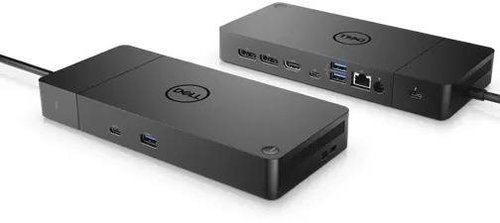
Dell Performance Dock WD19DCS Dual USB-C 240W
4.9 7 ratings
Docking Station - connection using USB-C USB 3.2 Gen 1 (3.0), power delivery 210 W
Code:  ADP3e015f Producer's Website:

Dell Performance Dock WD19DCS Dual USB-C 240W
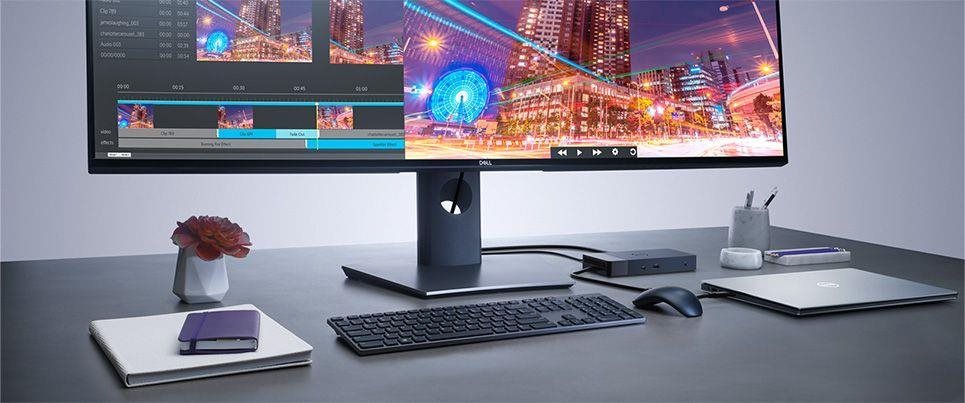
Docking Station Dell Performance Dock WD19DCS Dual USB-C 240W Lifestyle

This Dell Performance Dock WD19DCS Dual USB-C 240W will be quite reliable for your laptop. Especially when it comes to compact laptops, a docking station allows you to connect to much more accessories at once. You can be sure to use all the functions of your laptop, keep your workspace tidy and instantly connect to additional accessories. The docking station's construction is made of USB-C connector is used to establish a connection between the Dell Performance Dock WD19DCS Dual USB-C 240W docking station and your laptop. It has the connector standard of USB 3,2 Gen 1 (3,0). The docking station's construction is made of plastic. A connection cable and power adapter are also provided. You can also take advantage of multi-monitor support.
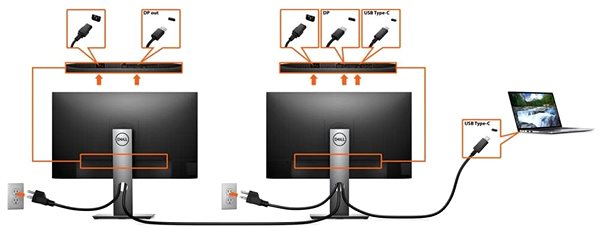
Docking Station Dell Performance Dock WD19DCS Dual USB-C 240W Connectivity (ports)

Key Parameters of the Dell Performance Dock WD19DCS Dual USB-C 240W Docking Station

  • The Dell docking station can help expand the connectivity and functionality of your laptop
  • This docking station connects to your laptop with USB-C
  • Standard ports: USB 3,2 Gen 1 (3,0)
  • Power Delivery feature with a maximum power delivery of 210 W
  • The docking station also offers the following features: support for multiple monitors
  • The package contains connecting cable and power adapter
  • This Dell docking station is made of plastic

Specifications

Laptop power port
USB-C
Standard male connector
USB 3.2 Gen 1 (3.0)
Max. Power Delivery value
210 W
USB-C 3.2 Gen 1 (3.0)
1 ×
USB-A 3.2 Gen 1 (3.0)
3 ×

Laptop power port

Laptop power port
USB-C
Standard male connector
USB 3.2 Gen 1 (3.0)
Max. Power Delivery value
210 W

Most common ports

Common data ports
USB-A, USB-C
Common graphics ports
DisplayPort, HDMI, USB-C

Data ports - Number and standards

USB-A standards
3.2 Gen 1
USB-C standards
3.2 Gen 1
USB-C 3.2 Gen 1 (3.0)
1 ×
USB-A 3.2 Gen 1 (3.0)
3 ×

Power ports for electrical devices

USB-A
3.2 Gen 1
USB-C
3.2 Gen 1

Graphics ports - Number and standards

DisplayPort standards
1.4
HDMI standards
2.0
HDMI 2.0
1 ×
DisplayPort 1.4
2 ×

Packaging

Package contents
Connecting cable, Power adapter

Compatibility

Type
Original
Compatible models
Latitude 3120 (Pentium), Latitude 3301, Latitude 3310 2-in-1, Latitude 3390 2-in-1, Latitude 3400, Latitude 3410, Latitude 3490, Latitude 3500, Latitude 3510, Latitude 3590, Latitude 5280, Latitude 5285, Latitude 5289, Latitude 5290, Latitude 5300, Latitude 5310, Latitude 5310 2-in-1, Latitude 5310 2-in-1 w/Thunderbolt, Latitude 5310 w/Thunderbolt, Latitude 5320, Latitude 5320 2-in-1, Latitude 5400, Latitude 5401, Latitude 5410, Latitude 5410 w/Thunderbolt, Latitude 5411, Latitude 5411 w/ Discrete Graphics, Latitude 5420, Latitude 5480, Latitude 5490, Latitude 5491, Latitude 5500, Latitude 5501, Latitude 5510, Latitude 5510 w/Thunderbolt, Latitude 5511, Latitude 5511 w/ Discrete Graphics, Latitude 5580, Latitude 5590, Latitude 5591, Latitude 7200 2-in-1, Latitude 7210 2-in-1, Latitude 7280, Latitude 7285, Latitude 7290, Latitude 7300, Latitude 7310, Latitude 7320, Latitude 7320 2-in-1, Latitude 7380, Latitude 7390, Latitude 7390 2-in-1, Latitude 7400, Latitude 7400 2-in-1, Latitude 7410, Latitude 7420, Latitude 7420 2-in-1, Latitude 7480, Latitude 7490, Latitude 7520, Latitude 9410, Latitude 9510, Latitude Chromebook Enterprise 5300 2-in-1, Latitude Chromebook Enterprise 5400, OptiPlex 3090 UFF, OptiPlex 7090 UFF, Precision 3520, Precision 3530, Precision 3540, Precision 3541, Precision 3550, Precision 3551, Precision 3551 w/ Discrete Graphics, Precision 3560, Precision 5520, Precision 5530, Precision 5530 2-in-1, Precision 5540, Precision 5550, Precision 5750, Precision 7520, Precision 7530, Precision 7540, Precision 7550, Precision 7720, Precision 7730, Precision 7740, Precision 7750, Rugged 5420, Rugged 5424, Rugged 7424, Vostro 5301, Vostro 5391, Vostro 5401, Vostro 5501, Vostro 5590, Vostro 7500, Vostro 7590, Vostro 7590 w/ Discrete Graphics, Wyse 5470, XPS 7390, XPS 7390 2-in-1, XPS 7590, XPS 9300, XPS 9305, XPS 9310, XPS 9360, XPS 9365, XPS 9370, XPS 9380, XPS 9500, XPS 9560, XPS 9570, XPS 9575, XPS 9700
More Specifications

Dell Products, Raheen Business Park, Limerick, Ireland, [email protected], www.dell.com


This American multinational corporation based in Round Rock (Texas, USA) is a leading player in the field of information technology. The Dell brand carries the hallmark of quality and is known throughout the world. In 2010, it ranked fifth in the poll of most admired computer companies.

Dell's operations are incredibly broad - the company can be found not only in personal computers, servers, storage devices, switches, software and peripherals, but also HDTV, cameras, printers and MP3 players. The company, whose history began in 1984, now ranks among the giants in the field.

Note:

Specifications can be changed without notice. Images are for illustrative purposes only.

Dobrý den, je dokovací stanice kompatibilní s Dell Precision 3590 p/n: KK53Y? Děkuji.

Dobrý den, je dokovací stanice vhodná pro notebook DELL Precision 7720? Děkuji JK

Dobry den, mohu k teto dockine pripojit Dell G15 5520 Gaming Notebook? Pokud ne, se kterou dockinou od Dellu je muj Notebook kompatibilni. Dekuji

Dobrý den, mohu tuto stanici použít s DELL Latitude 5540, nebo jakou byste poradil? Samozřejmě že je pro mě důležitá i cena. Raději bych se pohyboval do 7 tisíc korun.

Dobrý deň, bude stanica fungovať s týmto notebookom ? DELL Mobile Precision 7730 Intel Xeon E-2186M Nvidia Quadro P5200 w/16GB GDDR5 17.3" UltraSharp UHD IGZO 3840x2160 AG 32GB,DDR4-2666MHz Ďakujem za odpoveď

Dobrý deň. Bude táto stanica fungovať s Dell G5 15 5500? Nie je na zozname kompatibilných, pretože G5 séria nie je primárne určená na použitie s dockovacou stanicou. Ale požadované napájanie je 180W - 240W. A to táto stanica spĺňa.

Bude tato stanice kompaktibilní s Dell Latitude 5530? V seznamu kompaktibilních přístrojů jsem to nenašel. Děkuji za info.

Dobry den, zvladne tato dockovacia stanica 2 displeje pre MacBook Air M1? Konkretne 1440p + 1080px? Vdaka

Dobrý den, obsahuje balení i zdroj, případně, který by byl vhodný.

Dobrý deň. Vlastnim notbook dell precission 7720 planujem kupiť DELL Dokovacia stanica WD19DCS Performance 240W. Mam par otazok ohladom dokovacej stanice. Pripojena bude cez usb c thunderbolt dokaže upne napajať pracovnu stanicu alebo len dobijať ked bude vnotbooku bežat garaficka karta NVIDIA Quadro P4000, 8GB GDDR5.A ked budem mat pripojeny externy monitor viem zapnuť notbook iba na dokovacej stanici aby som nemusel zapinat aj dokovaciu stanicu aj notbook.A notbook by bol zatvoreny a zapinal by som ho iba na dokovacej stanici. Ďakujem za odpoved .

12
Questions and answers: Dell Performance Dock WD19DCS Dual USB-C 240W
Accessories for Dell Performance Dock WD19DCS Dual USB-C 240W
Try our cookies Alza.cz a. s., Company identification number 27082440, use cookies and other data to ensure the proper functioning of the website and, with your consent, also, among other things, to personalize advertising and the content of our websites. By clicking on the “I understand“ button, you agree to the use of cookies and the transfer of data regarding the behavior on the website for displaying targeted advertising on social networks and advertising networks on other websites.
Detailed settings
Alzak icon
P-DC1-WEB16
