


Dobrý deň, Poskladal som svoj prvý PC, ktorý aj reálne funguje. Skrinka je presne táto NEO ARGB Black. Ako dosku som použil Gigabyte B760 Gaming X DDR4. Avšak vôbec mi nefunguje RGB osvetlenie ventilátorov. Všetky sa točia,teda fungujú, sú pospajane a na doske pripojené 4 pinovym konektorom k SYS FAN konektoru na doske. Avšak z RGB Hubu skrinky ide ešte jeden kábel, taky 4 pinovy kde je jedna nožicka ,,zaslepena,, teda asi zamerne chyba a ten neviem kde pripojiť, Zrejme toto je asi problem, ze RGB ventilatorov nefunguje. NEviem, kde moze byt problem. Neviem kde sa pripaja. Na doske je jeden taky konektor, avsak aj ked to tam zapojim tak nic. V prirucke pise ze je na ARGB LED pasiky. Skusal som pozriet aj prirucku od skrinky ale neviem z toho vyjst. Kde moze byt prosim problem ? Treba to niekde spustit najprv v Biose ? Mam aj nainstalovanu aplikaciu Gigabyte centre kde sa nastavuju vsak skor farby pasikov, ale farby Fanov tam nevidim. Vedel by mi niekto poradit ? Vopred pekne ďakujem.
Zalman i3 Neo ARGB Black

Don't like the alternatives? Choose from the full product list
- Reviews 2
- Help and manuals 1
- Specifications
- Photos & Videos 6
- Alternatives 8
- Accessories and suggested products

Zalman i3 Neo ARGB Black
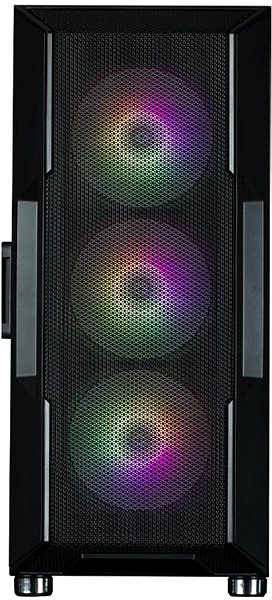
This Zalman i3 Neo ARGB Black Midi Tower PC case delivers an exciting design led by an eye-catching black colour tone. The paint covers a steel construction. The Midi Tower PC case is made for decently powerful home computers and people without enough space for a Big Tower. Although it's a smaller PC case, it can easily fit a good amount of professional or gaming parts. Discerning users will also enjoy the option to improve dissipation of heat using large cooling systems and fans that will slot in without an issue. The central desktop control panel, allowing for the connection and control of peripherals, is located on the top of the case. You will be able to insert a ATX, mATX (Micro ATX) and mITX (Mini ITX) type motherboard into the Zalman i3 Neo ARGB Black PC case. You can change the backlighting colour according to your liking.
Zalman i3 Neo ARGB Black PC Case Key Features
- Midi Tower PC case for powerful desktop PCs
- Can accommodate modern components alongside high-quality cooling
- Black steel well-designed construction fitted with a transparent side panel
- RGB backlight colours
- Location of front panel: top
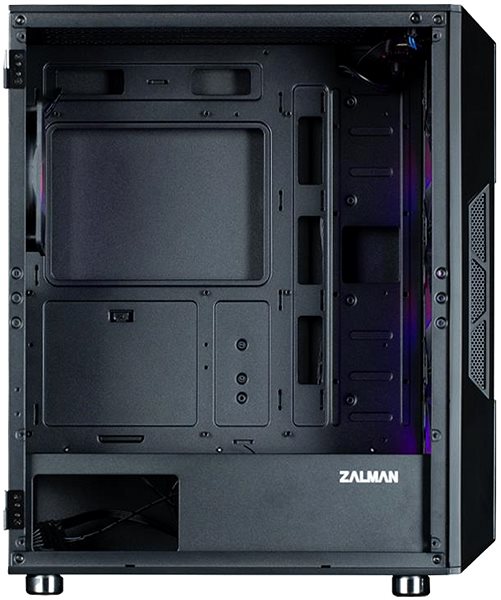
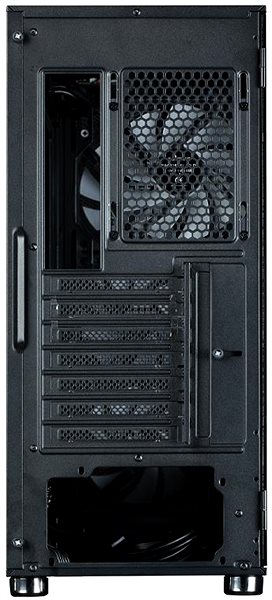
Zalman i3 Neo ARGB Black PC Case Hardware
3 x 2.5" SSD slots. All the other major components can be installed on the motherboard. There are connectors on the control panel that allow you to connect usb 2.0, USB 3.2 Gen 1, headphones and microphone. The power source of the Zalman PC case stays at the bottom, so it's not endangered by hot temperatures.
Specifications
Usage and size
Internal structure
External structure
PSU
Cooling system
Backlight
Material
Specifications can be changed without notice. Images are for illustrative purposes only.
