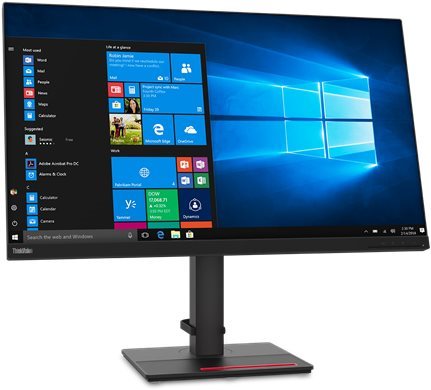
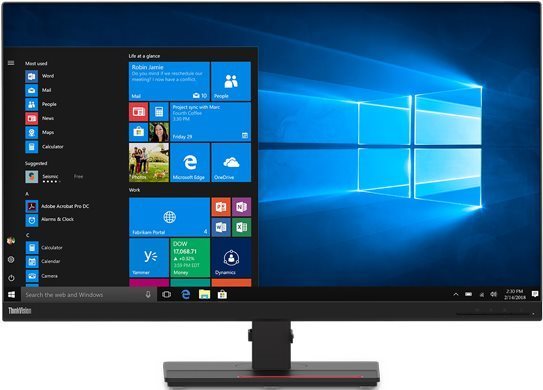
This Lenovo LCD monitor will enrich your PC setup with display with a screen size of 31.5". Its aspect ratio is 16:9. This LCD monitor works with IPS technology, boasting a great image quality and very good viewing angles. The image resolution of the computer monitor is 3840 × 2160 px. The fast response of 4 ms is great for intense games and keeps the image clear. Its refresh rate of 60 Hz is the regular standard. The Lenovo computer monitor has a brightness of 350 cd/m2. The DisplayPort 1.2, HDMI 2.0 and USB-C can be used for connecting to a PC.
32" Lenovo ThinkVision T32p-20 LCD Monitor Key Features
LCD monitor measuring 31.5"
Resolution: 3840 × 2160 px
LCD monitor built with IPS technology
Anti-reflective surface of the LCD monitor reduces sun glare
4 ms response time, refresh rate of 60 Hz
Maximum brightness of 350 cd/m2
LCD monitor compatible with: 100×100 VESA mounting
Monitor pivot (90-degree rotation)
The stand has adjustable height
Practical USB hub for connecting other electronics
Blue light filter for better sleep
32" Lenovo ThinkVision T32p-20 typical power draw is 39 W
32" Lenovo ThinkVision T32p-20 Monitor Construction and Equipment
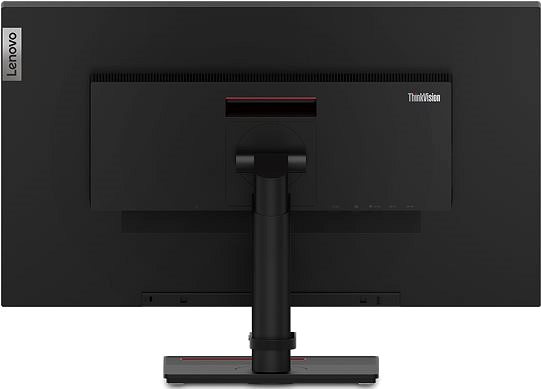
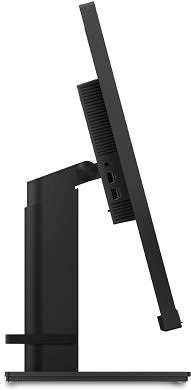
This Lenovo monitor has dimensions measuring 71.46 × 60.44 × 23.5 cm, and you can adjust the height according to your preferences. In addition to the classic stand, the monitor can be mounted onto a wall using a VESA mount. This monitor model has a weight of 6.78 kg. A nice degree of versatility is provided by its pivot function, meaning the monitor can be turned up to 90°. For greater comfort, this model works as a USB hub. The input signal interface is essential. The 32" Lenovo ThinkVision T32p-20 uses the DisplayPort 1.2, HDMI 2.0 and USB-C type. The Lenovo monitor has support for fast charging via Power Delivery.
Modern Functions of the 32" Lenovo ThinkVision T32p-20 Monitor
While working at night, you will surely appreciate the blue light filter built into this monitor that helps improve your sleep quality. Flicker-Free mode provides a very effective protection against eye fatigue by removing screen flickering.
Denotes the distance between the lower left and upper right corner of the screen. It is quoted in inches,while 1 "= 2.54 cm. How big a diagonal measurement to choose with which device and what are the benefitsand the disadvantages?
The monitor resolution type refers to the number of pixels that can be displayed on the monitor screen. Choosing the right resolution type can have a significant impact on the overall experience of using your monitor, whether it's for work, gaming or watching movies.
Monitor resolution refers to the number of pixels on the monitor screen, expressed as width × height. Higher resolutions provide a more detailed and clearer image, while lower resolutions may be suitable for smaller monitors or to save power.
Denotes the distance between the lower left and upper right corner of the screen. It is quoted in inches,while 1 "= 2.54 cm. How big a diagonal measurement to choose with which device and what are the benefitsand the disadvantages?
The monitor resolution type refers to the number of pixels that can be displayed on the monitor screen. Choosing the right resolution type can have a significant impact on the overall experience of using your monitor, whether it's for work, gaming or watching movies.
Monitor resolution refers to the number of pixels on the monitor screen, expressed as width × height. Higher resolutions provide a more detailed and clearer image, while lower resolutions may be suitable for smaller monitors or to save power.
The monitor connection type refers to the interface that is used to transmit the video signal from the source (e.g. computer) to the monitor. Different connection types support different resolutions and refresh rates and can affect the quality and performance of the display on the monitor.
The sRGB colour coverage of a monitor is a measure of how much of the range of colours defined in the sRGB (Standard Red Green Blue) standard the monitor is able to display. A higher percentage of sRGB coverage means that the monitor can display a wider and richer range of colors.
Lenovo is the world's largest computer maker, founded in 1984. Its original name was Legend. Later it was renamed to Legend Novo ("New Legend"), abbreviated Lenovo. In 2005 it took over IBM's computer division, which was among the largest computer makers in the world. It is similarly ambitious in the field of mobile phones, where it would like to surpass Apple and Samsung. As far as this goal goes, they acquired Motorola’s mobile division in January 2014 and have been ramping up production since.
The company also produces tablets, monitors, televisions, and storage solutions. Overall, they are known for delivering quality products at reasonable prices.
Note:
Specifications can be changed without notice. Images are for illustrative purposes only.

Dobrý den,
propojil jsem tento monitor s notebookem Lenovo T15p přez USB-C kabel který byl součásti monitoru ale notebook to nenabíjí, pouze přenáší obraz, nevíte proč? Je potřeba dokoupit kabel thunderbolt 4 aby došlo k nabíjení notebooku? Nebo v čem je háček?
Děkuji.
Dobrý den,
propojil jsem tento monitor s notebookem Lenovo T15p přez USB-C kabel který byl součásti monitoru ale notebook to nenabíjí, pouze přenáší obraz, nevíte proč? Je potřeba dokoupit kabel thunderbolt 4 aby došlo k nabíjení notebooku? Nebo v čem je háček?
Děkuji.
Dobrý den, zakoupil jsem monitor Lenovo ThinkVision T32p-20, ale aplikace LenovoDisplayControlCenter_1.0.34081.0 mí hlásí, že monitor není podporován. Nemám si ho tedy jak sladit, jelikož konfigurace přímo na monitoru toho moc nenabízí a přes aplikaci od grafické karty to také není ono.
Mám Windows 11 a propojení s PC jede před HDMI 2.0. Ovladače jsem zkoušel několikrát přeinstalovat, jak z webu výrobce, tak přes Microsoft store. Díky za radu..
Dobrý den, zakoupil jsem monitor Lenovo ThinkVision T32p-20, ale aplikace LenovoDisplayControlCenter_1.0.34081.0 mí hlásí, že monitor není podporován. Nemám si ho tedy jak sladit, jelikož konfigurace přímo na monitoru toho moc nenabízí a přes aplikaci od grafické karty to také není ono.
Mám Windows 11 a propojení s PC jede před HDMI 2.0. Ovladače jsem zkoušel několikrát přeinstalovat, jak z webu výrobce, tak přes Microsoft store. Díky za radu..
Dobrý den, je možné připojení MacBook Pro přes USB-C s využitím power delivery? Jaký je výkon power delivery? Je MacBook oficiálně podporovaný pro tento monitor? Děkuji
Dobrý den,
uvažuji o koupi tohoto monitoru.
Jsem fotograf, ale nepoužívám Adobe RGB, pouze sRGB.
Je velký rozdíl v kvalitě a přesnosti barev u tohoto monitoru a modelu Lenovo P32u-10?
Děkuji
Dobrý den,
uvažuji o koupi tohoto monitoru.
Jsem fotograf, ale nepoužívám Adobe RGB, pouze sRGB.
Je velký rozdíl v kvalitě a přesnosti barev u tohoto monitoru a modelu Lenovo P32u-10?
Děkuji
Dobrý den,
lze tento monitor připojit ke dvěma PC, např. jedno usb-c a druhé DP a mít v monitoru připojenou klávesnici a myš, která bude fungovat na právě aktivním vstupu?
Dobrý den,
lze tento monitor připojit ke dvěma PC, např. jedno usb-c a druhé DP a mít v monitoru připojenou klávesnici a myš, která bude fungovat na právě aktivním vstupu?
V prípade pripojenia T32 P20 s notebookom (Lenovo X1 a MacBook Pro) cez USB/C kábel, zabezpečí toto pripojenie prenos obrazu/zvuku vrátane nabíjania notebooku?
Try our cookiesAlza.cz a. s., Company identification number 27082440, use cookies and other data to ensure the proper functioning of the website and, with your consent, also, among other things, to personalize advertising and the content of our websites. By clicking on the “I understand“ button, you agree to the use of cookies and the transfer of data regarding the behavior on the website for displaying targeted advertising on social networks and advertising networks on other websites.
We use 8 categories of cookies on our website:
Technical cookies
These are strictly necessary for the functioning of the website and the features you choose to use. Without them, our website would not work; you wouldn't be able to log in to your user account, for example.
Functionality cookies
These cookies allow us to remember your basic choices and improve the user experience. These include remembering your preferred language or allowing you to stay logged in permanently.
Social media cookies
These cookies allow us to easily link you to your social media profile and, for example, allow you to share products and services with your friends and family.
Content personalisation
These cookies allow us to show you content and ads according to the information we have about you to best meet your needs. This includes what content you have viewed, or on what device you are accessing our website.
Non-personalised advertising
These cookies allow us to show you general ads for products and services.
Personalised advertising
Thanks to these cookies, we and our partners can offer you relevant products and services based on your purchases, your shopping behaviour and your preferences.
Audience metrics
These cookies allow us to optimise our site for your convenience based on how you use it. The aim is to remember or anticipate your choices. This includes, for example, the use of features, their location, or the behaviour on the page.
By giving your consent to the processing of cookies, functionality and analytical cookies will be installed on the device you use to browse the website (click on the "I understand" button for both categories, or you can select only one of the categories by clicking on the "Settings" button). We always install technical cookies on your device, even without your explicit consent, because without them our website would simply not work.
You can revoke your consent to the processing of cookies. In connection with our company's cookie processing, you also have the following rights: the right to access cookies, delete, modify, supplement and correct them, restrict processing and the right to lodge a complaint with the Office for Personal Data Protection. Read more about your rights.