


Dobrý den. Stále zápasím s KVM přepínáním a USB porty na monitoru. Mám pracovní NTB připojený přes USB-C a stolní PC připojené přes DP/USB UP. V monitoru mám klávesnici a myš. Bohužel neustále dochází k tomu, že po vypnutí jedné strany (např. stolního PC), není schopen monitor přepnout USB porty následně do USB-C či naopak. Když vypnu NTB a následně zapnu PC, obraz naběhne, ale USB nefungují. Je možné tomuto předejít nějakým nastavením USB, BIOSU atd.? Předpokládal jsem, že po přepnutí KVM zdroje se USB připojí k danému zařízení, ale bohužel z nějakého důvodu toto nefunguje jak má.
34" Philips 346B1C
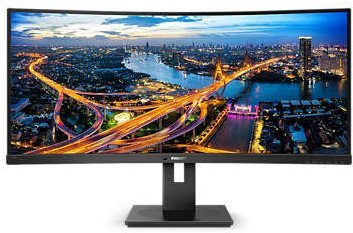

Monitor - VA, curved, Ultra Wide QHD 3440 × 1440 (21:9), 100 Hz, Anti-Glare display, 8 bit, 4 ms, adjustable height, speakers, HDMI, USB-C and DisplayPort, RJ-45 (LAN) data interface, VESA
Show full description
Code:
WC130b8a3
Product Fiche
Producer's Website:
Don't like the alternatives? Choose from the full product list
- Reviews 5
- Help and manuals 20
- Specifications
- Photos & Videos 8
- Alternatives 8
- Accessories and suggested products

34" Philips 346B1C
Discontinued
34" Philips 346B1C
This Philips monitor captivates with its futuristic design and image quality. Modern VA display technology ensures superb sharpness and true-to-life colour reproduction. The Philips 346B1C display features an exceptionally fine, ultra-wide image in a 21:9 format. Its outstanding colour depth delivers more than a billion shades, covering 119% of the sRGB colour space and 90% of Adobe RGB. This makes it the ideal monitor for architects or financial experts working with extensive spreadsheets.

34"
Screen Size
3440 × 1440 (Ultra Wide QHD)
Resolution (Resolution Type)
VA
Display Type
100Hz
Refresh Rate
4ms (GtG)
Response Time
Key Features of the 34" Philips 346B1C Monitor
- Rich colours with wide viewing angles thanks to the VA panel
- Covers 119% of the sRGB and 90% of the Adobe RGB colour space
- QHD resolution for a sufficiently fine image
- USB-C support including a built-in docking station and notebook charging up to 90W
- Less eye strain thanks to LowBlue technology
- Anti-reflective screen surface
The Philips 346B1C has a Built-in Docking Station with USB-C
A key advantage of the Philips 346B1C monitor is its built-in docking station. You can connect a keyboard, mouse and an RJ-45 Ethernet cable to the monitor. Then all you need to do is connect your notebook to the monitor with a single USB-C cable, and you're all set—it will even charge your notebook. Do you need a large workspace for your job? Then use the Philips 346B1C instead of two monitors. A wide-screen display with a Quad HD resolution of 3,440 × 1,440 pixels will definitely increase your productivity.

Saves up to 70% on energy costs
Thanks to its built-in sensor, the Philips 346B1C monitor knows whether someone is sitting in front of it or not. If the user moves away from the desk, the Philips monitor automatically reduces its brightness. The Philips 346B1C monitor features an integrated KVM switch. This makes it easy to control two different computers with a single keyboard and mouse. The Philips 346B1C is also ready for playing the latest games. Get smooth, artefact-free images at any frame rate.

Monitor Technical Specifications
- Screen Size: 34"
- Display Type: VA
- Backlight: LED
- Aspect Ratio: 21:9
- Maximum Brightness: 300cd/m²
- Contrast Ratio: 3,000:1
- Viewing Angles: 178°
- Response Time: 4ms (GtG)
- Refresh Rate: 100Hz
Package Contents
- 1× Stand
- 1× HDMI cable
- 1× DisplayPort cable
- 1× USB-C cable

Colour Gamut
Determines how accurately the monitor can display colours. sRGB is ideal for web, movies or games. DCI-P3/Adobe RGB is appreciated by graphic designers or professionals. The higher the stated value, the better the monitor displays colours. Maximum Brightness
Given in nits or cd/m², this value determines the monitor's brightness level. Brightness above 400 nits is key for HDR content and readability in sunlight, while standard office monitors are sufficient with values above 250. Refresh Rate and Response Time
The refresh rate (Hz) determines the number of frames displayed per second, so the higher the value, the smoother the picture and the less eye strain. A lower response time value (ms) eliminates motion blur. 144Hz+ is ideal for gaming, while values around 75Hz are suitable for office monitors.Specifications
34" (86.36 cm)
3440 × 1440
Construction
Panel technology
Display diagonal and resolution
Construction
Construction
Panel and screen technology
Panel technology
Panel type
Refresh rate
Response time
Maximum brightness
Native contrast
Surface display
Aspect Ratio
Aspect Ratio Type
Aspect Ratio
Backlight and colour
Backlight
Colour depth
Connection
DisplayPort, HDMI, USB-C
Graphical user interface (GUI) standards
Data interface
Audio interface
HDMI
DisplayPort
USB-C
USB
Features and functions
Colour
Black
Dimensions and weight
Width
Height
Depth
Weight
VESA mounting
Packaging
Cables included
Energy specifications
Energy efficiency class in SDR mode
Energy consumption in SDR mode
More Specifications

Philips Consumer Lifestyle B.V., Tussendiepen 4 9206 AD Drachten Netherlands, www.philips.com/support
Pernerova 702/39, 186 00 Prague 8, [email protected]
Note:
Specifications can be changed without notice. Images are for illustrative purposes only.
