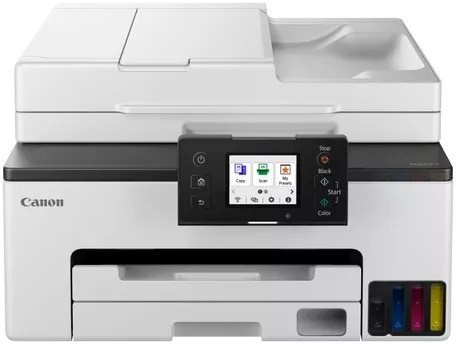
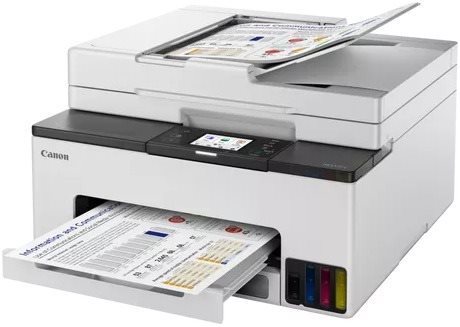
The Canon inkjet printer is a reliable tool for work offices. This is a multifunctional model that can also copy, print and scan, so it'll help you with all your document needs. This model is able to print in colour. When printing in colour, the Canon MAXIFY GX2040 Inkjet Printer can print at 10 images/minute pages per minutes. This inkjet printer has a maximum print resolution of 600 x 1200 DPI, which is fine for text, but it won't be able to print high-quality detailed images. It can print on both sides, which makes work much easier. You can connect to your computer or other devices through the USB, LAN and Wi-Fi interface. You don't have to deal with any annoying cables, since you can print wirelessly. For Apple users, it's compatible with the AirPrint feature, allowing you to easily print from any of your Apple devices. The Canon Inkjet Printer has a touch display, which makes it very easy to use. It's quite cost-efficient thanks to the tank system, which allows you to refill the cartridges.
Canon MAXIFY GX2040 Key Features Inkjet Printer
Canon Inkjet Printer features duplex printing
Wirelessly connect to devices via Wi-Fi to print documents
Features an easy-to-use touchscreen display
Canon MAXIFY GX2040 paper format: A4, A5 and A6 paper
Input tray holds up to 250 papers
Canon inkjet printer can also scan and copy
Compatible with Apple devices thanks to AirPrint feature
Tank system allows you to refill ink and save money
Coloured inkjet printer perfect for the office
Includes: Documentation, 4 bottles of ink and Power cable
Canon MAXIFY GX2040 Scanning and Copy Features
This Canon MAXIFY GX2040 inkjet printer is a multifunctional model, and it can print, copy and scan and take care of everything you'll need to do with documents. This Canon MAXIFY GX2040 inkjet printer can work with A4, A5 and A6 formats. Blank sheets are stored in the input tray that can fit up to 250 pieces of paper. This Canon inkjet printer has a recommended maximum monthly duty cycle of 27000 pages/month.
Printing technology determines how data is transferred to paper, affecting quality, speed and cost, and varies by type of application - from home to professional.
The resolution of a flatbed scanner is a parameter that determines the quality of the scan, measured in DPI (dots per inch) and the higher the resolution, the more detailed the scan.
The print resolution determines how detailed and sharp the output from the printer will be, measured in DPI, the higher the value the better the print quality, ideal for high quality photos and documents.
Black & White Print Speed - ESAT is a measurement of the printing speed of black and white documents based on the ESAT test, which includes the printer's actual performance during normal operation.
Color Print Speed - ESAT is a measurement of the speed of printing color documents using the ESAT test, which shows the actual speed under real-world conditions.
The time between the computer receiving the print job command to the printing of the first page of the document, during which the initial preparation of the printer takes place (control, warming up, etc.).
The number of printer colours determines the amount of ink used, with more than four colours ensuring higher print quality, especially for professional graphics and photos.
Zobrazovacia jednotka tlačiarne slúžiaca na informovanie o stave či nastavení tlačiarne. V prípade dotykového displeja slúži aj na priame nastavenie a ovládanie tlačiarne.
Touch
Colour
Colour
Grey
Package includes
Package Includes
4 bottles of ink, Documentation, Power cable
Services
Services
Ne
More Specifications
Canon was founded in 1933. Its original title translated to "portable laboratory optics". The Japanese company has been headquartered in Tokyo since its inception. Canon is particularly associated with the production of digital cameras and accessories, where they remain the leading innovator and producer of imaging solutions. Aside from digital cameras, the company also operates in the production of office equipment, particularly copiers or printers.
Note:
If there is no "package contains" box in the product parameters and the data or USB cable is not specifically mentioned in there, the package does not contain it and must be purchased separately.
Specifications can be changed without notice. Images are for illustrative purposes only.

Dobrý den,
mám od Vás od Vánoc tiskárnu Canon gx2040, bohužel tiskárna vůbec nefunguje. Sice kopíruje, ale já ji potřebuji na tisk dokumentů z mobilního telefonu iPhone nebo PC windows.
Tiskárna je připojena na Wifi bezdrátově. Na tiskárně svítí logo WiFi, že je úspěšně připojena, ale tisknout nelze. Na telefonu se přes AirPrint tiskárna tváří že je offline, stejný je stav tiskárny přes aplikaci Canon Print. Tiskárna je zapnutá a připojená ke stejné k síti jako dané zařízení. Stav je stejný i pokud připojím zařízení k jiné síti ale tiskárna zůstane na stejné digi síti.
Zkoušel jsem několikrát tiskárnu odpojit a znovu připojit na wifi, stejně tak resetovat její nastavení, bez úspěchu. Po novém připojení tiskárna je schopna tisknout, ale jakmile se vypne tak už nefunguje.
Je potřeba tedy nějaké speciální další nastavení tiskárny aby fungovala? Nebo máme prostě vadný kus? Tiskárnu jsme kupovali hlavně kvůli bezdrátovému tisku, AirPrint a automatickému zapnutí ale ani jedna z těchto funkcí nefunguje.
Děkuji za odpověď,
Dobrý den,
mám od Vás od Vánoc tiskárnu Canon gx2040, bohužel tiskárna vůbec nefunguje. Sice kopíruje, ale já ji potřebuji na tisk dokumentů z mobilního telefonu iPhone nebo PC windows.
Tiskárna je připojena na Wifi bezdrátově. Na tiskárně svítí logo WiFi, že je úspěšně připojena, ale tisknout nelze. Na telefonu se přes AirPrint tiskárna tváří že je offline, stejný je stav tiskárny přes aplikaci Canon Print. Tiskárna je zapnutá a připojená ke stejné k síti jako dané zařízení. Stav je stejný i pokud připojím zařízení k jiné síti ale tiskárna zůstane na stejné digi síti.
Zkoušel jsem několikrát tiskárnu odpojit a znovu připojit na wifi, stejně tak resetovat její nastavení, bez úspěchu. Po novém připojení tiskárna je schopna tisknout, ale jakmile se vypne tak už nefunguje.
Je potřeba tedy nějaké speciální další nastavení tiskárny aby fungovala? Nebo máme prostě vadný kus? Tiskárnu jsme kupovali hlavně kvůli bezdrátovému tisku, AirPrint a automatickému zapnutí ale ani jedna z těchto funkcí nefunguje.
Děkuji za odpověď,
Magyarországra történő kiszállításért tekintse meg ezt a termékoldalt: Canon MAXIFY GX2040
Try our cookiesAlza.cz a. s., Company identification number 27082440, use cookies and other data to ensure the proper functioning of the website and, with your consent, also, among other things, to personalize advertising and the content of our websites. By clicking on the “I understand“ button, you agree to the use of cookies and the transfer of data regarding the behavior on the website for displaying targeted advertising on social networks and advertising networks on other websites.
We use 8 categories of cookies on our website:
Technical cookies
These are strictly necessary for the functioning of the website and the features you choose to use. Without them, our website would not work; you wouldn't be able to log in to your user account, for example.
Functionality cookies
These cookies allow us to remember your basic choices and improve the user experience. These include remembering your preferred language or allowing you to stay logged in permanently.
Social media cookies
These cookies allow us to easily link you to your social media profile and, for example, allow you to share products and services with your friends and family.
Content personalisation
These cookies allow us to show you content and ads according to the information we have about you to best meet your needs. This includes what content you have viewed, or on what device you are accessing our website.
Non-personalised advertising
These cookies allow us to show you general ads for products and services.
Personalised advertising
Thanks to these cookies, we and our partners can offer you relevant products and services based on your purchases, your shopping behaviour and your preferences.
Audience metrics
These cookies allow us to optimise our site for your convenience based on how you use it. The aim is to remember or anticipate your choices. This includes, for example, the use of features, their location, or the behaviour on the page.
By giving your consent to the processing of cookies, functionality and analytical cookies will be installed on the device you use to browse the website (click on the "I understand" button for both categories, or you can select only one of the categories by clicking on the "Settings" button). We always install technical cookies on your device, even without your explicit consent, because without them our website would simply not work.
You can revoke your consent to the processing of cookies. In connection with our company's cookie processing, you also have the following rights: the right to access cookies, delete, modify, supplement and correct them, restrict processing and the right to lodge a complaint with the Office for Personal Data Protection. Read more about your rights.