


Dobry den. Je u zakoupeni Canon MAXIFY MB2150 v baleni cartrige barvy?
Canon maxify MB2150
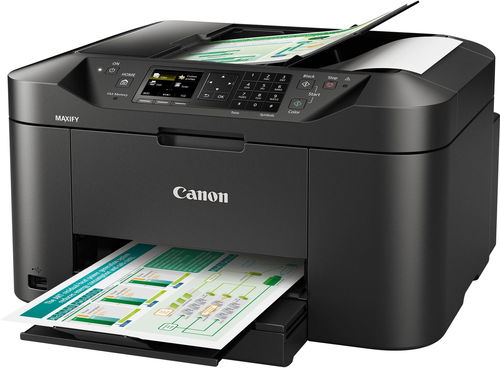
Inkjet Printer - multifunctional, colour, A4, copier and scanner, fax, black-and-white print speed of 19 images/minute, colour print speed of 13 images/minute, print resolution: 600 x 1200 DPI, duplex, ADF scanner, touchscreen, AirPrint, USB and Wi-Fi
Show full description
139.90 €
Price Guarantee
 Installment calculator
4,9%
interest
from 3.22 € monthly
Installment calculator
4,9%
interest
from 3.22 € monthly
Shop faster with pickup at AlzaBox or in-store.
Warranty 24 months
Code:
PC038j
Producer's Website:

Canon maxify MB2150
139.90 €
In stock > 5 pcs
Buy
Canon maxify MB2150
The MAXIFY series extends the portfolio of Canon with an added inkjet multifunction, with the purpose to meet the demand for high-volume colour printing for home offices and small businesses. In order for the printer to successfully fulfil its purpose in such an environment, it features a whole collection of desirable attributes. Some new features which are definitely worth mentioning include the newly developed inks with an increased capacity, simple touchscreen controls, the automatic document feed, a 250 sheet tray, double-sided printing and copying, and network connectivity including Cloud support. The number of pages per month has also been doubled. All this lies waiting in the sleek black construction that everyone will grow to love. And because nothing should be overdone, you can restrict the number of colour copies, and the printer will retain usage statistics.
Key features
- The first monochrome print comes out in 6 seconds
- Wireless and wired connectivity (Wi-Fi and Ethernet)
- Canon PRINT application, Mopria support (Android operating system), Apple AirPrint and Google Cloud Print support
- Pigment inks with DRHD technology, four separate ink cartridges
- Automatic double-sided printing
- Highly sensitive colour touchscreen with a 3" diagonal size
From your home network and from cloud storage
This printer's excellent network connectivity makes it a great device for flexible work, and can be shared by a team or even by a small business. Canon MAXIFY Cloud Link enables you to scan to and print from cloud storage, such as Evernote, Dropbox, OneDrive a Google Drive, directly from the printer's screen. The MAXIFY Printing Solutions application additionally offers a similar functionality to smartphones and tablets. These printers are also compatible with other mobile printing solutions, such as Apple AirPrint and Google Cloud Print.
New, improved ink
High-quality printing will now be available at very attractive prices thanks to the use of new inks with Dual Resistant High Density (DRHD) technology. The DRHD inks are a successor of FINE technology and are specially developed for the MAXIFY printer series. They are ideal for printing company documents, because the prints are exceptionally durable, resistant to water damage, smudges and permanent markers. Now you can create documents with exceptionally black text and delightfully vibrant colours. If you want to print an entire booklet or set of documents, it is certainly worth reaching for the high-capacity ink cartridges, which are even bigger than in the previous series. The black ink cartridge lasts for up to 2500 pages and for the colour cartridges you'll be looking at an average of about 1500 pages.
Additional information:
Supported network applications:
MAXIFY Printing Solutions application
Maxify Cloud Link (from the printer display or smart management)
The Canon Print Service plug-in module (Android)
Apple AirPrint
Google Cloud Print
Printing from email
Print margins (minimum):
Upper: 3mm, bottom: 5mm, left and right: 3.4mm
Automatic Document Feeder:
Up to 50 sheets
Printer Specifications:
Print speed (approximately): 24.0ppm in A4 monochrome, 15.5ppm in A4 colour
Time to output of the first page (approximately): Monochrome: 6s (ready) / 10s (from sleep mode), Colour: 7s (ready) / 12s (from sleep mode)
Print Technology: Inkjet technology, FINE print head
Maximum print resolution of 600 x 1200dpi
Print margins (minimum): Top: 3mm, bottom: 5mm, left and right: 3.4mm
Duplex printing: Automatic (A4 plain paper, Letter)
Scanner specifications:
Scanner Type: Flatbed, automatic document feeder
Scanner Technology: Colour scanner CIS
Scanner Resolution (Optical): Up to 1200 x 1200dpi
Maximum document size: scanner glass: A4, Letter (216 x 297mm)
Automatic Document Feeder: A4, Letter, Legal
Scanning depth (Input / Output): 48-bit / 24-bit colour, 16-bit / 8-bit grayscale
Scan functions: Scan to e-mail, scan to network folder, scan-to-cloud, scanning to a USB device
Copier Specifications:
Copy speed (approximately): Colour from ADF: 10ppm, Monochrome, from ADF: 18ppm
Multiple copies: Up to 99 pages
Reduce / Enlarge: 25 to 400%, fit to page
Copy quality settings: Standard, High
Copy Functions: Erase frame, Collate, 2 to 1, 4 to 1
Fax specifications:
Fax Type: Super G3 / Colour
Fax resolution: Monochrome mode: up to 300x300dpi, Colour Mode: 200x200 dpi
Fax speed: Monochrome mode: approx. 3s (33.6kbit/s), Colour Mode: approx. 1min (33.6kbit/s)
Fax memory: Up to 250 pages
Coded Speed Dial: Max. 100 numbers
Group Dial: Max. 99 numbers
Paper types:
Normal paper
Envelopes (DL, COM10)
Canon High Resolution Paper (HR-101N)
Canon Matte photo paper (MP-101)
Canon Pro Luster photo paper (LU-101)
Canon Plus Semi-gloss (SG-201)
Canon Plus Glossy II (PP-201)
Canon Glossy Everyday Use (GP-501)
Maximum paper input:
Paper tray: 250 sheets of plain paper
Paper sizes:
Plain paper: A4, A5, B5, Letter, Legal
Photo paper: A4, Letter, 20×25cm, 13x18cm, 10x15cm
Custom sizes: Width from 89 up to 215.9mm, height from 127 to 355.6mm
Paper weight:
Plain paper: 64 to 105g/m2
Canon photo paper: up to 275g/m2
Ink type:
DRHD (Dual Resistant High Density)
4 ink cartridges (black, cyan, magenta, yellow)
XL Inks:
Canon PGI-1500XL BK (1200 pages)
Canon PGI-1500XL C (1020 pages)
Canon PGI-1500XL M (780 pages)
Canon PGI-1500XL Y (935 pages)
Average yield of colour (CMY) ink cartridges: 900 pages
Cable connections:
USB 2.0 Hi-Speed
Port for USB flash memory device (type "A")
Wireless connections:
Wi-Fi IEEE802.11 b/g/n1
Wireless LAN network bandwidth frequency: 2,4GHz
Access Point mode
Application Support:
Canon PRINT Inkjet/SELPHY application
MAXIFY Cloud Link (from the printer display or smart management)
Canon Print Service plug-in (Android)
Mopria
Microsoft Mobile Print
Apple AirPrint
Google Cloud Print
Supported operating system
Windows 10 / 8.1 / 8 / 7 / 7 SP1 / Vista SP2
Windows Server 2008 / 2008 R2 / 2012 / 2012 R2
Mac OS X 10.8.5 and newer versions
Supported mobile operating systems:
iOS, Android, Windows RT, Windows Mobile 10
Minimum system requirements:
Windows: Internet Explorer 8, Internet connection or CD-ROM
Mac: Safari 5 and Internet connection
Display quality: 1024×768 or higher
Supplied software:
Printer driver and fax driver
Quick Utility Toolbox
IJ Network Device Setup Utility
Easy-WebPrint EX
Specifications
Print colour
Usage
Features
Connection
Type
Function
Connection
Connection
Supported Paper Sizes
Standard Paper Sizes
Photo paper formats
B5, Legal, Letter
Scanning
Scanner features
1200 x 1200 DPI
Printing parameters
600 x 1200 DPI
19 images/minute
13 images/minute
Input trays
20,000 pages/month
Available alternative refill
Dimensions
Height
Depth
Width
Weight
Equipment
Touch
Colour
Colour
Package includes
Package Includes
More Specifications

Canon was founded in 1933. Its original title translated to "portable laboratory optics". The Japanese company has been headquartered in Tokyo since its inception. Canon is particularly associated with the production of digital cameras and accessories, where they remain the leading innovator and producer of imaging solutions. Aside from digital cameras, the company also operates in the production of office equipment, particularly copiers or printers.
Note:
If there is no "package contains" box in the product parameters and the data or USB cable is not specifically mentioned in there, the package does not contain it and must be purchased separately.
Specifications can be changed without notice. Images are for illustrative purposes only.
