




Dobrý den, po připojení klávesnice k pc vše funguje až na touchpad, sice reaguje ale dost nepřesně, když chvíli ovládám pc právě přes touchpad na této klávesnici tak to začne úplně nesmyslně klikat, tam kam sem ani nechtěl, jezdí tam kam nechci, jakoby sám od sebe. Nevíte čím by to mohlo být?
Gogen WKB 460 CZ B
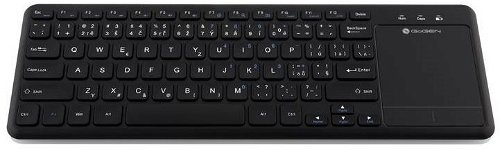
TV Remote Control - for PC/TV remote control, membrane, wireless, low profile keys, czech keyboard layout, USB and Wireless USB receiver, with AAA batteries, black colour
Czech keyboard
Show full description
Code:
WG9670d
Producer's Website:
Don't like the alternatives? Choose from the full product list
- Reviews 10
- Help and manuals 26
- Specifications
- Photos & Videos 4
- Alternatives 8
- Accessories and suggested products

Gogen WKB 460 CZ B
Discontinued
Gogen WKB 460 CZ B
Control your TV easily from your sofa using the GoGEN WKB 460 CZB wireless keyboard that offers easy application control and smart features. You can watch videos, browse the internet, chat with friends or read emails, all this from the comfort of your couch. The GoGEN WKB 460 also supports HbbTV hybrid TV control. Due to its maximum range of up to 8 metres, you can also use the GoGEN WKB 460 Wireless Keyboard in very large rooms. Of course, you can also use it with your notebook or PC, but the GoGEN WKB was designed primarily for maximum comfort when it comes to smart TVs.
Key Features of the GoGEN WKB 460 CZB Wireless Keyboard
- Integrated 4" touchpad
- A small, thin and lightweight keyboard is a great choice for controlling the smart TV
- Minimum power consumption
- The wireless keyboard GoGEN WKB 460 has a range of up to 8 metres
- Compatible with a wide range of smart TV brands, but it is ideal for GoGEN
An Integrated Touchpad
The GoGEN WKB 460 CZB Wireless Keyboard also has an integrated four-inch touchpad for easier control of your TV. Due to the touchpad, you will not need a mouse anymore. The touchpad is has left and right buttons, so it offers everything you need. Control is really easy and intuitive.
A Small and Light Miracle
The modern GoGEN WKB 460 CZB keyboard is small, lightweight and easy to use. It was designed for as easy as possible control of smart TVs, computers or laptops. Due to wireless technology, you will no longer be bothered by cables and thus you can keep the keyboard always at hand. Simply plug in a "Plug-and-Play" mini USB receiver into the device, turn on the keyboard, and you can start fully using it.
Specifications
Battery type
Number of batteries
Keyboard interface
For TV
Connection
Keyboard interface
Keyboard interface
Keyboard type
For TV
Layout
Switch properties
Switch type
Keyboard features
Keyboard features
Colour
Colour
Dimensions
Width
Height
Depth
Weight
Weight
Mouse interface
Mouse interface
Mouse use
Design
In the package
In the package
Usage
Designed for TV brand
Battery
Battery type
Number of batteries
Features
Functions
Suitable for device type
More Specifications

ETA a. s., nám. Práce 2523, 760 01 Zlín, [email protected]
Note:
Unless otherwise indicated, keyboards are equipped with CZ keys.
Unless otherwise indicated, keyboards are equipped with CZ keys.
Specifications can be changed without notice. Images are for illustrative purposes only.
