


Dobrý deň, kúpil som si tento set s tým že rozloženie klávesnice bude rovnaké ako na obrázku a max. budú nové popisky na potrebných klávesách. Bohužiaľ som dnes zistil že pravý Ctrl je nahradený klávesou &* v SK layout a \| v EN layout pričom tieto znaky existujú už pod inými klávesami. \| v EN layout má dokonca presne rovnaké popisky v klávese nad Enter. - Viete mi prosím povedať či je táto zmena normálna u každej lokalizovanej klávesnice zo sady HP PWD 800 keďže v zobrazenej fotke na EN layout je tam Ctrl? - Taktiež by som sa chcel opýtať či klávesnica v tejto sade je vlastne HP Pavilion Wireless Keyboard 600? Vopred Ďakujem za info
HP Pavilion Wireless Deskset 800 SK

Keyboard and Mouse Set - wireless, slovak office keyboard, low profile keys + optical mouse, 1600DPI, 3 buttons
Slovak keyboard
Show full description
Code:
HPBP0801g2n
Producer's Website:
Don't like the alternatives? Choose from the full product list
- Help and manuals 3
- Specifications
- Photos & Videos 2
- Alternatives 8
- Accessories and suggested products

HP Pavilion Wireless Deskset 800 SK
Discontinued
HP Pavilion Wireless Deskset 800 SK
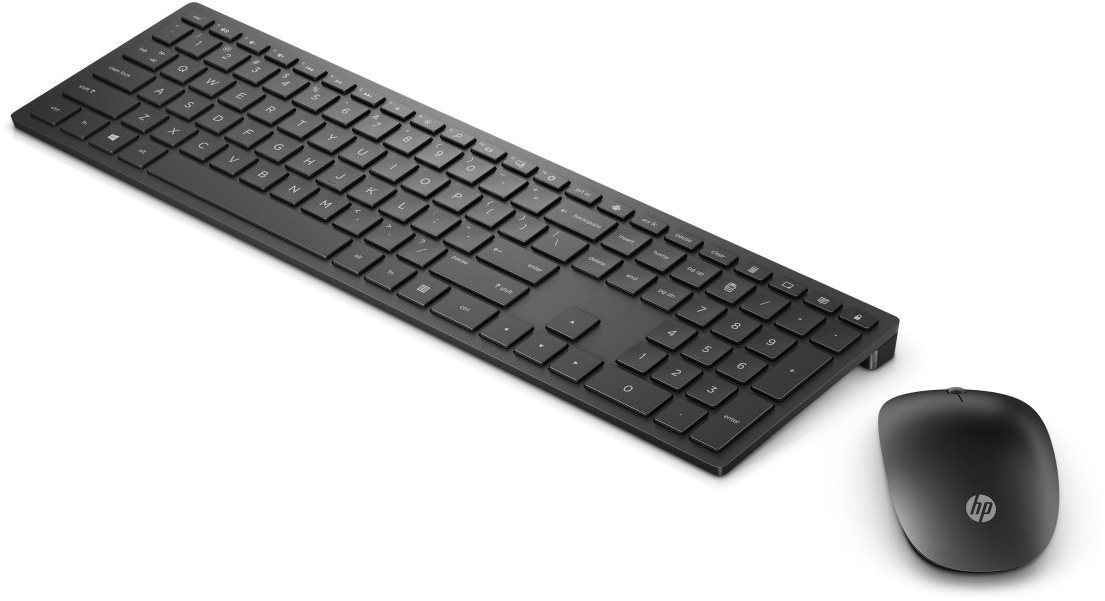
A keyboard and mouse are some of the most important accessories for a successful computer experience. This setup from HP Pavilion Wireless Deskset 800 SK gives you both of these important components. You can easily connect them to your PC or other electronics using the wireless USB receiver. This is an optical mouse. It uses an LED to detect movement. This type of technology is offered at a lower price. The keyboard is perfectly suited for offices. The weight of the set from HP is exactly 710 g. The keyboard is equipped with low-profile keys, which are arranged in a layout of slovak.
HP Pavilion Wireless Deskset 800 SK Mouse and Keyboard Set Key Features
- Package includes keyboard and mouse from HP
- Keyboard is suitable for office PCs
- Slovak localisation
- Uses batteries
- Suitable for left and right-handed people thanks to its special shape
- Components are connected to your PC with wireless technology
- Dimensions equal 41 × 11,4 × 1,87 cm
- Weighing 710 g
Properties of the HP Pavilion Wireless Deskset 800 SK PC Mouse
This mouse is equipped with optical technology. Its sensitivity is 1600 DPI. The method of connection is wireless. It has 3 buttons. For this mouse from HP, the designers decided on a classic wheel.
Specifications
Battery type
Keyboard interface
Office
Slovak
Connection
Battery type
Keyboard interface
Keyboard interface
Keyboard type
Office
Layout
Switch properties
Switch type
Colour
Colour
Dimensions
Width
Height
Depth
Weight
Weight
Mouse interface
Mouse interface
Mouse use
Office
Usage
Sensor
1,600 DPI
Mouse buttons
Wheel
Other mouse features
Backlighting
In the package
In the package
More Specifications

HP Inc Czech Republic s.r.o Za Brumlovkou 5/1559 140 00 Praha 4 VAT ID: CZ 03208427 Radek Mattas, [email protected]"
GO Europe GmbH, Zum Kraftwerk 1, Hattingen 45527, Germany, +49232468010, [email protected]
Hewlett-Packard was founded in the difficult times of the Great Depression. The founders were a pair of friends whose name the company still proudly bears. They started their business in an unobtrusive garage near the city of Palo Alto. It is now a national monument. HP’s success lay not in copying existing products, but in the ability and courage to come up with something new.
The first commercial triumph was an oscillator that surpassed all competition in quality, yet sold at a quarter of the price. In 1968, HP released their first desktop computer - a desktop calculator. The company currently manufactures products primarily related to computer technology - computers and laptops, printers, scanners, digital cameras, servers, and last but not least, calculators.
Note:
Unless otherwise indicated, keyboards are equipped with CZ keys.
Unless otherwise indicated, keyboards are equipped with CZ keys.
Specifications can be changed without notice. Images are for illustrative purposes only.
