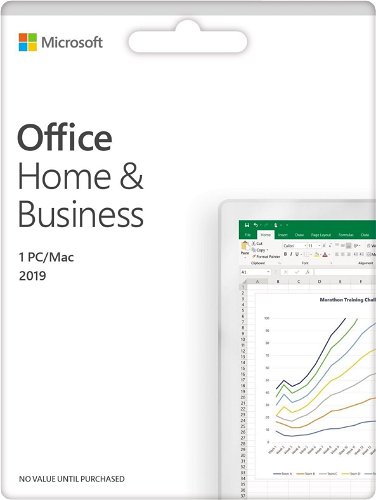
Microsoft Office 2019 Home and Business (Electronic Licence)
52 ratings
Office Software - MS Office 2019 intended for 1 device(s), with these applications: Word, Excel, PowerPoint and Outlook, subscription lasts forever, permanent license, install through download (electronically), appropriate for households and for businesses, intended for PC, compatible with Windows and macOS operating system(s), restricted geographically to only in the EU, license key can be found in: "My Library" - "License"
The product requires an up-to-date operating system.
What' s in Microsoft Office 2019 for Home and Business?
Off
Off
Off
Off
Off
Off
Key features of the Microsoft Office 2019 Home and Business License
One-time purchase for 1 device
Requires Windows 10 or Mac OS in the current version
Includes classic desktop versions of Word, Excel, PowerPoint and Outlook from Office 2019, plus OneNote for Windows 10
Installation is possible on 1 personal PC with Windows 10 or on 1 Mac computer
Includes 60 days of free support from Microsoft
Licensed for home and commercial use
Off
Excel in Office 2019
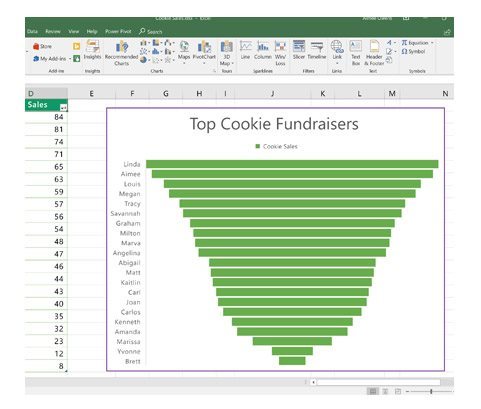
Excel in Office 2019 enriches your presentations with better scaling, new chart types, and other features designed to help you use your data to report and identify trends and opportunities. In addition, you can use a timeline visual graph to display a sequence of events in chronological order along a linear timeline.
Off
Off
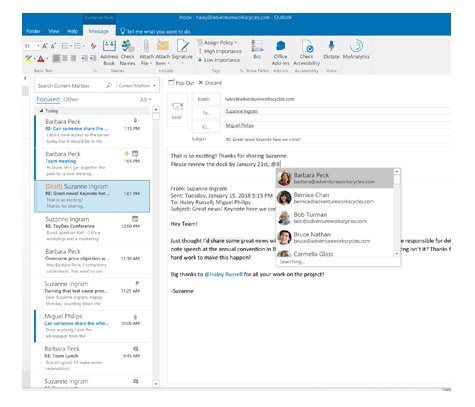
Outlook in Office 2019
Outlook 2019 offers attractive new smart features. You will achieve better results with them. For example, you can highlight your most important contacts by adding an @ to their name in emails or calendar entries, easily verify travel reservations and package deliveries, and prioritize your most important messages using the priority inbox feature.
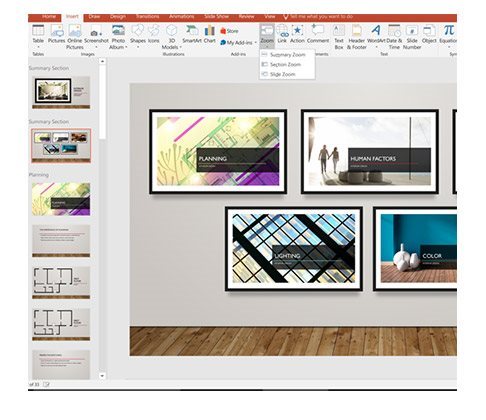
Magnifier in PowerPoint 2019
With the magnifying glass function, you can take your interpretation to a whole new level by introducing a linear interpretation using interactive images. The magnifying glass function provides more flexibility and allows you to continue the explanation without leaving the presentation mode. This will keep the listeners more focused and the effect of zooming in and out.
Off
How to install:
Visit https://setup.office.com/ and follow the instructions
Note:
Dobrý den,
Ve výčtu aplikací jsem nenašel One Note. Obsahuje prosím licence pro firmy i tento produkt?
Dobrý den,
Ve výčtu aplikací jsem nenašel One Note. Obsahuje prosím licence pro firmy i tento produkt?
Try our cookiesAlza.cz a. s., Company identification number 27082440, use cookies and other data to ensure the proper functioning of the website and, with your consent, also, among other things, to personalize advertising and the content of our websites. By clicking on the “I understand“ button, you agree to the use of cookies and the transfer of data regarding the behavior on the website for displaying targeted advertising on social networks and advertising networks on other websites.
We use 8 categories of cookies on our website:
Technical cookies
These are strictly necessary for the functioning of the website and the features you choose to use. Without them, our website would not work; you wouldn't be able to log in to your user account, for example.
Functionality cookies
These cookies allow us to remember your basic choices and improve the user experience. These include remembering your preferred language or allowing you to stay logged in permanently.
Social media cookies
These cookies allow us to easily link you to your social media profile and, for example, allow you to share products and services with your friends and family.
Content personalisation
These cookies allow us to show you content and ads according to the information we have about you to best meet your needs. This includes what content you have viewed, or on what device you are accessing our website.
Non-personalised advertising
These cookies allow us to show you general ads for products and services.
Personalised advertising
Thanks to these cookies, we and our partners can offer you relevant products and services based on your purchases, your shopping behaviour and your preferences.
Audience metrics
These cookies allow us to optimise our site for your convenience based on how you use it. The aim is to remember or anticipate your choices. This includes, for example, the use of features, their location, or the behaviour on the page.
By giving your consent to the processing of cookies, functionality and analytical cookies will be installed on the device you use to browse the website (click on the "I understand" button for both categories, or you can select only one of the categories by clicking on the "Settings" button). We always install technical cookies on your device, even without your explicit consent, because without them our website would simply not work.
You can revoke your consent to the processing of cookies. In connection with our company's cookie processing, you also have the following rights: the right to access cookies, delete, modify, supplement and correct them, restrict processing and the right to lodge a complaint with the Office for Personal Data Protection. Read more about your rights.