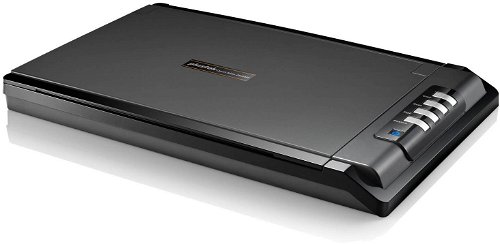
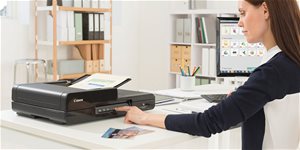
Scanner - A4, table and Flat scanner, resolution: 1200 x 1200 DPI, scanning speed up to: 20 pages/min., scans photographs, books and text, weight: 1,8kg, USB connection
The Plustek OpticSlim 2680H takes just 3 seconds to complete a 300 dpi, high-quality, colour image. It is the fastest flatbed scanner with an ADF scanner capability (SmartOffice PS4080U/PS456U/SC8016U), providing you with a two-mode scanning interface and back-up support. The LED backlight provides a stable light source that remains consistent throughout the scanner's entire service life. This gives you higher quality images without the need to warm up the system.
4 Buttons with Practical Features
Copy: scans images directly to the printer.
Scan: you can customise this button to fit your needs.
PDF: converts a scanned image of a text document into either a searchable or read-only PDF file.
Adjustable: arrange key set features (copy, OCR, PDF, email, scan, file) to make scanning easier.
Unique Lid Design for Universal Flatbed Scanning
The lid bends at 90° to make it easier to scan thicker books, magazines, and other thicker items. The lid is also completely removable to provide room for scanning hard-disks and larger-sized books without any limitations. An advantage of the scanner is its ability to create searchable PDF files that are universally usable.
Hardware Requirements: Supported OS: Windows XP/Vista/7/8 CPU: Pentium or faster CD/DVD drive 1 x USB 2.0 512MB of RAM (1GB or more recommended) 800MB of HDD space (1GB or more recommended)
The number of pixels that the scanner can record from a given area. The most common measurement is DPI (Dots Per Inch), which is an indication of how many image points (pixels) can fit within the length of one inch.
Color depth refers to the number of bits of information that the scanner acquires for each pi×el. The higher the color depth, the greater the amount of detail and color shades that the scanner can capture and reproduce. This results in better quality and colour accuracy of scanned images.
The number of pixels that the scanner can record from a given area. The most common measurement is DPI (Dots Per Inch), which is an indication of how many image points (pixels) can fit within the length of one inch.
Color depth refers to the number of bits of information that the scanner acquires for each pi×el. The higher the color depth, the greater the amount of detail and color shades that the scanner can capture and reproduce. This results in better quality and colour accuracy of scanned images.
Number of A4 pages that can be scanned in one minute.
20 PPM
Connection
Connection
USB
Max. document size
Maximum document size
A4
Functions
Duplex (two-sided) scanning
No
Scan options
Scanning options
Books, Photographs, Text
Dimensions
Width
41.5 cm
Depth
26.5 cm
Height
3.7 cm
Weight
1.8 kg
More Specifications
Note:
If there is no "package contains" box in the product parameters and the data or USB cable is not specifically mentioned in there, the package does not contain it and must be purchased separately.
Specifications can be changed without notice. Images are for illustrative purposes only.
Dobrý den,jde na tomto Plusteku skenovat diapozitivy ?
Děkuji za odpověď.
Pánek Z.
Dobrý den,jde na tomto Plusteku skenovat diapozitivy ?
Děkuji za odpověď.
Pánek Z.
Dobrý den,
s výrobkem jsem velmi spokojen, ale stejně jako další tazatelé jsem nedokázal sundat víko. Můžete zveřejnit nějaké jednoduché video, jak na to? I tato možnost vede zákazníky k nákupu právě tohoto typu.
Děkuji a přeji pěkný den
Dobrý den,
s výrobkem jsem velmi spokojen, ale stejně jako další tazatelé jsem nedokázal sundat víko. Můžete zveřejnit nějaké jednoduché video, jak na to? I tato možnost vede zákazníky k nákupu právě tohoto typu.
Děkuji a přeji pěkný den
Dobrý deň,
chcem sa opýtať či pri skenovaní viacerých dokumentov tieto dokáže ukladať do jedného PDF súboru alebo ukladá každý dokument ako samostatný súbor?
Dobrý deň,
chcem sa opýtať či pri skenovaní viacerých dokumentov tieto dokáže ukladať do jedného PDF súboru alebo ukladá každý dokument ako samostatný súbor?
Dobrý den, mám k tomuto skeneru následující dotazy:
1) Uvádíte rychlost skenování 3s (při 300 dpi) - za tyto tři sekundy je již skener plně připraven skenovat další stránku? Nebo je to tak, že 3s sice trvá vlastní expozice, ale po stisku tlačítka skenovat několik sekund trvá příprava na skenování, potom následuje 3s vlastního skenování, které je následováno několika dalšími sekundami zpracování, takže reálná rychlost jednoho skenovacího cyklu není 3s, ale třeba 20s nebo 30s?
Lze tedy, pokud bych skenoval 300dpi pdf (za předpokladu, že bych za 2 sekundy vyměnil snímanou stránku a stiskl tlačítko skenovat), skenovat jednu stránku za 5s (3s skenování + 2s výměna stránky a stisk tlačítka skenovat), tedy 12 stran/minuta ?
Jaká je tedy zhruba reálná rychlost procesu skenování (při slušně výkonném počítači)?
2) Má skener funkci descreen a dokáže potlačit moiré, aby např. tištěné obrázky v časopisu nebyly na skenu znehodnoceny pruhy (vlivem moiré)? Děkuji za Va vaše případné odpovědi.
Dobrý den, mám k tomuto skeneru následující dotazy:
1) Uvádíte rychlost skenování 3s (při 300 dpi) - za tyto tři sekundy je již skener plně připraven skenovat další stránku? Nebo je to tak, že 3s sice trvá vlastní expozice, ale po stisku tlačítka skenovat několik sekund trvá příprava na skenování, potom následuje 3s vlastního skenování, které je následováno několika dalšími sekundami zpracování, takže reálná rychlost jednoho skenovacího cyklu není 3s, ale třeba 20s nebo 30s?
Lze tedy, pokud bych skenoval 300dpi pdf (za předpokladu, že bych za 2 sekundy vyměnil snímanou stránku a stiskl tlačítko skenovat), skenovat jednu stránku za 5s (3s skenování + 2s výměna stránky a stisk tlačítka skenovat), tedy 12 stran/minuta ?
Jaká je tedy zhruba reálná rychlost procesu skenování (při slušně výkonném počítači)?
2) Má skener funkci descreen a dokáže potlačit moiré, aby např. tištěné obrázky v časopisu nebyly na skenu znehodnoceny pruhy (vlivem moiré)? Děkuji za Va vaše případné odpovědi.
Dobrý den. Dnes jsem zakoupil tento skener. Ve specifikaci se píše, že má zcela odnímatelné víko. Nepřišel jsem na to, jak ho odejmout. Můžete mi poradit?
Dobrý den. Dnes jsem zakoupil tento skener. Ve specifikaci se píše, že má zcela odnímatelné víko. Nepřišel jsem na to, jak ho odejmout. Můžete mi poradit?
Magyarországra történő kiszállításért tekintse meg ezt a termékoldalt: Plustek OpticSlim 2680H
Try our cookiesAlza.cz a. s., Company identification number 27082440, use cookies and other data to ensure the proper functioning of the website and, with your consent, also, among other things, to personalize advertising and the content of our websites. By clicking on the “I understand“ button, you agree to the use of cookies and the transfer of data regarding the behavior on the website for displaying targeted advertising on social networks and advertising networks on other websites.
We use 8 categories of cookies on our website:
Technical cookies
These are strictly necessary for the functioning of the website and the features you choose to use. Without them, our website would not work; you wouldn't be able to log in to your user account, for example.
Functionality cookies
These cookies allow us to remember your basic choices and improve the user experience. These include remembering your preferred language or allowing you to stay logged in permanently.
Social media cookies
These cookies allow us to easily link you to your social media profile and, for example, allow you to share products and services with your friends and family.
Content personalisation
These cookies allow us to show you content and ads according to the information we have about you to best meet your needs. This includes what content you have viewed, or on what device you are accessing our website.
Non-personalised advertising
These cookies allow us to show you general ads for products and services.
Personalised advertising
Thanks to these cookies, we and our partners can offer you relevant products and services based on your purchases, your shopping behaviour and your preferences.
Audience metrics
These cookies allow us to optimise our site for your convenience based on how you use it. The aim is to remember or anticipate your choices. This includes, for example, the use of features, their location, or the behaviour on the page.
By giving your consent to the processing of cookies, functionality and analytical cookies will be installed on the device you use to browse the website (click on the "I understand" button for both categories, or you can select only one of the categories by clicking on the "Settings" button). We always install technical cookies on your device, even without your explicit consent, because without them our website would simply not work.
You can revoke your consent to the processing of cookies. In connection with our company's cookie processing, you also have the following rights: the right to access cookies, delete, modify, supplement and correct them, restrict processing and the right to lodge a complaint with the Office for Personal Data Protection. Read more about your rights.