


Právě zakoupená dokovací stanice nefunguje na HDMI ani DisplayPort výstupech. Zkusil jsem na dvou různých NTB. Kompatibilita USB-C by měla být, v práci mi jiná dokovací stanice normálně na externím monitoru korektně zobrazuje. Je potřeba pro HDMI nebo DisplayPort výstup dokovací stanici nutně napájet z externího zdroje? Tento nemám, resp. jsem zkusil zdroj k telefonu, ale otázka je, jestli má dostatečné napětí / výkon. Pokud není potřeba ext napájení, asi je stanice vadná a budu reklamovat. Děkuji.
AXAGON HMC-4KX3 11-in-1 Docking Station, USB-C 5Gbps, 3x USB-A, 2x HDMI, DP, RJ-45, SD/microSD, aud
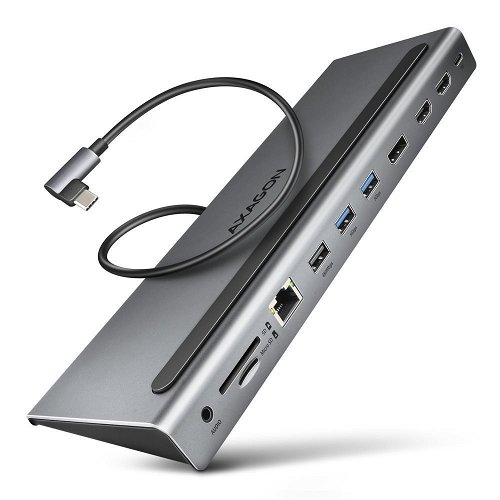
Docking Station - connection using USB-C USB 3.2 Gen 1 (3.0), power delivery 100 W
Show full description
104.90 €
Price Guarantee
Shop faster with pickup at AlzaBox or in-store.
Warranty 36 months
Code:
AG200a23h
Producer's Website:

AXAGON HMC-4KX3 11-in-1 Docking Station, USB-C 5Gbps, 3x USB-A, 2x HDMI, DP, RJ-45, SD/microSD, aud
104.90 €
In stock > 5 pcs
Buy
AXAGON HMC-4KX3 11-in-1 Docking Station, USB-C 5Gbps, 3x USB-A, 2x HDMI, DP, RJ-45, SD/microSD, aud
The AXAGON HMC-4KX3 Docking Station is an exceptionally practical accessory for your notebook. It offers the benefit of a large number of ports and interfaces, especially for ultrabooks with limited connectivity options. It expands the versatility of your notebook, helps keep your desk tidy and allows you to disconnect all your electronics with a single movement. The AXAGON docking station connects to your notebook via a USB-C interface. The connectors comply with the USB 3.2 Gen 1 (3.0) standard. The body of the docking station is made of aluminium and a connecting cable is also included in the package. Demanding users will appreciate the multi-monitor support. Thanks to the LED indicator, you have key information at a glance. At the same time, you can power your notebook using Power Delivery technology. The USB-C hub acts as a universal and powerful 11-in-1 docking station for modern notebooks. The USB hub offers three USB outputs with standard USB-A connectors. The hub can handle the permanent connection of several external drives at the same time. Thanks to the fast USB 3.2 Gen 1 interface, the hub's transfer speed is up to 5Gb/s. The hub also allows you to charge phones and tablets with a current of up to 1.5A/5V. The USB-C connector is reserved only for powering and simultaneously charging notebooks using Power Delivery 3.0 technology with a power of up to 100W. You plug a USB-C Power Delivery charger into the hub and connect the hub to the notebook. This also frees up one USB-C port. The prerequisite is a notebook with support for charging from a USB-C port using Power Delivery and a suitable PD charger. A higher surface temperature of the hub is not a defect – the heat generated by the hub's operation is better dissipated and transferred to the surroundings. The high-quality shielded cable guarantees high communication speed and minimal unwanted interference.

Key Features of the AXAGON HMC-4KX3 Docking Station, USB-C 5Gbps, 3x USB-A, 2x HDMI, DP, RJ-45, SD/mSD, audio, PD 100W
- Expand the connectivity and functionality of your notebook
- Connects to your notebook via USB-C
- Ports comply with the USB 3.2 Gen 1 (3.0) standard
- Also supports Power Delivery with a maximum power of 100W
- Multi-monitor support and LED indication
- A connecting cable is included in the package
- Hot Plug support allows you to connect devices on the fly
- Full Plug and Play support
- Supports power-saving mode
- Durable aluminium body for better hub cooling
Video Outputs
Each of the three video outputs (2× HDMI + 1× DisplayPort) provides a high-quality picture up to 4K/60Hz Ultra HD resolution. High frequencies are also supported in popular gaming resolutions of 2K/144Hz or FullHD/240Hz. Even when connecting three monitors simultaneously, the docking station can provide a resolution of up to 4K/30Hz on each of them. With HDR (High Dynamic Range) support, you can enjoy a significantly expanded range of colours and contrasts without any limitations. For the video output to function correctly, the notebook's USB-C port must support DisplayPort Alternate Mode (DP Alt Mode) or Thunderbolt 3/4. Support for the above-mentioned maximum supported resolutions and frequencies requires connection to a computer with DisplayPort version 1.4.

Network Card and Card Reader
The Gigabit network card will expand your computer with a fast and stable network connection, add a missing RJ-45 Ethernet network connector, or add another network card. The card reader supports all versions of SD and microSD cards including SDXC and microSDXC with a capacity of up to 2TB. High transfer speeds are ensured by the USB 3.2 Gen 1 interface. The card reader allows simultaneous work with cards in both slots and direct copying between them.

Docking Station Body
The robust aluminium body ensures the mechanical durability and high-quality cooling of the docking station. The wedge shape of the hub encourages its use as a notebook stand for better cooling and an ergonomic position. The included USB-C cable is designed for using the hub as a notebook stand; its optimal length of 40cm, along with the angled connector, allows it to be almost completely hidden under the notebook, contributing to a clean desk appearance. The USB-C cable is detachable and can be replaced with a longer cable if needed. Thanks to the Plug and Play and Hot Plug functions, connecting the hub is very simple without complicated installation, and you can also easily connect and disconnect peripherals while the computer is running.

Supported Display Modes in Windows
Mirror or extend the desktop of the primary monitor on each of the up to three connected monitors. Each of the connected monitors can display either a mirrored or extended desktop of the primary monitor as needed, e.g., one monitor will display a mirrored desktop of the primary monitor and the other two monitors will display two different extended desktops.

Supported Display Modes in macOS
Mirror the primary monitor's desktop on all up to three connected monitors. Extend the primary monitor's desktop on one of the connected monitors + mirror the primary monitor's desktop on up to two other connected monitors. Extend the primary monitor's desktop on one of the connected monitors + mirror the extended desktop of the first monitor on up to two other connected monitors.


Package contents:
USB-C hub, 40cm long USB-C cable, multilingual manual
Dimensions:
256 × 90 × 23mm
Weight:
317g
USB-C male cable length:
40cm
Input:
USB 5Gbps (USB 3.2 Gen 1 / USB 3.0)
Compatible with Thunderbolt 3/4
Connection via a reversible USB type C female connector
USB Outputs:
2× USB 5Gbps port, USB-A female connector
1× USB 5Gbps port, USB-C female connector
1× USB 480Mbps port, USB-A female connector
1× Power Delivery port (power only), USB-C female connector
The USB-C hub can handle the connection of several external drives simultaneously
Charging of mobile devices (including iPad) with a current of up to 1.5A from the hub's USB ports
Video output:
2× HDMI port, HDMI A female connector
1× DP port, DisplayPort female connector
Video resolution:
1 monitor connected to any of the video ports:
4K resolution 4096 × 2160 at up to 60Hz
2K / WQHD resolution 2560 × 1440 at up to 144Hz (Mac via DP up to 165Hz)
FHD resolution 1920 × 1080 at up to 240Hz (Mac max. 144Hz)
2 simultaneously connected monitors – up to 4K/60Hz on one monitor and 4K/30Hz on the second monitor
3 simultaneously connected monitors – up to 4K/30Hz on all monitors
Applies to connection to a computer with DisplayPort version 1.4.
For the video output to function, the hub must be plugged into a USB-C port that supports DisplayPort Alternate Mode (DP Alt Mode) or a USB-C port that supports Thunderbolt 3.
A suitable OS is also required. Without this support, the video output function will not be available.
HDR (High dynamic range, 10 bit support) – realistic reproduction of light and dark details
HPD (Hot-Plug-Detect) support
TMDS (Transition Minimized Differential Signaling) support
Full HDCP 1.4 and 2.3 (High-bandwidth Digital Content Protection) support
Support for 2-channel sound with a sampling frequency of up to 192 kHz and up to 24-bit sound in FullHD, in 4K/60Hz max. 48 kHz/24bit – in addition to the set video output resolution, the sound quality also depends on the source and end device, i.e. notebook/phone and TV/monitor/AV receiver.
Supported operating systems:
Windows 10/11 and newer, macOS, Linux, Chrome OS and Android
Compatibility depends on an updated operating system and support from the device manufacturer.
Drivers are included with supported operating systems and are installed completely automatically. No other drivers need to be installed.
DisplayPort Alternate Mode (DP Alt Mode) is only supported in updated operating systems and also depends on support from the device (notebook, phone)
RJ-45 output:
Gigabit Ethernet interface with RJ-45 connector for UTP or STP cable connection
Supported Ethernet interface transfer rates 10/100/1000 Mb/s
Supported specifications IEEE 802.3 10Base-T, IEEE 802.3u 100Base-TX, IEEE 802.3ab 1000Base-T
10/100/1000 Mb/s auto-detection
Supports IPv4/IPv6 packet Checksum Offload Engine (COE) to reduce CPU load including IPv4 IP/TCP/UDP/ICMP/IGMP & IPv6 TCP/UDP/ICMPv6 checksum checking and generation
Supports TCP Large Send Offload V1 and V2
Supports IEEE 802.1P Layer 2 priority encoding & decoding
Supports IEEE 802.1Q VLAN tagging
Supports IEEE 802.3az EEE (Energy Efficient Ethernet) - reduction of consumption in idle state
Jumbo frame support
Supports full-duplex transmissions with IEEE 802.3x flow control and half-duplex transmissions with back-pressure flow control
Supports Auto MDI/MDIX – crossover detection and auto-correction eliminates the need for crossover cables
Supports hardware Cyclic Redundancy Check (CRC) to detect transmission errors
Supports pair swap/polarity/skew correction
Wake-on-LAN function in various modes: Supports sleep mode and remote wake-up via Magic packet, Microsoft Wakeup Frame, Microsoft Wake Packet Detection, ECMA-393 proxZzzz for sleeping hosts, RealWoW! and also Link Change wake-up
Advanced Power Management functions: The adapter supports advanced power management and advanced power saving, e.g. when the Ethernet cable is disconnected
Supported Power Management technologies include Advanced Configuration Power management Interface (ACPI), Link Power Management (LPM) or IEEE 802.3az EEE (Energy Efficient Ethernet) and others Two LEDs to indicate network activity and adapter connection to USB and network
Audio output / input:
1× 3.5mm jack for headset, headphones or active speakers
2-channel analog stereo output 48 kHz @ 16 bit for playback
1-channel analog mono microphone input 48 kHz @ 16 bit for recording
Card reader – two slots:
Micro SD slot: microSD, microSDHC, microSDXC, TransFlash
SD slot: SecureDigital, SDHC, SDXC, MultiMedia Card, MMC 4.0, MMC Dual Voltage, MMC mobile, RS-MMC, with an adapter – miniSD, microSD, microSDHC, microSDXC, MMC Micro
The reader supports these flash card specifications:
SD 1.0/1.1 (SD – Secure Digital, up to 2GB)
SD 2.0 (SDHC – Secure Digital High Capacity, up to 32GB)
SD 3.0 (SDXC – Secure Digital eXtended Capacity, up to 2TB) MMC and eMMC 3.x / 4.0 / 4.1 / 4.2 / 4.3 / 4.4 / 4.5 / 5.0 (8-bit)
Supports SD 3.01 and SD Jukebox application (CPRM function)
Supports Ultra High Speed bus UHS-I (SDR12/SDR25/SDR50/DDR50/SDR104) speed up to 104 MB/s Supports hardware ECC (Error Correction Code) function and CRC (Cyclic Redundancy Check) function
2 LUN – in file managers the reader is indicated as two disk drives
Power Delivery:
Supports Power Delivery 3.0 – pass-through charging of the device from the mains adapter via the USB-C hub
Maximum power output through the PD USB-C output of the hub 100W – 20V/5A
Requires PD support from the device (notebook, phone) and a suitable PD mains adapter
Specifications
Power supply (cable)
Laptop power port
Standard male connector
Max. Power Delivery value
USB-C power supply (PD)
Laptop power port
Power supply (cable)
Laptop power port
Standard male connector
Max. Power Delivery value
Most common ports
Common data ports
Common graphics ports
Data ports - Number and standards
USB-A standards
USB-C standards
USB-C power supply (PD)
USB-A 3.2 Gen 1 (3.0)
USB-A 2.0
MicroSD
SD
Power ports for electrical devices
USB-A
USB-C
Graphics ports - Number and standards
DisplayPort standards
HDMI standards
HDMI 2.0
DisplayPort 1.4
Network ports
Maximum LAN speed
Audio ports
Audio ports
Features
Features
Support
Colour
Cable length
Material
Maximum number of monitors
Device refresh rate
Packaging
Package contents
Compatibility
Type
Dimensions and weight
Width
Height
Depth
Weight
More Specifications
Note:
Specifications can be changed without notice. Images are for illustrative purposes only.
