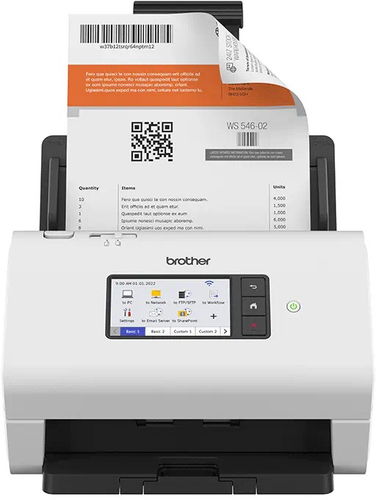
Scanner - A4, table, sheet-fed and documentary scanner, with document feeder, duplex, ADF, high speed scanning, resolution: 600 x 600 DPI, scanning speed up to: 60 PPM, scans text, weight: 3,37kg, LAN, USB 3.0 and WIFI connection
Brother ADS-4900W 898.90 € In stock 3 pcs at the supplier's
Buy
Brother ADS-4900W
The Brother Scanner enables quick and easy document scanning both at work and at home. The device is a table, sheet-fed and documentary scanner Brother ADS-4900W with classic document loading. The device in question is the so-called table, sheet-fed and documentary Scanner Brother ADS-4900W, where sheets pass through the scanner in a way you know from printers. These scanners are particularly fast and efficient and delightfully compact. Brother ADS-4900W provides a visual resolution of up to 600 x 600 DPI to ensure you get good scans and bit depth of up to 48 bit for realistic colour accuracy. The scanner can accommodate documents with a format A4 and its duplex scanning solution can scan a sheet of paper on both sides automatically. The Brother ADS-4900W Scanner links to your PC or laptop using LAN, USB 3,0 and WIFI. The scanner is fast and reliable, which means it always has your back.
Key Features of the Brother ADS-4900W Scanner
Table, Sheet-fed and Documentary scanner for comfortable paper insertion
Table, Sheet-fed and Documentary scanner with extra fast sheet processing
Optical resolution: 600 x 600 DPI
Bit depth up to 48 bit
Maximum document size up to A4
Brother ADS-4900W uses LAN, USB 3,0 and WIFI
Brother Scanner scans both sides of a paper simultaneously, so you don't have to reverse the side manually
The scanner is primarily designed for scanning text
The number of pixels that the scanner can record from a given area. The most common measurement is DPI (Dots Per Inch), which is an indication of how many image points (pixels) can fit within the length of one inch.
Color depth refers to the number of bits of information that the scanner acquires for each pi×el. The higher the color depth, the greater the amount of detail and color shades that the scanner can capture and reproduce. This results in better quality and colour accuracy of scanned images.
The number of pixels that the scanner can record from a given area. The most common measurement is DPI (Dots Per Inch), which is an indication of how many image points (pixels) can fit within the length of one inch.
Color depth refers to the number of bits of information that the scanner acquires for each pi×el. The higher the color depth, the greater the amount of detail and color shades that the scanner can capture and reproduce. This results in better quality and colour accuracy of scanned images.
Number of A4 pages that can be scanned in one minute.
60 PPM
Connection
Connection
LAN, USB 3.0, WIFI
Max. document size
Maximum document size
A4
Functions
Functions
ADF, With Feeder
Duplex (two-sided) scanning
Yes
Scan options
Scanning options
Text
Dimensions
Width
30 cm
Depth
23.6 cm
Height
24.7 cm
Weight
3.37 kg
More Specifications
Brother CEE GmbH, branch office, Veveří 102, Brno 616 00, Česká republika
Note:
If there is no "package contains" box in the product parameters and the data or USB cable is not specifically mentioned in there, the package does not contain it and must be purchased separately.
Specifications can be changed without notice. Images are for illustrative purposes only.

Dobrý den, po úspěšné instalaci, oživení a otestování u Vás před svátky zakoupeného ADS-4900w scanneru a s ním spojeného software, po doporučené aktualizaci firmware pomocí oficiálního programu, přestal fungovat displej scanneru. Po mnoha nákupech u Vás tedy nastal první problém. Scanner bylo dále možné ovládat prostřednictvím software včetně WiFi propojení a USB kabelu. Displej ale chyběl. Další pokusy o nápravu podle diskusních rad v síti situaci spíše dále zhoršily. Chci se proto zeptat na další doporučený postup: 1) Existuje "horká" linka, případně servis, kde by nám mohli ještě telefonicky mailem poradit? Ve srovnání s jinými zařízeními bych čekal možnost po resetu do továrního nastavení a odinstalování software možnost začít znovu i bez odvozu přístroje. 2) Jak ale postupovat při poslání scanneru v záruce k opravě? Děkuji za brzkou reakci (i na e-mail).
Magyarországra történő kiszállításért tekintse meg ezt a termékoldalt: Brother ADS-4900W
Try our cookiesAlza.cz a. s., Company identification number 27082440, use cookies and other data to ensure the proper functioning of the website and, with your consent, also, among other things, to personalize advertising and the content of our websites. By clicking on the “I understand“ button, you agree to the use of cookies and the transfer of data regarding the behavior on the website for displaying targeted advertising on social networks and advertising networks on other websites.
We use 8 categories of cookies on our website:
Technical cookies
These are strictly necessary for the functioning of the website and the features you choose to use. Without them, our website would not work; you wouldn't be able to log in to your user account, for example.
Functionality cookies
These cookies allow us to remember your basic choices and improve the user experience. These include remembering your preferred language or allowing you to stay logged in permanently.
Social media cookies
These cookies allow us to easily link you to your social media profile and, for example, allow you to share products and services with your friends and family.
Content personalisation
These cookies allow us to show you content and ads according to the information we have about you to best meet your needs. This includes what content you have viewed, or on what device you are accessing our website.
Non-personalised advertising
These cookies allow us to show you general ads for products and services.
Personalised advertising
Thanks to these cookies, we and our partners can offer you relevant products and services based on your purchases, your shopping behaviour and your preferences.
Audience metrics
These cookies allow us to optimise our site for your convenience based on how you use it. The aim is to remember or anticipate your choices. This includes, for example, the use of features, their location, or the behaviour on the page.
By giving your consent to the processing of cookies, functionality and analytical cookies will be installed on the device you use to browse the website (click on the "I understand" button for both categories, or you can select only one of the categories by clicking on the "Settings" button). We always install technical cookies on your device, even without your explicit consent, because without them our website would simply not work.
You can revoke your consent to the processing of cookies. In connection with our company's cookie processing, you also have the following rights: the right to access cookies, delete, modify, supplement and correct them, restrict processing and the right to lodge a complaint with the Office for Personal Data Protection. Read more about your rights.