We apologize for the inconvenience, but due to technical difficulties it is not possible to pickup orders at your branches at this moment. We are working on the repairs. Thank you for your understanding.
Inkjet Printer - multifunctional, colour, A4, copier and scanner, black-and-white print speed of 9,1 pages/min., colour print speed of 5 pages/min., print resolution: 4800 x 1200 DPI, tank system, display, AirPrint, USB and Wi-Fi
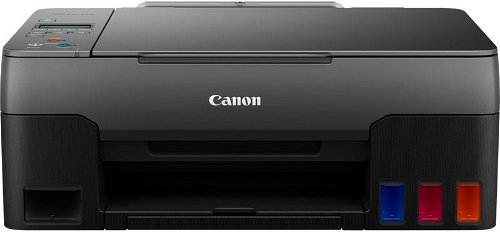
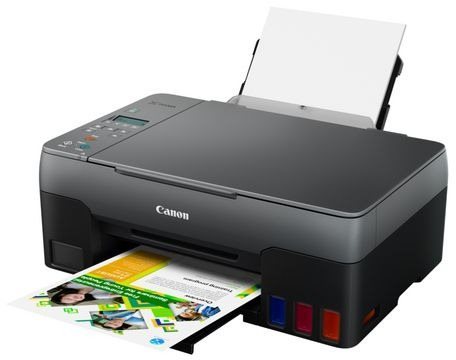
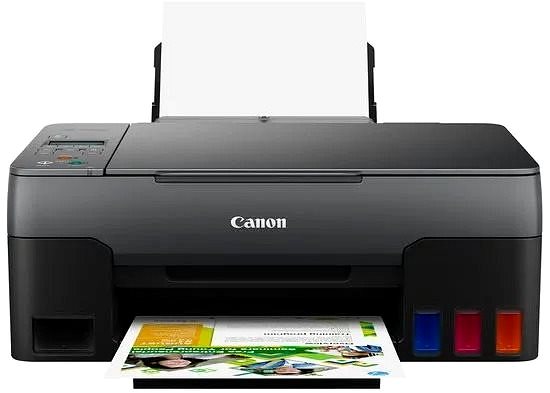
The Canon inkjet printer is the perfect tool to have at home. This is a 3-in-1 model that can copy, print and scan, so it'll help you with all your document needs. This printer can print in colour. When printing coloured documents, the Canon PIXMA G3420 can print at 5 pages/min. print speeds. This inkjet printer model has a maximum print resolution of 4800 x 1200 DPI, which is a high-standard, so the printer will be able to print highly detailed images. You can use an entire paper to print thanks to the borderless printing feature. You can connect to your computer or other devices through the USB and Wi-Fi interface. You don't have to deal with any cables because you can print wirelessly. If you own Apple devices, it's compatible with the AirPrint feature, allowing you to easily print from any of your Apple devices. The Canon Inkjet Printer has a graphic display that makes it easy to use. It's also quite cost-efficient thanks to the tank system, which allows you to conveniently refill the cartridges.
Canon PIXMA G3420 Key Features Inkjet Printer
Easily print documents by connecting to Wi-Fi
Canon PIXMA G3420 paper format: A4, A5 and A6 paper
Input tray can fit up to 100 papers
Canon inkjet printer can also copy and scan
Printer has borderless printing function, for versatile use
Compatible with Apple devices thanks to AirPrint
Cost-efficient tank system allows you to refill the ink
Coloured inkjet printer perfect to use at home
Packaging contains: Documentation, Bottle with ink, Power cable and Software
Canon Inkjet Printer Resolution
Print beautiful photographs thanks to this inkjet printer. One big advantage of inkjet printers is natural colour rendering, which is ideal for printing out photos. This Canon inkjet printer has an above-standard printing resolution of 4800 x 1200 DPI. Resulting prints and photographs will have highly-detailed quality, even when printed on large formats. Even if you're planning on printing often and using a lot of coloured ink, it won't be too expensive. The Canon PIXMA G3420 features a tank system. Just pour in more of the ink to refill the tank when it gets low. This reduces the cost, and it is also environmentally friendly.
Canon PIXMA G3420 Scanning and Copy Features
The Canon PIXMA G3420 inkjet printer is multifunctional, and it can copy, scan and print and take care of everything you need to do with documents. The Canon PIXMA G3420 inkjet printer can operate with A4, A5 and A6 paper formats. Clean sheets can be stored in the input tray, which holds up to 100 pieces of paper.
Printing technology determines how data is transferred to paper, affecting quality, speed and cost, and varies by type of application - from home to professional.
Printing technology determines how data is transferred to paper, affecting quality, speed and cost, and varies by type of application - from home to professional.
The resolution of a flatbed scanner is a parameter that determines the quality of the scan, measured in DPI (dots per inch) and the higher the resolution, the more detailed the scan.
The print resolution determines how detailed and sharp the output from the printer will be, measured in DPI, the higher the value the better the print quality, ideal for high quality photos and documents.
Zobrazovacia jednotka tlačiarne slúžiaca na informovanie o stave či nastavení tlačiarne. V prípade dotykového displeja slúži aj na priame nastavenie a ovládanie tlačiarne.
Bottle with ink, Documentation, Power cable, Software
More Specifications
Canon was founded in 1933. Its original title translated to "portable laboratory optics". The Japanese company has been headquartered in Tokyo since its inception. Canon is particularly associated with the production of digital cameras and accessories, where they remain the leading innovator and producer of imaging solutions. Aside from digital cameras, the company also operates in the production of office equipment, particularly copiers or printers.
Note:
If there is no "package contains" box in the product parameters and the data or USB cable is not specifically mentioned in there, the package does not contain it and must be purchased separately.
Specifications can be changed without notice. Images are for illustrative purposes only.
Jsou v tiskarne tedy vsechny naplne s 60% barvy alespon? Nebo ani to ne? Cetl jsem tu nekde, ze pry byva obcas jen cerna. Dekuji.
Jsou v tiskarne tedy vsechny naplne s 60% barvy alespon? Nebo ani to ne? Cetl jsem tu nekde, ze pry byva obcas jen cerna. Dekuji.
Dobry den,
jake cartridge jsou vhodne pro tuto tiskarnu? Primo u vyrobce je uvedena GI-41, kterou jsem zde ale nenasla. GI-490 podle informaci vhodna neni, zjevne ani GI-40 nebo GI-590. Jaky inkoust tedy koupit?
Dobry den,
jake cartridge jsou vhodne pro tuto tiskarnu? Primo u vyrobce je uvedena GI-41, kterou jsem zde ale nenasla. GI-490 podle informaci vhodna neni, zjevne ani GI-40 nebo GI-590. Jaky inkoust tedy koupit?
Dobrý deň, chcela by som sa spýtať. Pri prvom použití sme skúšali tlačiť samozrejme texty aj fotky. Texty vytlačilo v poriadku ale fotky nám vytlačilo také celkom vyblednuté. Skúsili sme ten istý obrázok na ten istý papier vytlačiť 3x až potom bol pekný farebný a sýty. Kúpili sme fotopapier a tam sa nám zdali lepšie tie fotky. Chcem sa spýtať či to môže byť nastavením tlačiarne lebo fotky na fotopapier sme tlačili cez mobil priamo cez položku obrázky a na obyčajný papier cez počítač klasicky cez tlač. Tiež sa chcem spýtať obyčajné papiere A4 máme recyklované môže aj toto ovplyvniť to že by bolo fotka svetlá ?
Ďakujem Alexandra
Dobrý deň, chcela by som sa spýtať. Pri prvom použití sme skúšali tlačiť samozrejme texty aj fotky. Texty vytlačilo v poriadku ale fotky nám vytlačilo také celkom vyblednuté. Skúsili sme ten istý obrázok na ten istý papier vytlačiť 3x až potom bol pekný farebný a sýty. Kúpili sme fotopapier a tam sa nám zdali lepšie tie fotky. Chcem sa spýtať či to môže byť nastavením tlačiarne lebo fotky na fotopapier sme tlačili cez mobil priamo cez položku obrázky a na obyčajný papier cez počítač klasicky cez tlač. Tiež sa chcem spýtať obyčajné papiere A4 máme recyklované môže aj toto ovplyvniť to že by bolo fotka svetlá ?
Ďakujem Alexandra
Dobrý den,
Koupil jsem u vás tuto tiskárnu a používal ji k tisku i skenování přes wifi. Od určité doby se tiskárna dostala do stavu, že při tisku i ze dvou různých PC v síti hlásí stav offline. Zkoušel jsem všechny doporučené způsoby řešení této situace. Jediné co pomohlo, byl reset tiskárny do továrního nastavení, znovunastavení wifi a přeinstalace ovladačů tiskárny na obou PC. Dva dny to fungovalo a už je zase tiskárna offline, nepomáhá zapnutí+vypnutí, vytažení ze zásuvky a znovuzapojení, prostě nic. Wifi je plně funkční, vytištěná Network Configuration Page je naprosto obsahově shodná se stavem, kdy vše fungovalo.
Prosím poraďte.
Dobrý den,
Koupil jsem u vás tuto tiskárnu a používal ji k tisku i skenování přes wifi. Od určité doby se tiskárna dostala do stavu, že při tisku i ze dvou různých PC v síti hlásí stav offline. Zkoušel jsem všechny doporučené způsoby řešení této situace. Jediné co pomohlo, byl reset tiskárny do továrního nastavení, znovunastavení wifi a přeinstalace ovladačů tiskárny na obou PC. Dva dny to fungovalo a už je zase tiskárna offline, nepomáhá zapnutí+vypnutí, vytažení ze zásuvky a znovuzapojení, prostě nic. Wifi je plně funkční, vytištěná Network Configuration Page je naprosto obsahově shodná se stavem, kdy vše fungovalo.
Prosím poraďte.
Dobrý den, lze zde provádět vzdálený tisk? Např. nebudu ve stejné síti, ale v jiném městě, abych byl schopný ve firmě tisknout z kanceláře mimo výrobu?
Dobrý den, lze zde provádět vzdálený tisk? Např. nebudu ve stejné síti, ale v jiném městě, abych byl schopný ve firmě tisknout z kanceláře mimo výrobu?
Magyarországra történő kiszállításért tekintse meg ezt a termékoldalt: Canon PIXMA G3420
Try our cookiesAlza.cz a. s., Company identification number 27082440, use cookies and other data to ensure the proper functioning of the website and, with your consent, also, among other things, to personalize advertising and the content of our websites. By clicking on the “I understand“ button, you agree to the use of cookies and the transfer of data regarding the behavior on the website for displaying targeted advertising on social networks and advertising networks on other websites.
We use 8 categories of cookies on our website:
Technical cookies
These are strictly necessary for the functioning of the website and the features you choose to use. Without them, our website would not work; you wouldn't be able to log in to your user account, for example.
Functionality cookies
These cookies allow us to remember your basic choices and improve the user experience. These include remembering your preferred language or allowing you to stay logged in permanently.
Social media cookies
These cookies allow us to easily link you to your social media profile and, for example, allow you to share products and services with your friends and family.
Content personalisation
These cookies allow us to show you content and ads according to the information we have about you to best meet your needs. This includes what content you have viewed, or on what device you are accessing our website.
Non-personalised advertising
These cookies allow us to show you general ads for products and services.
Personalised advertising
Thanks to these cookies, we and our partners can offer you relevant products and services based on your purchases, your shopping behaviour and your preferences.
Audience metrics
These cookies allow us to optimise our site for your convenience based on how you use it. The aim is to remember or anticipate your choices. This includes, for example, the use of features, their location, or the behaviour on the page.
By giving your consent to the processing of cookies, functionality and analytical cookies will be installed on the device you use to browse the website (click on the "I understand" button for both categories, or you can select only one of the categories by clicking on the "Settings" button). We always install technical cookies on your device, even without your explicit consent, because without them our website would simply not work.
You can revoke your consent to the processing of cookies. In connection with our company's cookie processing, you also have the following rights: the right to access cookies, delete, modify, supplement and correct them, restrict processing and the right to lodge a complaint with the Office for Personal Data Protection. Read more about your rights.