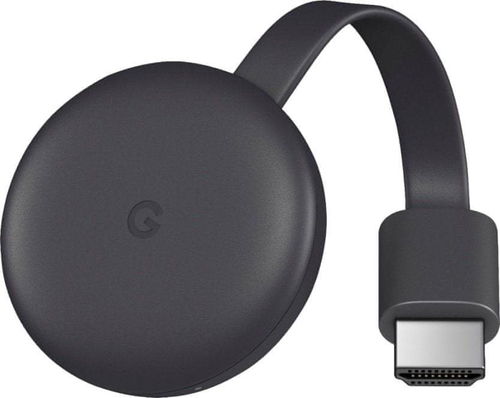
Google Chromecast 2 is an enhanced version of Google's popular mini computer that makes playing all your video content a breeze. Apart from its low price, which is really hard to resist, it stands out above all for its simplicity and high utility value, exactly in the style of Google's philosophy.
Google Chromecast 3 is an enhanced version of Google's popular mini computer that makes playing all your video content a breeze. Apart from its low price, which is really hard to resist, Chromecast 3 stands out above all for its simplicity and high utility value, exactly in the style of Google's philosophy. With easy connectivity to modern smart devices such as your computer, tablet or mobile phone, controlling the real Google Chromecast 3 will be a pleasure and you won't have to worry about where you left the remote again.
Key Features of the Google Chromecast 3 Black Mini Computer
Play content from different platforms and devices
Control with smart devices
Google Chromecast 3 plays content from Alza Media, YouTube, Netflix, Hulu, Google Play and more
Easily mirror your phone, tablet or Chrome web browser screen
Google Chromecast 3 Black handles Full-HD streaming at up to 60 frames per second
Power supply via micro-USB
Support for Windows, Android and Apple devices
Dimensions: only 52 × 52 × 14mm
Compact Chic - That's Chromecast 3
The Google Chromecast 3 is better equipped in terms of hardware compared to its younger brother, which is reflected in the quality of streaming. This model can transfer Full-HD resolution at up to 60 frames per second. Of course, it supports the 802.11ac WiFi standard operating in the less-busy 5 GHz band. However, we cannot overlook the changes in design, which now resembles a space saucer or a restless yo-yo. Chromecast 3 can also play content from Alza Media, your favourite YouTube videos, as well as movies and TV shows from Netflix, Hulu Plus, music and movies from Google Play, andcan even display a currently open tab in your Google Chrome player. What's more, it's very versatile, as it can be used on multiple platforms, so whether you want to play from Android, iOS, MAC, or PC - you can simply do this - and see it nicely on the big screen of your TV.
Easy Connection via HDMI
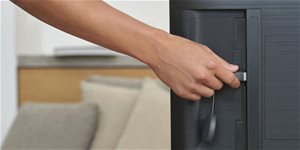
With this handy helper, you also don't have to worry about correct wiring. Just use Plug and Play to easily connect Google Chromecast 3 to your HDTV via HDMI, plug in the USB power and then enjoy the adventures of your favourite heroes on the big screen. With Chromecast 3, you can also forget about being tethered by wires - all communication with other devices is via WiFi connections in the 2.4 and 5 GHz bands, so you'll have complete freedom over where your content streams from.
Specifications
Colour
Black
Supported resolution
Full HD, HD Ready
Interface
HDMI, Micro USB
Connectivity
Wi-Fi
Number of USB slots
1 ×
Colour
Colour
Black
Basic parameters
Supported resolution
Full HD, HD Ready
Connection and playback
Interface
HDMI, Micro USB
Connectivity
Wi-Fi
Number of USB slots
1 ×
Features and functions
Functions
Voice control
Application
Amazon Prime Video, Netflix, YouTube
More Specifications
Google Commerce Limited, 70 Sir John Rogerson’s Quay, Dublin 2, D02 R296, Ireland, g.co/pixel/help
Note:
Specifications can be changed without notice. Images are for illustrative purposes only.
Dobrý den,
protože se tu v některých odpovědích ne zcela exaktně rozlišuje mezi streamováním (podporovaných aplikací) a zrcadlením plochy (PC, notebooku, mobilu, tabletu), rád bych si ujsanil jednu věc: Jak jsem zjistil z jedné videorecenze, při streamování podorovaných webů (YouTube apod. - tj. označené ikonou) Chromecast od (např.) mobilu přijme informaci co má streamovat a sám se přes wifi (ultra přes ethernet) prostřednictvím modemu/routeru připojí k danému webu a stream si bere přímo, nikoliv už prostřednictvím (např.) mobilu apod.
1. Jak je to se skutečným zrcadlením, tj. např. co na mobilu to na TV/monitoru? Např. na mobilu spustím Digi2Go TV a přes Chromecast mohu tentýž obraz sledovat na TV/monitoru?
Neboli cesta modem ==> mobil ==> Chromecast ==> TV?
2. Co přesně se míní termínem "podporované aplikace"? Weby podporující streamování přes Chromecast, nebo i "skutečné" appky např. z GooglaPlay apod.?
Díky za odpovědi.
Dobrý den,
protože se tu v některých odpovědích ne zcela exaktně rozlišuje mezi streamováním (podporovaných aplikací) a zrcadlením plochy (PC, notebooku, mobilu, tabletu), rád bych si ujsanil jednu věc: Jak jsem zjistil z jedné videorecenze, při streamování podorovaných webů (YouTube apod. - tj. označené ikonou) Chromecast od (např.) mobilu přijme informaci co má streamovat a sám se přes wifi (ultra přes ethernet) prostřednictvím modemu/routeru připojí k danému webu a stream si bere přímo, nikoliv už prostřednictvím (např.) mobilu apod.
1. Jak je to se skutečným zrcadlením, tj. např. co na mobilu to na TV/monitoru? Např. na mobilu spustím Digi2Go TV a přes Chromecast mohu tentýž obraz sledovat na TV/monitoru?
Neboli cesta modem ==> mobil ==> Chromecast ==> TV?
2. Co přesně se míní termínem "podporované aplikace"? Weby podporující streamování přes Chromecast, nebo i "skutečné" appky např. z GooglaPlay apod.?
Díky za odpovědi.
Dobrý den, mám starou LCD televizí Sony, ale má 2 hdmi IN.. Bude mi tento Chromecast fungovat i na ni? Doma máme chytrou TV ale tahle je v loznici a chcem se i na ni připojit na Nás ucet Netflix.. Díky za odpověď, Gonsior
Dobrý den, mám starou LCD televizí Sony, ale má 2 hdmi IN.. Bude mi tento Chromecast fungovat i na ni? Doma máme chytrou TV ale tahle je v loznici a chcem se i na ni připojit na Nás ucet Netflix.. Díky za odpověď, Gonsior
Google chromecast 3.
Dobry den prosím po zapnutí kontrolka na něm svítí žlutě, a aplikace jej nemůže najit.
WiFi je ok vše funguje, ale jako by se nechtěl připojit.
Na TV taky nic.
Jako by nefungoval.
Da se nějak restartovat?
Díky za info N. M.
Google chromecast 3.
Dobry den prosím po zapnutí kontrolka na něm svítí žlutě, a aplikace jej nemůže najit.
WiFi je ok vše funguje, ale jako by se nechtěl připojit.
Na TV taky nic.
Jako by nefungoval.
Da se nějak restartovat?
Díky za info N. M.
Dobrý den, dnes sem zapojila a z telefonu - apple mi to stale vyskakuje, pustim video z netflixu a prenos se po minute, dvou prerusi. Zkusila sem pustit z telefonu androidu a dela to to same. Ma s tim prosim nekdo zkusenost co s tim? Dekuji
Dobrý den, dnes sem zapojila a z telefonu - apple mi to stale vyskakuje, pustim video z netflixu a prenos se po minute, dvou prerusi. Zkusila sem pustit z telefonu androidu a dela to to same. Ma s tim prosim nekdo zkusenost co s tim? Dekuji
Zdravím všechny co používáte pokud chci posílat do Chromecastu mkv/avi formáty ? Nechci nic konvertovat ale rovnou to z VLC polsat do TV ... Z DLNA mám špatné zkušenosti, chci něco výrazně jednodužšího, proto mě napadl ten Chromecast ...
(mám starší plazmu Panasonic a ta prostě spoustu formátů z flashdisku nepřehraje). Díky !
Zdravím všechny co používáte pokud chci posílat do Chromecastu mkv/avi formáty ? Nechci nic konvertovat ale rovnou to z VLC polsat do TV ... Z DLNA mám špatné zkušenosti, chci něco výrazně jednodužšího, proto mě napadl ten Chromecast ...
(mám starší plazmu Panasonic a ta prostě spoustu formátů z flashdisku nepřehraje). Díky !
Try our cookiesAlza.cz a. s., Company identification number 27082440, use cookies and other data to ensure the proper functioning of the website and, with your consent, also, among other things, to personalize advertising and the content of our websites. By clicking on the “I understand“ button, you agree to the use of cookies and the transfer of data regarding the behavior on the website for displaying targeted advertising on social networks and advertising networks on other websites.
We use 8 categories of cookies on our website:
Technical cookies
These are strictly necessary for the functioning of the website and the features you choose to use. Without them, our website would not work; you wouldn't be able to log in to your user account, for example.
Functionality cookies
These cookies allow us to remember your basic choices and improve the user experience. These include remembering your preferred language or allowing you to stay logged in permanently.
Social media cookies
These cookies allow us to easily link you to your social media profile and, for example, allow you to share products and services with your friends and family.
Content personalisation
These cookies allow us to show you content and ads according to the information we have about you to best meet your needs. This includes what content you have viewed, or on what device you are accessing our website.
Non-personalised advertising
These cookies allow us to show you general ads for products and services.
Personalised advertising
Thanks to these cookies, we and our partners can offer you relevant products and services based on your purchases, your shopping behaviour and your preferences.
Audience metrics
These cookies allow us to optimise our site for your convenience based on how you use it. The aim is to remember or anticipate your choices. This includes, for example, the use of features, their location, or the behaviour on the page.
By giving your consent to the processing of cookies, functionality and analytical cookies will be installed on the device you use to browse the website (click on the "I understand" button for both categories, or you can select only one of the categories by clicking on the "Settings" button). We always install technical cookies on your device, even without your explicit consent, because without them our website would simply not work.
You can revoke your consent to the processing of cookies. In connection with our company's cookie processing, you also have the following rights: the right to access cookies, delete, modify, supplement and correct them, restrict processing and the right to lodge a complaint with the Office for Personal Data Protection. Read more about your rights.