
TP-Link TL-WPA4226 Powerline KIT with WiFi 83.90 € In stock > 5 pcs
Buy
TP-Link TL-WPA4226 Powerline KIT with WiFi
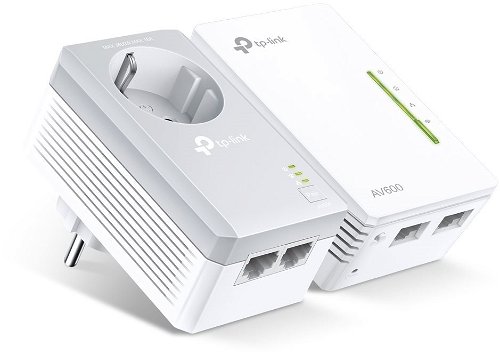
The powerline is a simple way to connect to the web sans WiFi. The powerline uses regular electricity to form a connection to the internet, so one need simply connect the adaptor to a wall outlet, and it forms a LAN connection without the need to waste time drilling holes in the wall. The TP-Link TL-WPA4226 Powerline KIT with WiFi has an impressive length of 300 m. Of course, the transfer speed largely depends on the stability of your connection, but this model usually offers an ideal of 600 Mb/s. The packaging contains 2 × adaptéru. The secondary unit of the TP-Link powerline is armed with two LAN connectors. A big advantage is that the adaptors on this device are designed with a through-socket. You will thus be able to connect your other electronics. The signalling diodes will keep you up to date on the status of the network connection. This model's primary unit will give you a LAN connection that has a speed of 10/100 Mb/s. The secondary unit has a speed of 10/100 Mb/s.
TP-Link TL-WPA4226 Powerline KIT with WiFi Powerline Key Features
Easily installed by plugging into the wall
Modern technology, which creates a very reliable connection
You won't need to senselessly drill into the wall
TP-Link TL-WPA4226 Powerline KIT with WiFi reach: 300 m
Data transfer speed of 600 Mb/s
WiFi range of 2,4 GHz
Through sockets give you the ability to plug in other devices
The protocols and standards used in powerline adapters include technologies that ensure compatibility and optimal network performance, common standards include HomePlug AV, HomePlug AV2, IEEE 1901 and G.hn, determine how powerline devices communicate or ensure different models and brands work together.
Encryption is the process of securing data from unauthorized access by converting it into an encrypted format, powerline adapters use encryption to protect the transmitted data from eavesdropping and attacks, ensuring secure network communication.
TP-LINK Czech, s. r. o., Pekařská 695/10, Jinonice, 155 00 Praha 5, CZ +420 212 812 622 / SK +421 233 006 532, [email protected]
Note:
Specifications can be changed without notice. Images are for illustrative purposes only.

Dobrý den, Wifi kterou vysílá extenderový - koncový adaptér, má stejné ID a heslo jako hlavní router, nebo se musí nějak konfigurovat? A pokud ano, dá se mu připojit ID a heslo jako na hlavním routeru, aby se nemusela připojená zařízení přihlašovat na WiFi s novými parametry?
Dobrý den, prosím o radu. Ve 2. NP mám umístěný router AC1750 Wireless. Ten mi přes WIFI pokrývá celý 2.NP a část 1.NP, v 1.PP ale signál WIFI není. Protože jsem instaloval letos tepelné čerpadlo, potřeboval jsem do 1.PP dostat internet. K tomu jsem použil Powerline TP-link TL-PA7017 KIT. Mám to zapojené na stejné fázi a jsem s tím spokojený. Protože chci ale pokrýt celý sklep ještě bezdrátovým signálem, tak jsem koupil WIFI Repeater DUOBOOST, ten jsem však nedokázal ani podle návodu rozchodit. Našel jsem však TP-link TL-WPA4226 KIT Powerline s WIFI.
Můj dotaz je: "Pokud bych vyměnil Powerline původní za typ s WIFI, tak bych docílil ve sklepě jak bezdrátový signál, tak signál po kabelu ethernetovém ( pro tepelné čerpadlo), v 1. a 2. NP bych měl pokryto bezdrátovým signálem? Všechna tato uvedená zařízení by spolu komunikovala bez problému? IP adresa routeru by se nemusela měnit a mohla by zůstat stejná ( to je zase podmíněno-spojeno s tepelným čerpadlem)?"
Děkuji za radu.
Jaromír Pacák
Dobrý den, prosím o radu. Ve 2. NP mám umístěný router AC1750 Wireless. Ten mi přes WIFI pokrývá celý 2.NP a část 1.NP, v 1.PP ale signál WIFI není. Protože jsem instaloval letos tepelné čerpadlo, potřeboval jsem do 1.PP dostat internet. K tomu jsem použil Powerline TP-link TL-PA7017 KIT. Mám to zapojené na stejné fázi a jsem s tím spokojený. Protože chci ale pokrýt celý sklep ještě bezdrátovým signálem, tak jsem koupil WIFI Repeater DUOBOOST, ten jsem však nedokázal ani podle návodu rozchodit. Našel jsem však TP-link TL-WPA4226 KIT Powerline s WIFI.
Můj dotaz je: "Pokud bych vyměnil Powerline původní za typ s WIFI, tak bych docílil ve sklepě jak bezdrátový signál, tak signál po kabelu ethernetovém ( pro tepelné čerpadlo), v 1. a 2. NP bych měl pokryto bezdrátovým signálem? Všechna tato uvedená zařízení by spolu komunikovala bez problému? IP adresa routeru by se nemusela měnit a mohla by zůstat stejná ( to je zase podmíněno-spojeno s tepelným čerpadlem)?"
Děkuji za radu.
Jaromír Pacák
Dobrý den, mám problém s poměrně častou nestabilitou wifi ... v nepravidelných intervalech se stává, že např. na telefonu sice signál je, ale je tam vykřičník, čili bez připojení k internetu. Potom zas za nějakou dobu to jde, je to poměrně nestabilní. Úplně to takto nesplňuje očekávané požadavky. Co s tím? ( ps mobilem či jiným zařízením to není) Děkuji
Lze nějak změnit IP adresu zařízení tak jako to má třeba Zyxel?Mám problém s tím, že pokud zapojením TP-WPA4226 k routeru od Vodafonu, který LAN zařízením přiděluje přes DHCP IP adresy, tak asi minutu ten Powerline funguje dobře, přidělí mně IP adresu a poté znefunkční celou síť, tzn. i počítače připojené LAN přímo do routeru od Vodafonu, přestanou komunikovat a nejsem ani schopen se připojit na ten hlavní router. Musím powerline adaptér odpojit z routeru a ten restartovat. Potom celá síť opět funguje do doby než zapojím zase ten powerline adaptér.
Dobrý den,
bude toto řešení fungovat i v případě, že chci dostat internet z domu do sklepa, kde je jiný zásuvkový okruh, nicméně stejná skříň s pojistkami?
Dobrý den,
bude toto řešení fungovat i v případě, že chci dostat internet z domu do sklepa, kde je jiný zásuvkový okruh, nicméně stejná skříň s pojistkami?
Try our cookiesAlza.cz a. s., Company identification number 27082440, use cookies and other data to ensure the proper functioning of the website and, with your consent, also, among other things, to personalize advertising and the content of our websites. By clicking on the “I understand“ button, you agree to the use of cookies and the transfer of data regarding the behavior on the website for displaying targeted advertising on social networks and advertising networks on other websites.
We use 8 categories of cookies on our website:
Technical cookies
These are strictly necessary for the functioning of the website and the features you choose to use. Without them, our website would not work; you wouldn't be able to log in to your user account, for example.
Functionality cookies
These cookies allow us to remember your basic choices and improve the user experience. These include remembering your preferred language or allowing you to stay logged in permanently.
Social media cookies
These cookies allow us to easily link you to your social media profile and, for example, allow you to share products and services with your friends and family.
Content personalisation
These cookies allow us to show you content and ads according to the information we have about you to best meet your needs. This includes what content you have viewed, or on what device you are accessing our website.
Non-personalised advertising
These cookies allow us to show you general ads for products and services.
Personalised advertising
Thanks to these cookies, we and our partners can offer you relevant products and services based on your purchases, your shopping behaviour and your preferences.
Audience metrics
These cookies allow us to optimise our site for your convenience based on how you use it. The aim is to remember or anticipate your choices. This includes, for example, the use of features, their location, or the behaviour on the page.
By giving your consent to the processing of cookies, functionality and analytical cookies will be installed on the device you use to browse the website (click on the "I understand" button for both categories, or you can select only one of the categories by clicking on the "Settings" button). We always install technical cookies on your device, even without your explicit consent, because without them our website would simply not work.
You can revoke your consent to the processing of cookies. In connection with our company's cookie processing, you also have the following rights: the right to access cookies, delete, modify, supplement and correct them, restrict processing and the right to lodge a complaint with the Office for Personal Data Protection. Read more about your rights.
