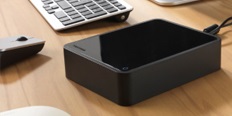
Centralise your data into an easy-to-use, smart storage that easily connects to your WiFi router so you can easily save all your digital content to the WD My Cloud Home. The device also supports automatic backup of videos and photos from your mobile tablet or tablet, and wireless backup and synchronisation of your laptops, computers, Macs and cloud accounts.
Key Features of the WD My Cloud Home 8TB smart home storage device
Easy file search using an application or web interface
Own private space for every user - ideal for families
Third-party applications for customisation - such as Plex Media Server, Dropbox, Google Drive, IFTTT, and more
Download from a cloud account (Dropbox, Box, Google Drive, Facebook) - keep everything in one place
Auto Backup for all Macs and PCs at home
Set up a uniqueMy Cloud Homepassword or touch ID for the My Cloud Home mobile app
Centralise Your Data
The advantage of My Cloud Home is that you have all your data in one place, and it's totally safe. It's also easy to organise your videos, photos, and other data. Keep all the data from your phones, tablets, computers, or external storage at your fingertips.
My Cloud Home is Accessible from Anywhere
Access files from anywhere in the world where the internet connection is. Just use the My Cloud Home desktop or mobile application or the MyCloud.com web interface. Then there is nothing to prevent you from uploading, browsing, or sharing data. It just can't get any easier.
Intuitive Data Storage
No more complicated setup. Just plug the WD My Cloud Home into your home WiFi router and get it working through your smartphone. All device activities will be indicated by the LED indicator. There is no need for a computer and to top it all off, data storage is completely free.
The device features a USB 3.0 port on the back that allows you to quickly import photos and videos from a variety of devices, such as USB flash drives or external hard drives. WD My Cloud Home is compatible with Windows 7 (64-bit only) or later and Mac OS X version 10.10 or later. For mobile devices, it is compatible with iOS 9+ and Android 4.4+.
My Cloud Home Package Contents
My Cloud Home Ethernet cable Power adapter and cable A short installation guide
HDD and SSD drives are used for permanent storage of data on computers and laptops. But what are the differences between the two, and what are their advantages?
Manufacturer's recommended use of the disc. It specifies whether the disk is suitable for desktops, laptops, servers, data storage, or as an external drive. As a rule, it is not possible to inter...
HDD and SSD drives are used for permanent storage of data on computers and laptops. But what are the differences between the two, and what are their advantages?
Manufacturer's recommended use of the disc. It specifies whether the disk is suitable for desktops, laptops, servers, data storage, or as an external drive. As a rule, it is not possible to inter...
Manufacturer's recommended use - corporate deployments require high transmission speed or a higher number of disks, for home, use just a simpler model.
Indicates the number of USB 3.0 connectors, which are used to extend the capacity of the device using a flash drive or external drive. USB interface can also be used to connect a printer, which will...
Dobrý den.
Včera jsem zakoupil My cloud home a zapojil ho stejně jako dříve My cloud, přihlásil se k WD disk prohlásil za svůj a dál už nic.
Podle seznamovacího videa se My cloud home se měl sám objevit v síťových discích a to nenastalo, tak nebylo co přimapovat .
Na jednom počítači se lze připojit jen po spuštění aplikace WD discovery, a na druhém vůbec ne, hlásí, že nebyl správně připojen, přičemž připojen je stále stejně do rozbočovače jako ostatní disky.
Přes webové rozhraní je My cloud home vidět nelze prakticky nic uložit, protože to běží rychlostí připojení k internetu nebo ještě pomaleji a nikoli rychlostí GB sítě.
Na webovém rozhraní nelze kromě kromě jména, restartu, vypnutí a smazání všeho nelze nic nastavit (Třeba IP adresu, případně diagnostikovat jak to lze je u My cloud).
Program WD Drive Utilites disk nenajde (ani na jednom PC).
Chtěl bych, aby přístup k disku My cloud home byl možný pouze spuštěním PC a přimapováním. Nechci žádné obtěžující programy navíc.
Dobrý den.
Včera jsem zakoupil My cloud home a zapojil ho stejně jako dříve My cloud, přihlásil se k WD disk prohlásil za svůj a dál už nic.
Podle seznamovacího videa se My cloud home se měl sám objevit v síťových discích a to nenastalo, tak nebylo co přimapovat .
Na jednom počítači se lze připojit jen po spuštění aplikace WD discovery, a na druhém vůbec ne, hlásí, že nebyl správně připojen, přičemž připojen je stále stejně do rozbočovače jako ostatní disky.
Přes webové rozhraní je My cloud home vidět nelze prakticky nic uložit, protože to běží rychlostí připojení k internetu nebo ještě pomaleji a nikoli rychlostí GB sítě.
Na webovém rozhraní nelze kromě kromě jména, restartu, vypnutí a smazání všeho nelze nic nastavit (Třeba IP adresu, případně diagnostikovat jak to lze je u My cloud).
Program WD Drive Utilites disk nenajde (ani na jednom PC).
Chtěl bych, aby přístup k disku My cloud home byl možný pouze spuštěním PC a přimapováním. Nechci žádné obtěžující programy navíc.
Magyarországra történő kiszállításért tekintse meg ezt a termékoldalt: WD My Cloud Home 8TB
Try our cookiesAlza.cz a. s., Company identification number 27082440, use cookies and other data to ensure the proper functioning of the website and, with your consent, also, among other things, to personalize advertising and the content of our websites. By clicking on the “I understand“ button, you agree to the use of cookies and the transfer of data regarding the behavior on the website for displaying targeted advertising on social networks and advertising networks on other websites.
We use 8 categories of cookies on our website:
Technical cookies
These are strictly necessary for the functioning of the website and the features you choose to use. Without them, our website would not work; you wouldn't be able to log in to your user account, for example.
Functionality cookies
These cookies allow us to remember your basic choices and improve the user experience. These include remembering your preferred language or allowing you to stay logged in permanently.
Social media cookies
These cookies allow us to easily link you to your social media profile and, for example, allow you to share products and services with your friends and family.
Content personalisation
These cookies allow us to show you content and ads according to the information we have about you to best meet your needs. This includes what content you have viewed, or on what device you are accessing our website.
Non-personalised advertising
These cookies allow us to show you general ads for products and services.
Personalised advertising
Thanks to these cookies, we and our partners can offer you relevant products and services based on your purchases, your shopping behaviour and your preferences.
Audience metrics
These cookies allow us to optimise our site for your convenience based on how you use it. The aim is to remember or anticipate your choices. This includes, for example, the use of features, their location, or the behaviour on the page.
By giving your consent to the processing of cookies, functionality and analytical cookies will be installed on the device you use to browse the website (click on the "I understand" button for both categories, or you can select only one of the categories by clicking on the "Settings" button). We always install technical cookies on your device, even without your explicit consent, because without them our website would simply not work.
You can revoke your consent to the processing of cookies. In connection with our company's cookie processing, you also have the following rights: the right to access cookies, delete, modify, supplement and correct them, restrict processing and the right to lodge a complaint with the Office for Personal Data Protection. Read more about your rights.