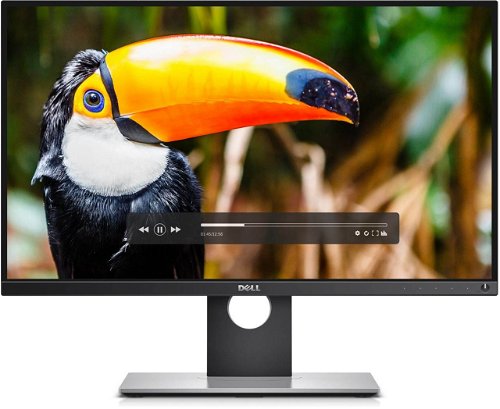
Very accurate calibration, thin frame, extremely high resolution, authentic colors and many other superlative behind this professional monitor Dell UltraSharp 25 PremierColour technology. Imagine the luxury of all parameters are precisely tuned already in production. In short, buy, sell, expand, turn and work!
This monitor has very accurate calibration, a thin frame, extremely high resolution, authentic colours and many other super features make this professional monitor, the Dell UltraSharp 25 with PremierColour technology, the best choice possible. Imagine the luxury of all these parameters precisely tuned and already in production.
Five Reasons to Buy
Extremely thin frame for connecting two or more monitors
100% coverage of colour spaces, Adobe RGB and sRGB
Support for "KVM" to view the applications from two computers on one monitor
Stunning qHD resolution 2560×1440
Very wide viewing angles for maximum comfort
Colours on a Professional Level
The PremierColour monitor ensures consistent and accurate colors that are perfectly adjusted at the factory. There is no problem to set it up according to your tastes and get incredible colour depth of 1.07 billion colours and a wide colour range. It has approximately 64 times more colours than standard monitors. The monitor offers 100% coverage of Adobe RGB and 100% sRGB coverage area, plus two new colour spaces: 100% area coverage REC 709 and 98% coverage of the DCI P3 area which are popular among filmmakers and post-production animation requiring the most advanced technology.
Unrivaled Viewing Experience
A combination of very thin frame and extremely wide viewing angles could only result in perfection. Thin frames are used among other things for the eventual combination of two or more monitors. Stunning resolution qHD with IPS technology represents an unprecedented show with amazing sharpness, which can be seen from abnormally wide viewing angle of 178° / 178° in each direction. You can tilt, and rotate in all directions, according to your wishes, so out get the most comfortable viewing of your monitor,
Intuitive Control, Simple Administration
You have an option called,"KVM show" redeem. If you want to see applications from two computers simultaneously on one screen, you use this option. This is controlled using a single keyboard and mouse. It is sure to please demanding users with extensive connectivity options, namely through HDMI 1.4 / MHL 2.0, DisplayPort / miniDisplayPort, 4 x USB 3.0, with one charging port and 2 x USB 3.0 for connecting to a computer (KVM).
Denotes the distance between the lower left and upper right corner of the screen. It is quoted in inches,while 1 "= 2.54 cm. How big a diagonal measurement to choose with which device and what are the benefitsand the disadvantages?
The monitor resolution type refers to the number of pixels that can be displayed on the monitor screen. Choosing the right resolution type can have a significant impact on the overall experience of using your monitor, whether it's for work, gaming or watching movies.
Monitor resolution refers to the number of pixels on the monitor screen, expressed as width × height. Higher resolutions provide a more detailed and clearer image, while lower resolutions may be suitable for smaller monitors or to save power.
Denotes the distance between the lower left and upper right corner of the screen. It is quoted in inches,while 1 "= 2.54 cm. How big a diagonal measurement to choose with which device and what are the benefitsand the disadvantages?
The monitor resolution type refers to the number of pixels that can be displayed on the monitor screen. Choosing the right resolution type can have a significant impact on the overall experience of using your monitor, whether it's for work, gaming or watching movies.
Monitor resolution refers to the number of pixels on the monitor screen, expressed as width × height. Higher resolutions provide a more detailed and clearer image, while lower resolutions may be suitable for smaller monitors or to save power.
The monitor connection type refers to the interface that is used to transmit the video signal from the source (e.g. computer) to the monitor. Different connection types support different resolutions and refresh rates and can affect the quality and performance of the display on the monitor.
Dell Products, Raheen Business Park, Limerick, Ireland, [email protected], www.dell.com
This American multinational corporation based in Round Rock (Texas, USA) is a leading player in the field of information technology. The Dell brand carries the hallmark of quality and is known throughout the world. In 2010, it ranked fifth in the poll of most admired computer companies.
Dell's operations are incredibly broad - the company can be found not only in personal computers, servers, storage devices, switches, software and peripherals, but also HDTV, cameras, printers and MP3 players. The company, whose history began in 1984, now ranks among the giants in the field.
Note:
Specifications can be changed without notice. Images are for illustrative purposes only.
Dobrý den,
utáhne tento monitor grafická karta GeForce GTX 750?
Děkuji
Dobrý den,
utáhne tento monitor grafická karta GeForce GTX 750?
Děkuji
Dobrý den,
můj notebook má grafickou kartu GeForce GTX 1050 + Intel HD Graphic 630. Utáhne po připojení přes HDMI plné rozlišení monitoru Dell UP2516D? Bude monitor bez problémů fungovat?
Děkuji.
Dobrý den,
můj notebook má grafickou kartu GeForce GTX 1050 + Intel HD Graphic 630. Utáhne po připojení přes HDMI plné rozlišení monitoru Dell UP2516D? Bude monitor bez problémů fungovat?
Děkuji.
Dobrý den, má monitor funkci omezující škodlivé modré záření? Doporučil byste mi tento monitor na úpravu fotek a sledování videí, nebo je výrazně lepší varianta Dell U2718Q? Nejsem si ale jist, zda by můj počítač druhý zmíněný monitor dokázal plně využít (Dell Latitude 15 5501, Intel Core i7 9850H Coffee Lake, RAM 16GB DDR4, NVIDIA GeForce MX150). Pochopil jsem prosím správně, že k propojení k noteboku slouží kabel USB3 - USB3, nebo je třeba HDMI? Předem děkuji za odpověď.
Dobrý den, má monitor funkci omezující škodlivé modré záření? Doporučil byste mi tento monitor na úpravu fotek a sledování videí, nebo je výrazně lepší varianta Dell U2718Q? Nejsem si ale jist, zda by můj počítač druhý zmíněný monitor dokázal plně využít (Dell Latitude 15 5501, Intel Core i7 9850H Coffee Lake, RAM 16GB DDR4, NVIDIA GeForce MX150). Pochopil jsem prosím správně, že k propojení k noteboku slouží kabel USB3 - USB3, nebo je třeba HDMI? Předem děkuji za odpověď.
Dobry den,
objednal som si dnes tento monitor. Ak je tam napisane "Na objednavku do 4 pracovnich dnu" mozem sa spolahnut na to, ze sa tento monitor da naozaj kupit a objednavka bude splnena do tych cca 4 dni, alebo je mozne, ze sa uz nebude dat objednat?
Dakujem
Dobry den,
objednal som si dnes tento monitor. Ak je tam napisane "Na objednavku do 4 pracovnich dnu" mozem sa spolahnut na to, ze sa tento monitor da naozaj kupit a objednavka bude splnena do tych cca 4 dni, alebo je mozne, ze sa uz nebude dat objednat?
Dakujem
Dobrý den,
mám grafickou kartu - Gigabyte NVidia GTX 550 Ti (GV-N550OC-1GI). Zvládne tato grafika plné rozlišení tohoto monitoru? Dle specifikace by měla, ale přesto ...
Dobrý den,
mám grafickou kartu - Gigabyte NVidia GTX 550 Ti (GV-N550OC-1GI). Zvládne tato grafika plné rozlišení tohoto monitoru? Dle specifikace by měla, ale přesto ...
Try our cookiesAlza.cz a. s., Company identification number 27082440, use cookies and other data to ensure the proper functioning of the website and, with your consent, also, among other things, to personalize advertising and the content of our websites. By clicking on the “I understand“ button, you agree to the use of cookies and the transfer of data regarding the behavior on the website for displaying targeted advertising on social networks and advertising networks on other websites.
We use 8 categories of cookies on our website:
Technical cookies
These are strictly necessary for the functioning of the website and the features you choose to use. Without them, our website would not work; you wouldn't be able to log in to your user account, for example.
Functionality cookies
These cookies allow us to remember your basic choices and improve the user experience. These include remembering your preferred language or allowing you to stay logged in permanently.
Social media cookies
These cookies allow us to easily link you to your social media profile and, for example, allow you to share products and services with your friends and family.
Content personalisation
These cookies allow us to show you content and ads according to the information we have about you to best meet your needs. This includes what content you have viewed, or on what device you are accessing our website.
Non-personalised advertising
These cookies allow us to show you general ads for products and services.
Personalised advertising
Thanks to these cookies, we and our partners can offer you relevant products and services based on your purchases, your shopping behaviour and your preferences.
Audience metrics
These cookies allow us to optimise our site for your convenience based on how you use it. The aim is to remember or anticipate your choices. This includes, for example, the use of features, their location, or the behaviour on the page.
By giving your consent to the processing of cookies, functionality and analytical cookies will be installed on the device you use to browse the website (click on the "I understand" button for both categories, or you can select only one of the categories by clicking on the "Settings" button). We always install technical cookies on your device, even without your explicit consent, because without them our website would simply not work.
You can revoke your consent to the processing of cookies. In connection with our company's cookie processing, you also have the following rights: the right to access cookies, delete, modify, supplement and correct them, restrict processing and the right to lodge a complaint with the Office for Personal Data Protection. Read more about your rights.