



Dobrý den, vlastním už starší počítač MacBook Pro 13" (rok 2013), takže nemá USB-C, má Thunderbolt 2 a moje otázka zní, jestli je možné plně využívat dokovací stanice kuřpíkladu s přikoupením dalšího příslušenství, pokud ano, tak jakého? Děkuji za odpověď.
27" BenQ PD2710QC

LCD Monitor - Quad HD 2560 × 1440, IPS, 16:9, 5ms, 350cd/m2, 1000:1 contrast, DisplayPort, HDMI 1.4, mini DisplayPort, USB-C, USB, LAN, headphone output, adjustable height, pivot, speakers, VESA, Power Delivery
Show full description
Code:
WT157u1c
Producer's Website:
Don't like the alternatives? Choose from the full product list

27" BenQ PD2710QC
Discontinued
27" BenQ PD2710QC
The BenQ PD2710QD is a professional 27" IPS monitor with premium image quality that corresponds to 100% coverage of sRGB color space and Rec 709. It also offers a high WQHD resolution of 2560×1440 with a 16: 9 aspect ratio. It is appreciated not only by graphic artists, BenQ PD2710QC is designed to meet the specific needs of users, offering USB-C, so with the only cable you can transfer images, recharge your notebook, and use the built-in docking station.
The great product underlines the rich ergonomics, such as adjusting the screen to any position by height shifting, tilting, or turning to the Pivot position. There is also the traditional eye-protection technology, Flicker-free and Low Blue Light, to prevent background blinking. They reduce the radiated harmful blue light.

WQHD Resolution
Arrange with fresh, amazing graphics with 2K image resolution.

Not filled Alternative text to the photo!
Modern docking station with USB-C
USB-C removes cable clutter from your desk and makes it easier to connect your laptop or tablet. It is the only cable you need for complete docking, including recharging. The dock provides USB 3.0 and USB-C connectors for peripherals, wired networks, audio connectors, and DisplayPort output for the next monitor.

Coverage 100% sRGB and Rec.709 standard
Rec.709 and 100% coverage of sRGB color space will work with the highest precision.

Wide angle of view with IPS technology
The PD2710QC is equipped with an IPS panel that offers wide viewing angles (178 degrees horizontally and vertically) for exceptional clarity, and fresh image quality at all angles.
Darkroom mode
Darkroom adjusts image brightness and contrast, provides crisp detail, and creates optimal settings for working in a dark environment.


CAD / CAM mode
You will never miss a single detail! The revolutionary CAD/CAM mode offers a high-contrast image to show the lines, and shapes, of technical drawings. Excellent display parameters are best used in Pro/E, SOLIDWORKS, AutoCAD, CATIA, and other CAD/CAM solutions.
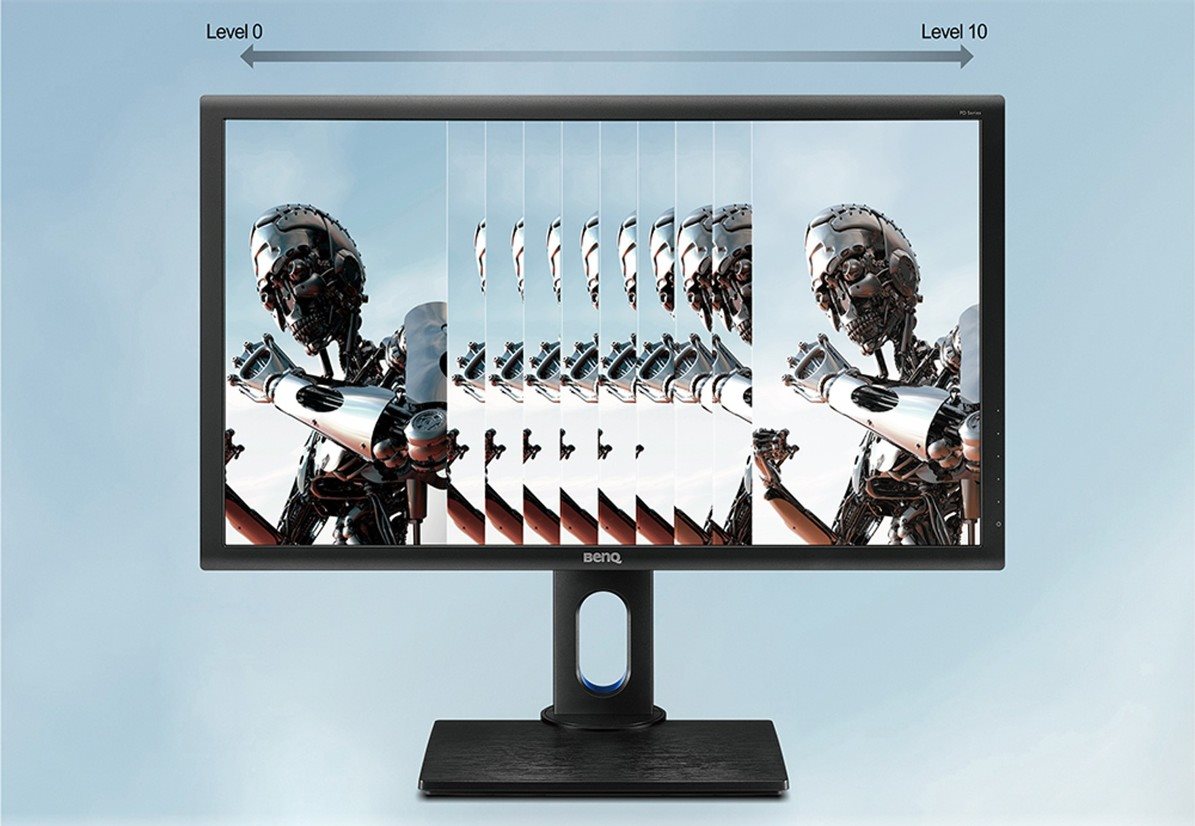
Animation mode
The animation mode enhances the details in dark shadows to easily debug your designs, while the areas of the image that do not need this feature remain unchanged.

10 preset levels
Animation mode lets you adjust the backlight intensity by 10 preset levels.
Workspace division
With BenQ's Display Pilot, you can divide the screen into the desired areas for better multitasking.

DualView mode
You can improve your workflow by switching to DualView, where you can present new designs in different display modes, side by side.

Rich ergonomics and Pivot
Ergonomics plays a significant role in productivity. Set your monitor to the right height to make it comfortable and keep working. Use the Pivot function to automatically tilt the image vertically.


BenQ Flicker-free
Hours of work in front of the monitor can now be completed without feeling tired or irritated. BenQ Flicker-free technology eliminates blinking of the image at all levels of brightness, and effectively reduces eye fatigue. Normal LED backlit screens flash at 200x per second. Your eyes do not have to see blinking, but they definitely feel it. Relieve your eyes from flashing by moving to the PD2710QC monitor.

Low Blue Light
Each monitor produces blue light, which is one of the main causes of eye damage, eye fatigue, headaches, and sleep disturbances. Unique BenQ Low Blue Light technology eliminates the harmful blue light spectrum of colors transmitted by regular computer screens, and lets you spend time in front of your computer in healthier conditions. Use 4 preset types depending on the activity.

Specifications
Extended warranty
685.8 mm (27 ")
2560 × 1440 Quad HD
Construction
Warranty
Extended warranty
Display diagonal and resolution
Construction
Construction
Panel and screen technology
Panel type
Refresh rate
Response time
Maximum brightness
Native contrast
Aspect Ratio
Aspect Ratio Type
Aspect Ratio
Connection
DisplayPort, HDMI, mini DisplayPort, USB-C
Graphical user interface (GUI) standards
Data interface
Audio interface
Features and functions
Features
Functions
Equipment
Dimensions and weight
Width
Height
Depth
Weight
VESA mounting
Packaging
Cables included
Colour
Black, Silver
More Specifications

This Taiwanese corporation has offices around the world and is well-known for its consumer electronics. It has further offerings in communication and computing technology, and thanks to several strategic acquisitions, has been able to enter new markets and gain prominence. It is also a major sponsor of e-sports competitions, which has brought it to prominence among younger consumers. Millions of satisfied customers around the globe can attest to BenQ's matchless quality and innovation.
Note:
Specifications can be changed without notice. Images are for illustrative purposes only.
