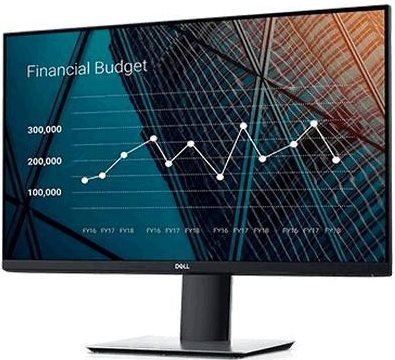
This Dell LCD monitor will expand your PC setup with panel with a screen size of 27". The aspect ratio of this device is 16:9. This LCD monitor works on the basis of IPS technology, popular for its high image and colour quality and good viewing angles. The image resolution of this monitor is 1920 × 1080 px. The response time of 5 ms is adequately quick for ordinary PC work, as well as media and games. Its refresh rate of 60 Hz represents the usual standard. This Dell monitor presents a brightness of 300 cd/m2. The DisplayPort, HDMI 1.4 and VGA is utilised for connecting to your PC.
27" Dell P2719H Professional LCD Monitor Key Features
Maximum supported resolution: 1920 × 1080 px
LCD monitor uses IPS technology
Anti-reflective surface of the LCD monitor is glare-free
5 ms response time and refresh rate of 60 Hz
Brightness: 300 cd/m2
Can be flipped into portrait mode
Mount with adjustable height
Practical USB hub for connecting electronics
Blue light filter for healthier eyes
27" Dell P2719H Professional typical power consumption is equal to 19 W
Connectivity: usb 2.0 and usb 3.2 gen 1 (usb 3.0)
27" Dell P2719H Professional Monitor Design
The Dell monitor has dimensions measuring 60.99 × 39.43 × 18.5 cm. In addition, you can adjust the height as needed. The PC monitor model has a weight of 4.35 kg. A good degree of versatility is made possible by the pivot function, meaning the monitor can be turned 90°. To make your work even easier, this model works as a USB hub. The interface for the input is essential. The 27" Dell P2719H Professional has the DisplayPort, HDMI 1.4 and VGA type.
Modern Functions of the 27" Dell P2719H Professional Monitor
While working in the night, you will surely appreciate the blue light filter on the monitor, which helps improve your sleep quality. Flicker-Free mode provides a very effective protection against eye strain and fatigue by eliminating image flickering.
Denotes the distance between the lower left and upper right corner of the screen. It is quoted in inches,while 1 "= 2.54 cm. How big a diagonal measurement to choose with which device and what are the benefitsand the disadvantages?
The monitor resolution type refers to the number of pixels that can be displayed on the monitor screen. Choosing the right resolution type can have a significant impact on the overall experience of using your monitor, whether it's for work, gaming or watching movies.
Monitor resolution refers to the number of pixels on the monitor screen, expressed as width × height. Higher resolutions provide a more detailed and clearer image, while lower resolutions may be suitable for smaller monitors or to save power.
Denotes the distance between the lower left and upper right corner of the screen. It is quoted in inches,while 1 "= 2.54 cm. How big a diagonal measurement to choose with which device and what are the benefitsand the disadvantages?
The monitor resolution type refers to the number of pixels that can be displayed on the monitor screen. Choosing the right resolution type can have a significant impact on the overall experience of using your monitor, whether it's for work, gaming or watching movies.
Monitor resolution refers to the number of pixels on the monitor screen, expressed as width × height. Higher resolutions provide a more detailed and clearer image, while lower resolutions may be suitable for smaller monitors or to save power.
The monitor connection type refers to the interface that is used to transmit the video signal from the source (e.g. computer) to the monitor. Different connection types support different resolutions and refresh rates and can affect the quality and performance of the display on the monitor.
Dell Products, Raheen Business Park, Limerick, Ireland, [email protected], www.dell.com
This American multinational corporation based in Round Rock (Texas, USA) is a leading player in the field of information technology. The Dell brand carries the hallmark of quality and is known throughout the world. In 2010, it ranked fifth in the poll of most admired computer companies.
Dell's operations are incredibly broad - the company can be found not only in personal computers, servers, storage devices, switches, software and peripherals, but also HDTV, cameras, printers and MP3 players. The company, whose history began in 1984, now ranks among the giants in the field.
Note:
Specifications can be changed without notice. Images are for illustrative purposes only.
Dobrý den, chcem sa spýtať, aká dlhá je záruka na tento monitor v prípade, keď si ho objednám na IČO. Dakujem
Dobrý den, chcem sa spýtať, aká dlhá je záruka na tento monitor v prípade, keď si ho objednám na IČO. Dakujem
Prosím o radu 27" Dell P2719H Professional vs. MSI Gaming Optix G271 - LED monitor 27" Nemohu si mezi nimi vybrat nyní mám dva mnohem slabší kusy a bolí mě z nich oči, potřebuji, aby to bylo vše co nejlépe vidět a bez odlesků nebo nadměrného záření. Jsem hráč, ale teď víc web a filmy, takže např. pozorovací úhly. Děkuji za každý hlas lidi i profíků :D Chci trochu pokroku
Prosím o radu 27" Dell P2719H Professional vs. MSI Gaming Optix G271 - LED monitor 27" Nemohu si mezi nimi vybrat nyní mám dva mnohem slabší kusy a bolí mě z nich oči, potřebuji, aby to bylo vše co nejlépe vidět a bez odlesků nebo nadměrného záření. Jsem hráč, ale teď víc web a filmy, takže např. pozorovací úhly. Děkuji za každý hlas lidi i profíků :D Chci trochu pokroku
V minulých dnech jsem u Alzy koupil monitor DELL P2719H (nemá repro). Připojil jsem k monitoru 2 stejné PC (Win 10) prostřednictvím HDMI (slučovač) - vše v pořádku. Jak mám získat z tohoto propojení - výstup AUDIO k připojení externích stolních reproduktorů (stereo) ?
Děkuji za radu.
Škuthan
V minulých dnech jsem u Alzy koupil monitor DELL P2719H (nemá repro). Připojil jsem k monitoru 2 stejné PC (Win 10) prostřednictvím HDMI (slučovač) - vše v pořádku. Jak mám získat z tohoto propojení - výstup AUDIO k připojení externích stolních reproduktorů (stereo) ?
Děkuji za radu.
Škuthan
Dobrý den,
rád bych tento monitor propojil s Macbookem Air (Thunderbolt)
a Macbookem Pro 2014 (HDMI, Thunderbolt)
Pokud správně chápu, port Thunderbolt a MiniDisplayPort jsou stejné vstupy?
je třebadokoupit nějaký kabel nebo redukci? Díky
Dobrý den,
rád bych tento monitor propojil s Macbookem Air (Thunderbolt)
a Macbookem Pro 2014 (HDMI, Thunderbolt)
Pokud správně chápu, port Thunderbolt a MiniDisplayPort jsou stejné vstupy?
je třebadokoupit nějaký kabel nebo redukci? Díky
Try our cookiesAlza.cz a. s., Company identification number 27082440, use cookies and other data to ensure the proper functioning of the website and, with your consent, also, among other things, to personalize advertising and the content of our websites. By clicking on the “I understand“ button, you agree to the use of cookies and the transfer of data regarding the behavior on the website for displaying targeted advertising on social networks and advertising networks on other websites.
We use 8 categories of cookies on our website:
Technical cookies
These are strictly necessary for the functioning of the website and the features you choose to use. Without them, our website would not work; you wouldn't be able to log in to your user account, for example.
Functionality cookies
These cookies allow us to remember your basic choices and improve the user experience. These include remembering your preferred language or allowing you to stay logged in permanently.
Social media cookies
These cookies allow us to easily link you to your social media profile and, for example, allow you to share products and services with your friends and family.
Content personalisation
These cookies allow us to show you content and ads according to the information we have about you to best meet your needs. This includes what content you have viewed, or on what device you are accessing our website.
Non-personalised advertising
These cookies allow us to show you general ads for products and services.
Personalised advertising
Thanks to these cookies, we and our partners can offer you relevant products and services based on your purchases, your shopping behaviour and your preferences.
Audience metrics
These cookies allow us to optimise our site for your convenience based on how you use it. The aim is to remember or anticipate your choices. This includes, for example, the use of features, their location, or the behaviour on the page.
By giving your consent to the processing of cookies, functionality and analytical cookies will be installed on the device you use to browse the website (click on the "I understand" button for both categories, or you can select only one of the categories by clicking on the "Settings" button). We always install technical cookies on your device, even without your explicit consent, because without them our website would simply not work.
You can revoke your consent to the processing of cookies. In connection with our company's cookie processing, you also have the following rights: the right to access cookies, delete, modify, supplement and correct them, restrict processing and the right to lodge a complaint with the Office for Personal Data Protection. Read more about your rights.