




Dobrý den je tento monitor vhodný i na občasné hraní her a kancelářskou práci.
24" BenQ BL2420PT


Monitor - Quad HD 2560 × 1440, IPS, 16:9 wide-angle, 5ms, 60Hz, 8bit, 300cd/m2, 1000:1 contrast, HDMI, DisplayPort, VGA and DVI, USB, headphone output, adjustable height, pivot, speakers, VESA
Show full description
Code:
WT130b0u
Producer's Website:
Don't like the alternatives? Choose from the full product list
- Reviews 11
- Help and manuals 17
- Specifications
- Photos & Videos 11
- Alternatives 8
- Accessories and suggested products

24" BenQ BL2420PT
Discontinued
24" BenQ BL2420PT

The professional BenQ BL2420PT monitor offers a 23.8" IPS display with QHD resolution (2560 x 1440). It is designed for demanding users who require perfect colour reproduction and exquisite level of detail, delivered by the special CAD/CAM mode, Animation Mode and 100% sRGB.
The monitor comes with Display Pilot software that enables you to adjust monitor settings quickly and easily.
The BenQ BL2420PT is also designed to be ergonomic and its wide range of monitor settings means you can place it on your desk in the way that suits you best.
The BenQ BL2420PT doesn’t harm your eyes. Thanks to Flicker-Free and Low Blue Light BenQ technology, it effectively reduces fatigue and eye strain.
Key features
- Professional design monitor
- QHD 2560 x 1440 resolution
- CAD/CAM Mode, Animation Mode
- High user comfort - ergonomics, Display Pilot
- IPS display, 100% sRGB, wide viewing angles
- Eye protection - Flicker-Free, Low Blue Light
BenQ Eye-care
The latest range of BenQ Eye-Care monitors delivers maximum eye protection while providing a pleasant and comfortable viewing experience, courtesy to the advanced Flicker-Free and Low Blue Light technology.
This photo is off the lightbox and not in it so show.

BenQ Flicker-Free
BenQ Flicker-Free technology eliminates image flickering at all brightness levels and effectively reduces eye fatigue. Conventional LCD screens with LED backlighting flicker 200x per second. Your eyes may not see that flickering, but they certainly feel it. Give your eyes a much need relief and switch to the BL2420PT.
This photo is off the lightbox and not in it so show.

BenQ Low Blue Light
Every monitor produces a shade of blue light that is one of the leading causes of eye strain, eye damage, headaches and sleeping disorders. Thankfully, unique BenQ Low Blue Light Technology is designed to filter out the harmful blue light emitted by common computer monitors, effectively diminishing eye fatigue and irritation and improving your eye health.
This photo is off the lightbox and not in it so show.

QHD resolution
QHD 2560 x 1440 has over 77% more working space comparing with 1920x1080 Full HD displays.
This photo is off the lightbox and not in it so show.

IPS technology offers many advantages
Each colour is faithfully represented with optimal precision from every viewing angle to deliver a great visual experience. Thanks to the 8-bit panel rendering over 16.7 million colours, every image is displayed in the richest and most realistic colours possible.
Ultra-wide viewing angles of 178°/178°
For a realistic and natural picture with truly faithful colour reproduction and excellent detail from virtually any perspective—left, right, top and bottom
100% sRGB coverage
It provides image that far exceeds colour monitors with 72% NTSC coverage in quality and is characteristic for its rich tones and vibrant colours
This photo is off the lightbox and not in it so show.

CAD/CAM Mode
The BenQ BL2420PT delivers an exceptional visual performance. It includes CAD/CAM Mode, which provides precise rendering of even the smallest details in Pro/E, SolidWorks, AutoCAD, CATIA and other CAD/CAM software. It adjusts colour and contrast of your monitor so that you can be sure you will see every dot and every comma.
This photo is off the lightbox and not in it so show.

This photo is off the lightbox and not in it so show.

Animation Mode
The unique BenQ Animation Mode was developed to make it easier to distinguish texture detail in darker areas. Animation Mode enhances details in dark shadows so you can fine-tune creations effortlessly, while areas that do not require this function remain unaltered.
10-Level animation mode adjustment
10 levels of display brightness reveal details in darker areas and allow you to create a precise artwork.
This photo is off the lightbox and not in it so show.

Not filled with alternative text to a photo!
Display Pilot
Display Pilot is a complete software package for designers that need better setting adjustment for their monitor. The Application Tuning tool allows you to assign specific colour modes to frequently used applications on your PC and Display Pilot then automatically applies the default colour mode for each application you run. Among other features, Display Pilot enables you to set auto-pivot image rotation, desktop partition, PIP/PBP and other OSD settings, such as brightness adjustment.
This photo is off the lightbox and not in it so show.

Ergonomic monitor - height adjustable stand (HAS)
The monitor’s wide range of settings—height, tilt, pivot, or rotation—allows you to turn your monitor into your own personalised workstation that best fits your height and viewing habits, with a maximum distance of 140 mm between the bottom of the screen and the base.
This photo is off the lightbox and not in it so show.

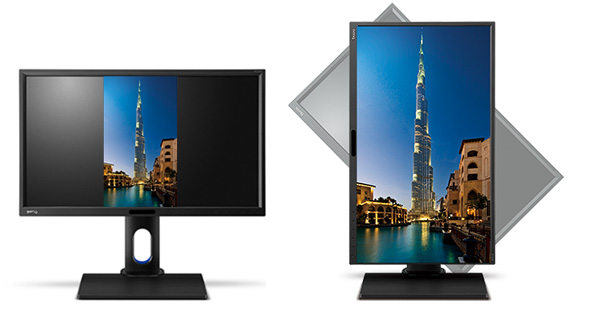
Auto-Pivot
BenQ smart detection screen orientation auto-pivots the display horizontally and vertically, without requiring any Windows drivers or graphics card settings.
This photo is off the lightbox and not in it so show.
Specifications
Extended warranty
609.6 mm (24 ")
2560 × 1440 Quad HD
Construction
Warranty
Extended warranty
Display diagonal and resolution
Construction
Construction
Panel and screen technology
Panel type
Refresh rate
Response time
Maximum brightness
Native contrast
Panel technology
Aspect Ratio
Aspect Ratio Type
Aspect Ratio
Backlight and colour
Colour depth
Connection
DisplayPort, DVI, HDMI, VGA
Graphical user interface (GUI) standards
Data interface standards
Audio interface
Colour gamut
100 %
Features and functions
Features
Functions
Equipment
Dimensions and weight
Width
Height
Depth
Weight
VESA mounting
Packaging
Cables included
Energy specifications
Energy efficiency class in SDR mode
Energy consumption in SDR mode
Colour
Black
More Specifications

This Taiwanese corporation has offices around the world and is well-known for its consumer electronics. It has further offerings in communication and computing technology, and thanks to several strategic acquisitions, has been able to enter new markets and gain prominence. It is also a major sponsor of e-sports competitions, which has brought it to prominence among younger consumers. Millions of satisfied customers around the globe can attest to BenQ's matchless quality and innovation.
Note:
Specifications can be changed without notice. Images are for illustrative purposes only.
