





Dobrý den, používám na svém macbooku 2 externí monitory, jeden z nich výše zmíněný Odyssey (oba dva přes DP). Dlouhou dobu jsem neměl s tím problém, ale poslední týdny mi Odyssey nejde přes DP propojit. Zkoušel jsem jiný port na Macu (tím to není), zkoušel jsem jiný kabel (tím to také není), druhý monitor na všem zmíněném funguje. Momentálně to řeším propojením přes HDMI, ale beru to jako dočasné řešení. Nevíte čím by to mohlo být, a jak by se to dalo řešit? Děkuji moc.
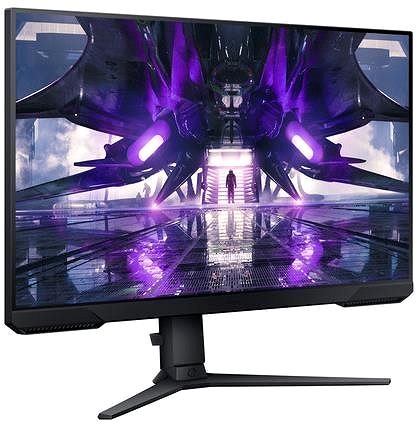
27" Samsung Odyssey G32A
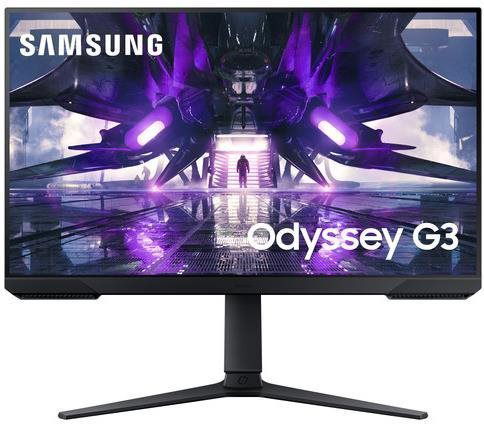

Monitor - Full HD 1920 × 1080, VA, 16:9 wide-angle, 1ms, 165Hz, FreeSync, 250cd/m2, 3000:1 contrast, HDMI and DisplayPort, headphone output, adjustable height, pivot, VESA
Show full description
Code:
WH605e1g2c
Producer's Website:
Don't like the alternatives? Choose from the full product list
- Reviews 8
- Help and manuals 12
- Specifications
- Photos & Videos 9
- Alternatives 8
- Accessories and suggested products

27" Samsung Odyssey G32A
Discontinued
27" Samsung Odyssey G32A
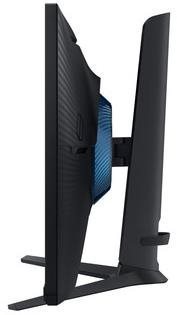
This Samsung LCD monitor will enrich your PC experience with panel boasting a screen size of 27". The aspect ratio of this device is 16:9. This LCD monitor is powered by the VA technology, boasting a faithful image reproduction with high contrast. The screen resolution of this monitor is 1920 × 1080. The very fast response of 1 ms is perfect for games and keeps the images clear. Its refresh rate of 165 Hz is designed for more demanding users, notably reduces eye strain and fatigue, and it is used to seamlessly render content. The Samsung monitor presents a brightness of 250 cd/m2. The HDMI and DisplayPort is utilised for connecting to your computer.
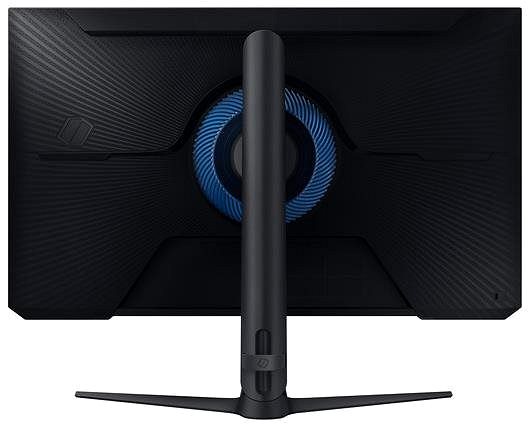
27" Samsung Odyssey G32A LCD Monitor Key Features
- LCD monitor measures: 27"
- Max. resolution supported: 1920 × 1080
- LCD monitor works using VA technology
- The matte surface of this LCD monitor stops annoying glare
- 1 ms response time, refresh rate of 165 Hz
- Maximum brightness: 250 cd/m2
- FreeSync for synchronisation with AMD graphics cards
- LCD monitor is compatible with 100×100 VESA mounts
- Monitor pivot
- Mount with adjustable height
- Blue light filter to ensure you can fall asleep easily even after working late
27" Samsung Odyssey G32A Monitor Construction
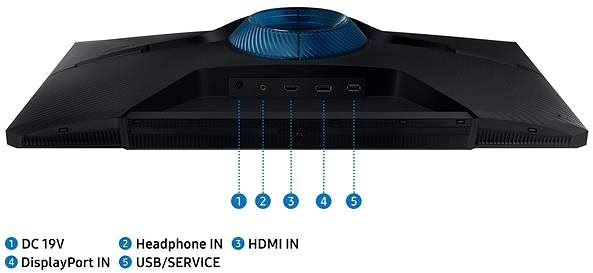
This Samsung PC monitor measures 61.9 × 52.1 × 23.4 cm, and you can adjust the height according to your needs. In addition to the classic stand, the PC monitor can be hung on the wall with a VESA stand. The monitor model weighs 4.8 kg. A useful degree of versatility is provided by its pivot function, meaning the monitor can be rotated up to 90°. The interface for the input is essential. This 27" Samsung Odyssey G32A has the HDMI and DisplayPort type. You can plug headphones directly into the monitor.
Practical Functions of the 27" Samsung Odyssey G32A Monitor
While working at night, you will undoubtedly appreciate the blue light filter built into this monitor, which helps improve your sleep quality. Flicker-Free mode provides a competent shield against eye strain and fatigue by removing screen flickering. The monitor includes a highly demanded feature for any gamer called FreeSync, which is image synchronisation with AMD graphics cards.
Specifications
27" (68.58 cm)
1920 × 1080
Construction
Panel technology
Power outlet type
Country
Display diagonal and resolution
Construction
Construction
Panel and screen technology
Panel technology
Panel type
Refresh rate
Response time
Maximum brightness
Native contrast
Surface display
Technology
Aspect Ratio
Aspect Ratio Type
Aspect Ratio
Connection
Graphical user interface (GUI) standards
Audio interface
HDMI
DisplayPort
Features and functions
Features
Functions
Colour
Black
Dimensions and weight
Width
Height
Depth
Weight
VESA mounting
Packaging
Cables included
Energy specifications
Energy efficiency class in SDR mode
Energy consumption in SDR mode
Energy efficiency class in HDR mode
Standby consumption
Maximum power consumption
Typical power consumption
More Specifications

Samsung Electronics Czech and Slovak, s.r.o., V parku 2323/14, Chodov, 148 00 Praha 4, 800 726 786, [email protected]
Creating a better world – the immodest vision which has driven Samsung since its inception in 1938. The courage to invest in the development of new technologies is typical for the company, as evidenced by a series of visionary solutions. Currently, Samsung is the largest group of companies in South Korea and the third largest worldwide conglomerate by revenue.
Samsung consumers associate the brand with high-quality consumer electronics. It is known for its Galaxy series, one of the best and most sought after mobile phones in its class. One must also mention Samsung TVs, where the company has long been at the cutting edge in technology and quality. The competence of the company is much broader. It is active in machinery and heavy industry, chemicals, construction, retail, and financial services.
Note:
Specifications can be changed without notice. Images are for illustrative purposes only.
