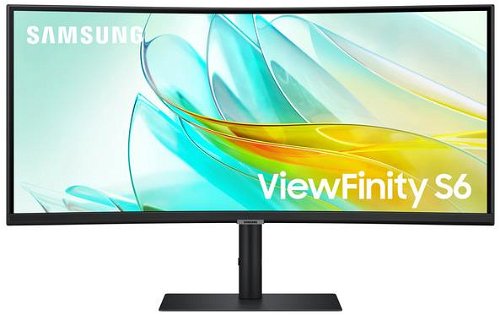
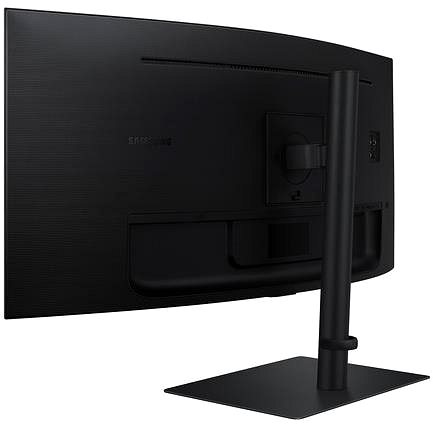
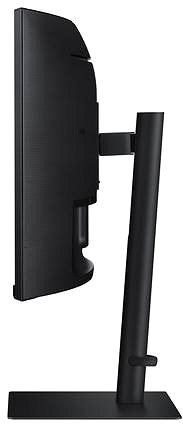
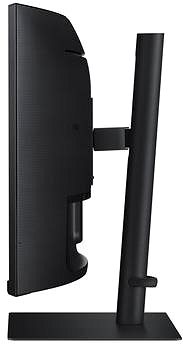
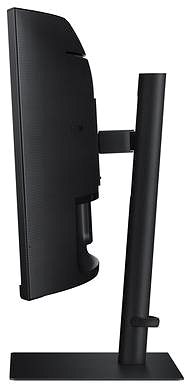
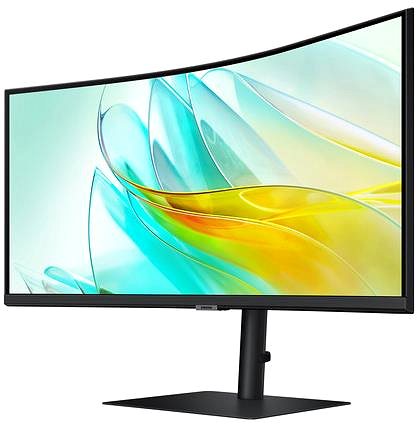
This 34" Samsung LCD monitor allows you to work in Ultra Wide QHD (3440 × 1440) resolution. The high contrast of its VA panel enables deeper reproduction of black. This makes it easier for you to distinguish objects even in darker areas. The display's matte surface reduces light reflection in the room and helps against light coming from a window. The 21:9 widescreen monitor is ideal for multitasking or even streaming, where you can have multiple windows open side by side. The maximum brightness of 350 cd/m² is designed for working in areas protected from direct sunlight and is also suitable for rooms that are not too brightly lit. It can be mounted on a wall or stand using a 100×100 VESA mount. This allows you to easily install multiple monitors in your office.
Key Features of the 34" Samsung ViewFinity S65UC Monitor
Work efficiently with this 34" Samsung LCD monitor with Ultra Wide QHD (3440 × 1440) resolution
Uses a VA panel with a refresh rate of up to 100Hz and a 5ms response time for colour display
The matte finish display prevents glare and reduces eye strain
The 21:9 widescreen format offers broader multitasking possibilities
Maximum brightness of 350 cd/m² is designed for work out of direct sunlight and in less illuminated rooms
FreeSync technology ensures smooth image loading
Curved monitor construction
You'll Love the Features and Functions of This Samsung Monitor
The 34" VA PC monitor is designed with a curved display, which is more natural for the human eye due to the optimal field of view. It also allows you to relax and enjoy a film or a game. It has a filter that lets less harmful blue light through and a Flicker-free function that reduces the frequency of monitor flickering. This can help reduce eye fatigue and improve sleep quality. Automatic ambient light sensing allows the display to adjust its brightness so that it is not too bright at night and ensures readability during the day. The PiP (Picture in Picture) function displays a small window with a second image or video on the display next to the main image. It allows you to easily switch between the main image and the smaller embedded window without having to cancel the main activity on the screen. You can tilt the monitor and adjust it to your desired height so that its top is at eye level, promoting good posture, eliminating the risk of back pain, avoiding strain on your cervical spine, and preventing scoliosis. The tilt option is especially appreciated by those who stand while working at their desk.
You'll be delighted with the Samsung monitor's equipment
You can connect the monitor to your computer or laptop using HDMI, USB-C, and DisplayPort. If your computer doesn't have a suitable connector, you can expand the connectivity by purchasing a compatible port replicator. A port replicator will also be useful for connecting two monitors. The built-in speakers provide a convenient solution for sound and image in one device. In addition to the monitor itself, the package also includes an HDMI, DisplayPort, and USB-C cable.
Choose a monitor based on its native contrast
The Samsung monitor provides a native contrast of 3000:1. The native contrast ratio of a monitor reflects the difference between the brightest and darkest displayed point. If the contrast ratio of the monitor is 3000:1, it means that the brightest point (white) is 3000× brighter than the darkest point (black).
Data shown on the energy label for monitors:
The manufacturer and model of the monitor are listed in the header
Scale of energy classes (left), specific energy class of the product (right)
kWh/1000h: energy consumption in kilowatt-hours per 1,000 hours of operation
SDR kWh/1000h: energy consumption in SDR mode in kilowatt-hours per 1,000 hours of operation
HDR kWh/1000h: energy consumption in HDR mode in kilowatt-hours per 1,000 hours of operation
Pixels: vertical and horizontal display resolution (3440 × 1440 px)
Units in inches and centimetres: screen screen size
After scanning the QR code, you will be redirected to the European EPREL database, where you will see the display type, the technology used in its production (e.g., LCD, QLED), and other monitor specifications.
Denotes the distance between the lower left and upper right corner of the screen. It is quoted in inches,while 1 "= 2.54 cm. How big a diagonal measurement to choose with which device and what are the benefitsand the disadvantages?
The monitor resolution type refers to the number of pixels that can be displayed on the monitor screen. Choosing the right resolution type can have a significant impact on the overall experience of using your monitor, whether it's for work, gaming or watching movies.
Monitor resolution refers to the number of pixels on the monitor screen, expressed as width × height. Higher resolutions provide a more detailed and clearer image, while lower resolutions may be suitable for smaller monitors or to save power.
Denotes the distance between the lower left and upper right corner of the screen. It is quoted in inches,while 1 "= 2.54 cm. How big a diagonal measurement to choose with which device and what are the benefitsand the disadvantages?
The monitor resolution type refers to the number of pixels that can be displayed on the monitor screen. Choosing the right resolution type can have a significant impact on the overall experience of using your monitor, whether it's for work, gaming or watching movies.
Monitor resolution refers to the number of pixels on the monitor screen, expressed as width × height. Higher resolutions provide a more detailed and clearer image, while lower resolutions may be suitable for smaller monitors or to save power.
The monitor connection type refers to the interface that is used to transmit the video signal from the source (e.g. computer) to the monitor. Different connection types support different resolutions and refresh rates and can affect the quality and performance of the display on the monitor.
The European Commission has recently approved new energy labels for household appliances. You will find them in stores starting from the 2021. Which appliances are affected by the changes? What should the consumer prepare for and what will the new energy labels look like? In this article, we bring you an overview of the most important changes.
52 kWh/1000h
Energy efficiency class in HDR mode
G
More Specifications
Samsung Electronics Czech and Slovak, s.r.o., V parku 2323/14, Chodov, 148 00 Praha 4, 800 726 786, [email protected]
Creating a better world – the immodest vision which has driven Samsung since its inception in 1938. The courage to invest in the development of new technologies is typical for the company, as evidenced by a series of visionary solutions. Currently, Samsung is the largest group of companies in South Korea and the third largest worldwide conglomerate by revenue.
Samsung consumers associate the brand with high-quality consumer electronics. It is known for its Galaxy series, one of the best and most sought after mobile phones in its class. One must also mention Samsung TVs, where the company has long been at the cutting edge in technology and quality. The competence of the company is much broader. It is active in machinery and heavy industry, chemicals, construction, retail, and financial services.
Note:
Specifications can be changed without notice. Images are for illustrative purposes only.
Dobrý den,
má monitor zabudovanou webkameru?
Díky.
Dobrý den,
má monitor zabudovanou webkameru?
Díky.
Hello, I'm interested in buying this product. I have few questions regarding the specifications, are it is not mentioned here or on the Samsung website.
- power delivery: it says up to 90W, but it does not mention the voltage/current standards
- RJ45 LAN: which speed is supported?
- KVM switch: does the USB hub work only over the USB port? In other words, if I'm connecting the display to a desktop PC, do I still need to connect a USB cable in order for the HUB to work?
Thank you in advance
Hello, I'm interested in buying this product. I have few questions regarding the specifications, are it is not mentioned here or on the Samsung website.
- power delivery: it says up to 90W, but it does not mention the voltage/current standards
- RJ45 LAN: which speed is supported?
- KVM switch: does the USB hub work only over the USB port? In other words, if I'm connecting the display to a desktop PC, do I still need to connect a USB cable in order for the HUB to work?
Thank you in advance
Try our cookiesAlza.cz a. s., Company identification number 27082440, use cookies and other data to ensure the proper functioning of the website and, with your consent, also, among other things, to personalize advertising and the content of our websites. By clicking on the “I understand“ button, you agree to the use of cookies and the transfer of data regarding the behavior on the website for displaying targeted advertising on social networks and advertising networks on other websites.
We use 8 categories of cookies on our website:
Technical cookies
These are strictly necessary for the functioning of the website and the features you choose to use. Without them, our website would not work; you wouldn't be able to log in to your user account, for example.
Functionality cookies
These cookies allow us to remember your basic choices and improve the user experience. These include remembering your preferred language or allowing you to stay logged in permanently.
Social media cookies
These cookies allow us to easily link you to your social media profile and, for example, allow you to share products and services with your friends and family.
Content personalisation
These cookies allow us to show you content and ads according to the information we have about you to best meet your needs. This includes what content you have viewed, or on what device you are accessing our website.
Non-personalised advertising
These cookies allow us to show you general ads for products and services.
Personalised advertising
Thanks to these cookies, we and our partners can offer you relevant products and services based on your purchases, your shopping behaviour and your preferences.
Audience metrics
These cookies allow us to optimise our site for your convenience based on how you use it. The aim is to remember or anticipate your choices. This includes, for example, the use of features, their location, or the behaviour on the page.
By giving your consent to the processing of cookies, functionality and analytical cookies will be installed on the device you use to browse the website (click on the "I understand" button for both categories, or you can select only one of the categories by clicking on the "Settings" button). We always install technical cookies on your device, even without your explicit consent, because without them our website would simply not work.
You can revoke your consent to the processing of cookies. In connection with our company's cookie processing, you also have the following rights: the right to access cookies, delete, modify, supplement and correct them, restrict processing and the right to lodge a complaint with the Office for Personal Data Protection. Read more about your rights.