


Dobrý den, koupil jsem si USB-C HUB AlzaPower Metal USB-C Dock Station 9v1 (140W) za účelem připojování 2 různých NTB "na střídačku" 1) Dell Latitude 5500 (65w napájecí zdroj) 2) HP Zbook 15 G10 (150w napájecí zdroj) Windows 10/11 Použil jsem jako napájení AlzaPower M300 Multi Charge Power Delivery 100W černá (již jsem měl doma) propojuji napájení s HUBem kabelem AlzaPower M300 Multi Charge Power Delivery 100W černá Na HUBu: HDMI funguje jak má (2560x1440 60Hz, nicméně monitor má 144Hz, zde by vyšší frekvence byla bonus, ale nikoliv must have) USB-A (myš, klávesnice) a ethernet port fungují jak mají 2 problémy: 1) HP Zbook 15 G10 se nenabíjí pokud je zapnutý, pouze nízkým proudem ve standby. Potřebuji výkonnější zdroj? Který? 2) u obou NTB nefunguje výstupní USB-C na zapojení externího monitoru (ASUS MB166c), ačkoliv při zapojení přímo do NTB funguje. Pochopil správně, že potřebuji usb-c s min. 10w a port dává pouze 7,5w, ano? Doporučte mi prosím USB-C hub který toto dokáže.
AlzaPower Metal USB-C Dock Station 9in1 (140W) Space Grey
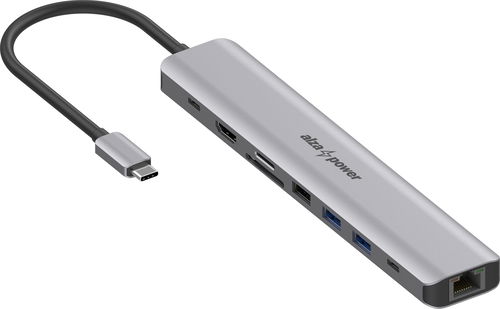


AlzaPower Metal USB-C Dock Station 9in1 (140W) Space Grey

A Docking Station Suitable for Even the Most Powerful Laptops
This docking station gives you several extra connectors – 1× HDMI 2.0, 3× USB-A, 1× USB-C with a transfer speed of up to 10Gb/s, an SD and microSD memory card reader, 1× RJ45 for a wired network connection and, of course, a USB-C for powering your laptop with up to 125W. The AlzaPower Metal lets you expand your laptop's connectivity with other important interfaces in a single compact device. Just plug it into a free USB-C port and you can immediately use all the available connectors to connect peripherals – from external monitors to fast USB drives and other devices. To ensure optimal functionality and stable data transfer, it is recommended to connect the docking station to a power source with at least 140W of power.


up to 125W
Charging power for your laptop
max. 10Gb/s
Data transfer speed
4K/60Hz
HDMI 2.0
34 × 184 × 14mm
Compact dimensionsEnjoy a Perfect Picture in 4K Ultra HD
Thanks to the HDMI 2.0 connector, you can connect an external monitor to your laptop and enjoy a resolution of up to 4K Ultra HD at 60Hz. In the Windows environment, it allows you to extend your desktop, while with macOS only screen mirroring is available. The AlzaPower Metal docking station supports DP 1.4 Alt Mode (backward compatible with DP 1.2).

Charge Quickly and Safely with Power Delivery 3.1
The AlzaPower Metal docking station uses a USB-C (female) connector with Power Delivery 3.1 support and up to 140W of power, of which 15W is used for the station's operation, with the remaining 125W used to power the laptop – just connect a mains adapter or other power source with at least 140W of power. Power Delivery is completely safe – the docking station only draws as much power from the connected source as it actually needs, so there is no risk of overloading or overheating.
Please note:
Most adapters are only 67W (e.g. included with laptops), which is not sufficient for the optimal functioning of the docking station.

Fast USB-A Ports, a Memory Card Reader and Gigabit Ethernet
Four USB ports are available for connecting peripherals such as a mouse, keyboard, printer or external drive, or for powering other devices – two USB-A 3.1 Gen 2 with transfer speeds of up to 10Gb/s, one USB-A 2.0 with a speed of 480Mb/s, and one USB-C 3.1 Gen 2, also up to 10Gb/s. The docking station is therefore ready for both fast data transfer and connecting common accessories. It also includes an SD and microSD memory card reader, which allows both cards to be used simultaneously. For a stable network connection, there's a LAN connector supporting speeds up to 1Gb/s, ideal for work and streaming.

AlzaPower Metal Impresses with its High-Quality Design
The AlzaPower Metal docking station supports Plug & Play technology, so it's ready to use immediately after connecting to your computer, with no need to install drivers or software. What's more, it impresses with its lightweight yet very durable metal construction made from an aluminium alloy. Its compact dimensions guarantee easy portability and that it will take up minimal space on your desk. The cable has a flexible PVC sheath and is 15cm long.


Detailed Specifications of the AlzaPower Metal USB-C Dock Station 9-in-1 (140W), Space Grey
- Elegant aluminium design, including the connector
- Flexible 15cm PVC cable
- 1× USB-C 3.2 Gen 2 (male) for connecting a laptop (max. 85W) with DP1.4 Alt mode support; for maximum bandwidth, the connected device must support DP1.4 mode (this protocol is used by laptops from 2019 and newer)
- 1× USB-C 3.2 Gen 2 (female) with data transfer up to 10Gb/s and charging (1.5A)
- 1× HDMI 2.0 with support for max. 4K/60Hz video output, up to 12-bit colour depth, HDCP 2.3 and HDR
- In macOS, only screen mirroring
- 2× USB-A 3.2 Gen 2 with maximum data transfer speed of 10Gb/s and charging (1.5A)
- 1× USB-A 2.0 with maximum data transfer speed of 480Mb/s and charging (1.5A)
- 1× USB-C PD (female) with Power Delivery 3.1 (max. 140W); 15W is reserved for the docking station's operation, the remaining 125W is reserved for charging the connected device
- SD and microSD memory card reader compatible with Secure Digital v3.0 UHS-I (Ultra High Speed), speeds up to 312Mb/s and the ability to use both slots at the same time
- 1× RJ45 with speeds up to 1Gb/s, support for Wake-On-LAN or Duplex Flow Control
- Total output of all data ports is 12W
- Suitable for all laptops with USB-C (Thunderbolt)Samsung DeX support (Samsung Galaxy S8 and newer)
- Compatible with macOS X v10.8 and higher and Windows 7/8/10/11
- Plug & Play installation
- Must be connected to a power source with a minimum of 140W
- We recommend checking your laptop's compatibility to ensure it supports all the docking station's functions
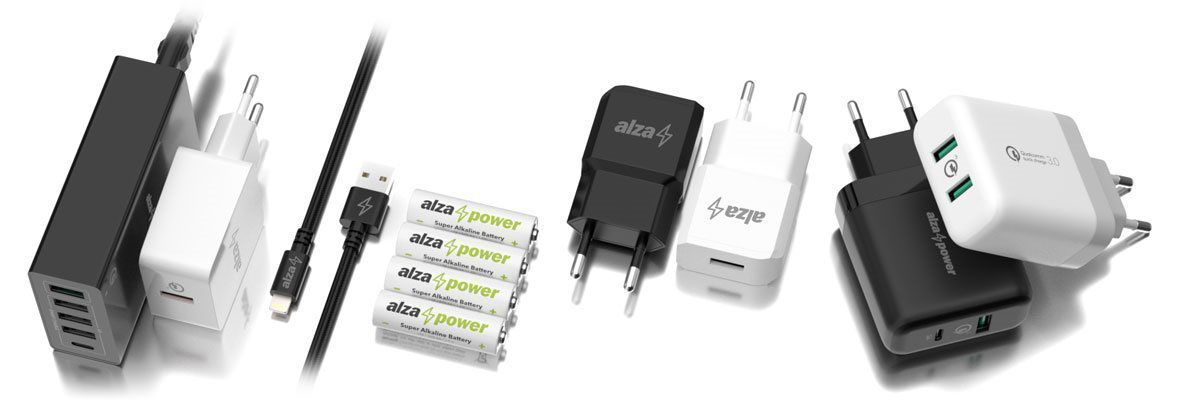
The AlzaPower Product Family
We designed AlzaPower products to meet the highest standards. Thanks to this, we can guarantee the top quality of each individual product and provide above-standard services. That is why, in the event of a defect, we offer an immediate exchange for a new item for most of our products, at all our branches.
Specifications
Laptop power port
Most common ports
Data ports - Number and standards
Power ports for electrical devices
Graphics ports - Number and standards
Network ports
Features
Compatibility
Dimensions and weight

A 36-month / 3-year or 48-month / 4-year warranty refers to the total duration of the warranty from the date of receiving the goods. Compared to standard statutory rights, this gives you an additional 12 months / 1 year or 24 months / 2 years, respectively, to file a claim.
Specifications can be changed without notice. Images are for illustrative purposes only.
