Try our cookiesAlza.cz a. s., Company identification number 27082440, uses cookies to ensure the functionality of the website and with your consent also to personalisage the content of our website. By clicking on the “I understand“ button, you agree to the use of cookies and the transfer of data regarding the behavior on the website for displaying targeted advertising on social networks and advertising networks on other websites.
We use 8 categories of cookies on our website:
Technical cookies
These are strictly necessary for the functioning of the website and the features you choose to use. Without them, our website would not work; you wouldn't be able to log in to your user account, for example.
Functionality cookies
These cookies allow us to remember your basic choices and improve the user experience. These include remembering your preferred language or allowing you to stay logged in permanently.
Social media cookies
These cookies allow us to easily link you to your social media profile and, for example, allow you to share products and services with your friends and family.
Content personalisation
These cookies allow us to show you content and ads according to the information we have about you to best meet your needs. This includes what content you have viewed, or on what device you are accessing our website.
Non-personalised advertising
These cookies allow us to show you general ads for products and services.
Personalised advertising
Thanks to these cookies, we and our partners can offer you relevant products and services based on your purchases, your shopping behaviour and your preferences.
Audience metrics
These cookies allow us to optimise our site for your convenience based on how you use it. The aim is to remember or anticipate your choices. This includes, for example, the use of features, their location, or the behaviour on the page.
Third party cookies
These are third party cookies, and you can find out more about them and our partners here.
By giving your consent to the processing of cookies, functionality and analytical cookies will be installed on the device you use to browse the website (click on the "I understand" button for both categories, or you can select only one of the categories by clicking on the "Settings" button). We always install technical cookies on your device, even without your explicit consent, because without them our website would simply not work.
You can revoke your consent to the processing of cookies. In connection with our company's cookie processing, you also have the following rights: the right to access cookies, delete, modify, supplement and correct them, restrict processing and the right to lodge a complaint with the Office for Personal Data Protection. Read more about your rights.
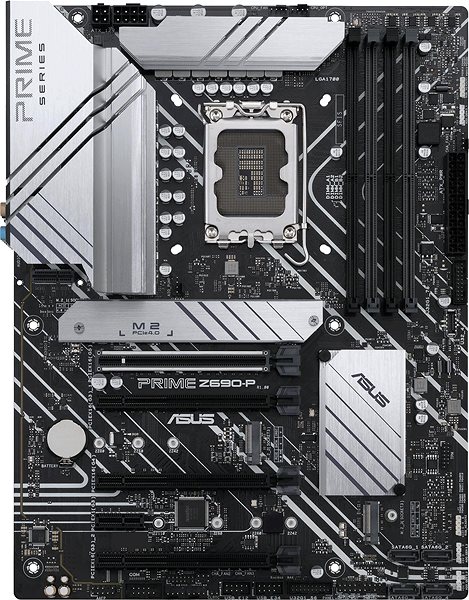
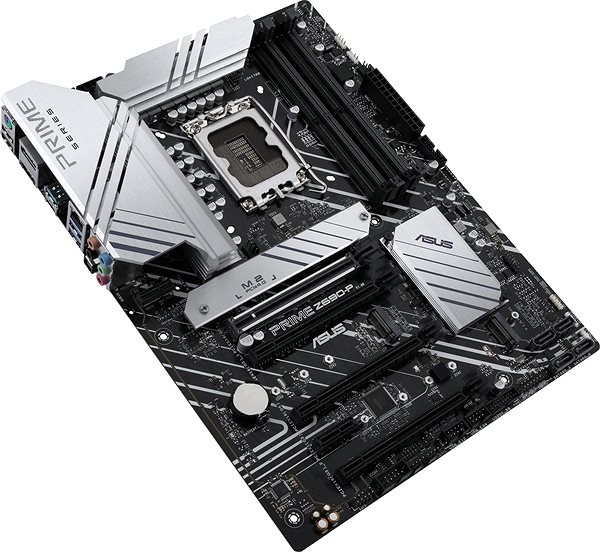
Socket is on the motherboard and is used for fitting of the processing unit (CPU). Processors from individual producers and different generations are not compatible with each other.
Designation of a specific type of chipset. This determines the properties of the motherboard - support for the processor, memory; provides communication of the device with the bus.
The format of the board indicates its standardized size. Small board (m-ATX) is suitable for example for building a HTPC, larger board (ATX) offers better connectivity (more connectors, slots,...
Overview of functions and features that the motherboard is equipped with. The absence of some elements may be additionally addressed by purchasing them (eg. the controller).
For CPU with integrated GPU, Integrated network card, Integrated sound card, PCI Express 5.0
Memory type determines which generation of memory motherboard uses. Generally speaking, the newer generation, the greater the performance. The various memory types (eg. DDR3 and DDR4) are not...
Socket is on the motherboard and is used for fitting of the processing unit (CPU). Processors from individual producers and different generations are not compatible with each other.
Designation of a specific type of chipset. This determines the properties of the motherboard - support for the processor, memory; provides communication of the device with the bus.
The format of the board indicates its standardized size. Small board (m-ATX) is suitable for example for building a HTPC, larger board (ATX) offers better connectivity (more connectors, slots,...
Overview of functions and features that the motherboard is equipped with. The absence of some elements may be additionally addressed by purchasing them (eg. the controller).
For CPU with integrated GPU, Integrated network card, Integrated sound card, PCI Express 5.0
Memory type determines which generation of memory motherboard uses. Generally speaking, the newer generation, the greater the performance. The various memory types (eg. DDR3 and DDR4) are not...
Slots for main memory allow you to fit more memory modules for more capacity. Maximum memory capacity is limited only by the number of slots, but also support from the motherboard.
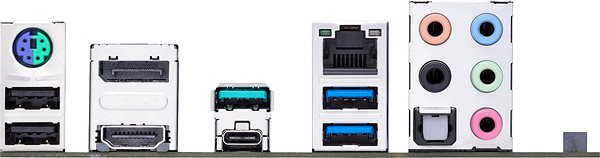
External connectors are designed to connect to various peripherals, such as monitors, keyboards, mice, external drives, printers, microphones, headphones and many others.
Jack, PS/2, RJ-45 (LAN) 2.5Gbps, S/PDIF , USB 2.0, USB 3.2 Gen 1, USB 3.2 Gen 2, USB 3.2 Gen 2x2
Connectors for direct connection of components. This includes eg. The SATA interface for hard drives, advanced M.2 for SSD and USB ports for connecting external "Bracket".
COM header, M2 Socket, RGB LED Header, Serial ATA III, Thunderbolt header, TPM header, USB 2.0 header, USB 3.2 Gen 1 header, USB-C 3.2 Gen 1 header
ASUS is a symbol of the growth of Taiwan's economy. The firm's beginnings date back to April 2, 1989, when as a small manufacturer of motherboards began his work with a few employees. Today, Asus employs more than 12,500 employees worldwide.
ASUS products can be found in almost every category of the information technology marketplace. ASUS is focused on desktops, laptops, phones, optical drives and components. In the manufacture of motherboards, the company is now the dominant player with a staggering 40% market share.
Note:
This product is not an independently functional unit and may require professional installation.
Specifications can be changed without notice. Images are for illustrative purposes only.

Dobry den, citam vo viacerych prispevkoch, ze treba update BIOSu ked chceme pouzivat i5 - 13600KF Raptor Lake, ale na druhej strane vyrobca pise, ze doska je pripravena na cipy 13tej generacie... tie prispevky o BIOS update su starsieho data... su uz tieto dosky momentalne pripravene alebo stale treba update cez nejaky starsi CPU? Dakujem
Dobrý deň, rad by som sa spytal či by sa dala vymeniť doska, alebo skôr poslať naspäť a spraviť na nej Bios update, kedže mám Intel I5-13600KF čo je 13. generácia a nie je to kompatibilne a preto mi nespustí pc
Pokud plánujete na tuto základovku usadit 13 generaci intelu, tak doporučuji možnost "update biosu". Jinak PC nenahodíte a nikam se s ním nedostanete.
A nebo si můžete ještě dokoupit Intel Celeron G6900 a update provést s ním, ale to je dalších cca 1400 navíc.
Pokud plánujete na tuto základovku usadit 13 generaci intelu, tak doporučuji možnost "update biosu". Jinak PC nenahodíte a nikam se s ním nedostanete.
A nebo si můžete ještě dokoupit Intel Celeron G6900 a update provést s ním, ale to je dalších cca 1400 navíc.
"Some intel z690 chipset motherboards may need a BIOS update prior to using Raptor Lake CPUs. Upgrading the BIOS may require CPU that is supported by older BIOS revisions" Plánujem si zakúpiť nový Intel Core i7-13700KF processor s tou to motherboard, viete mi povedať či sa ma bude týkať ten to problem ? Ďakujem.
Dobrý deň!
Chcel by som sa spýtať, či sa dajú pripojiť k základnej doske ASUS PRIME Z690-P nasledujúce komponenty:
grafická karta ASUS DUAL GeForce GTX 1660 SUPER O6G MINI,
M.2. disk Samsung 980 1 TB
Procesor Intel Core i5 12400f
RAMky hyperx fury beast ddr5 5200mhz
Za odpoveď predom ďakujem.
Dobrý deň!
Chcel by som sa spýtať, či sa dajú pripojiť k základnej doske ASUS PRIME Z690-P nasledujúce komponenty:
grafická karta ASUS DUAL GeForce GTX 1660 SUPER O6G MINI,
M.2. disk Samsung 980 1 TB
Procesor Intel Core i5 12400f
RAMky hyperx fury beast ddr5 5200mhz
Za odpoveď predom ďakujem.
Dobry den,
je pri tejto doske normalne ak POST sekvencia trva dohromady aj 18 sekund?
Asi 12 sekund nic, len cierna obrazovka, a az potom sa zobrazi ASUS logo. Potom dalsich 6 sekund a az potom sa nacita bootloader operacneho systemu.
Je tento cas pri tejto doske v poriadku?
Dobry den,
je pri tejto doske normalne ak POST sekvencia trva dohromady aj 18 sekund?
Asi 12 sekund nic, len cierna obrazovka, a az potom sa zobrazi ASUS logo. Potom dalsich 6 sekund a az potom sa nacita bootloader operacneho systemu.
Je tento cas pri tejto doske v poriadku?