




Dobrý den, prosím o rozměry tiskárny š x d x v ? (mám limit pracovní plochy stolu). Prosím o upřesnění skutečné barvy tiskárny (první foto v galerii je tmavé-černá, další fotky o hodně světlejší šedá nebo bílá) ? Děkuji.
Brother MFC-L2700DW
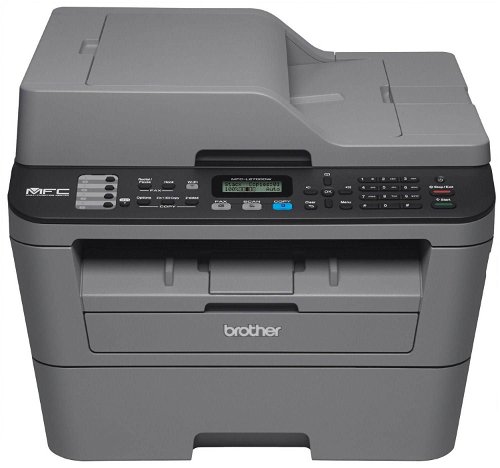
Laser Printer - multifunction, all-in-one A4 printer, scanner, copier, fax, 26 ppm, 2400x600 dpi, duplex printing, ADF, USB 2.0, LAN, WiFi
Show full description
Code:
PB449a
Producer's Website:
Don't like the alternatives? Choose from the full product list
- Help and manuals 9
- Specifications
- Photos & Videos 12
- Alternatives 8
- Accessories and suggested products

Brother MFC-L2700DW
Discontinued
Brother MFC-L2700DW

The Brother MFC-L2700DW is a fast, reliable monochrome laser all-in-one designed squarely with the Small Office and Home Office (SOHO) user in mind. Its compact, desk-friendly size is ideal for smaller offices where working space is at a premium, and it prints and copies sharp, professional black and white pages at up to 2400 x 600dpi resolution. It offers the added benefits of business-friendly scanning and faxing from the scan glass or automatic document feeder, so it's ideal for the small office that has the need to duplicate, digitize and share documents. Thanks to its fast print speed of up to 26ppm, and automatic duplex printing, it's ideal for printing business documents including multi-page reports, spreadsheets, invoices, and more.
The MFC-L2700DW features a built-in document glass for high-quality copying, faxing, and color scanning. It allows users to scan documents to a file, image, optical character recognition (OCR), email, and Microsoft SharePoint2. Plus the up to 35-sheet automatic document feeder is ideal for unattended copying, scanning and faxing. For more demanding tasks, the printer has a specialized processor and 32MB memory. Features an adjustable, 250-sheet capacity paper tray for letter or legal size paper. Plus, a single-sheet manual feed slot for envelopes, labels or thicker media.
Brother designed the MFC-L2700DW to make it easy to connect to a wireless network using the wireless assistant that walks you through set up. You don’t need a USB cable, and you won’t even need to know your wireless network password. Share the machine with others on a wireless network using 802.11 b/g/n or wired network via Ethernet, or connect to a single computer using a USB cable1 via the Hi-Speed USB port. It's equally easy to navigate menus and change settings using the controls and two-line LCD Display. Print wirelessly from your mobile device using AirPrint, Wi-Fi Direct, and more.
Additional Specifications:
Toners and Drum Units:
Brother - TN-2310 (HL-L23xx, DCP-L25xx, MFC-L27xx, 1 200 pages, 5%, A4)
Brother - TN-2320 (HL-L23xx, DCP-L25xx, MFC-L27xx, 2 600 pages, 5%, A4)
Brother - DR-2300 (HL-L23xx, DCP-L25xx, MFC-L27xx, 12 000 pages)
- Printers are usually supplied with a starter toner and/or cartridges with an approximate 60% capacity of regular cartridges which are available to purchase separately.
Specifications
Print colour
Connection
Standard Paper Sizes
Type
Print colour
Function
Connection
Connection
Supported Paper Sizes
Standard Paper Sizes
Scanning
Scanner features
Printing parameters
Print speed in black and white - maximum
Input trays
2,000 pages/month
100 sheets
Dimensions
Height
Depth
Width
Equipment
Colour
Colour
Package includes
Package Includes
More Specifications

Brother CEE GmbH, branch office, Veveří 102, Brno 616 00, Česká republika
Note:
If there is no "package contains" box in the product parameters and the data or USB cable is not specifically mentioned in there, the package does not contain it and must be purchased separately.
Specifications can be changed without notice. Images are for illustrative purposes only.
