Dobrý den, umožňuje tiskárna automatické skenování oboustranných dokumentů (např. 10 listů 2 stranných A4) umístěných do podavače nahoře?. U tohoto modelu nám to není úplně jasné. Předpokládáme, že tiskárna má automatický duplexní tisk. Děkuji.
Canon i-SENSYS MF623Cn
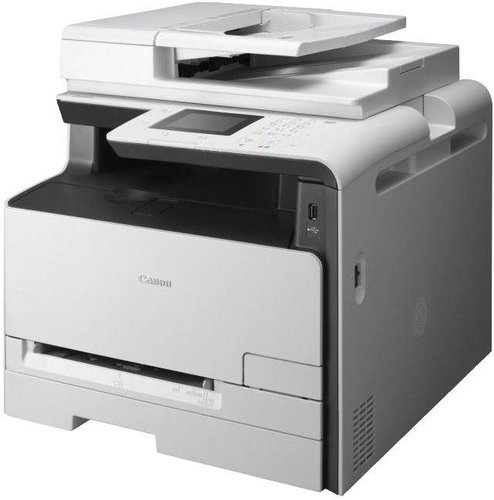
Laser Printer - colour, multifunction, A4, printer/scanner/copier, 14 ppm, LCD, 1200x1200dpi, 512MB, AirPrint, USB + LAN
Show full description
Code:
PC323j1
Producer's Website:
Don't like the alternatives? Choose from the full product list
- Help and manuals 8
- Specifications
- Photos & Videos 1
- Alternatives 8
- Accessories and suggested products

Canon i-SENSYS MF623Cn
Discontinued
Canon i-SENSYS MF623Cn
This colour laser multifunction A4 device is designed mainly for small businesses and mobile users. The compact printer includes a host of smart scanning, printing and connectivity options to help you work more productively.
Key features:
- Reliable and user-friendly printer, scanner, and copier
- Direct scanning to document or folder
- 50-sheet document feeder
- Intuitive colour touch screen
- USB connection
- Seamless integration
Effective work
The Canon i-SENSYS MF623Cn is a user-friendly laser printer with an automatic document feeder. It is suitable for fast and efficient printing in cramped workrooms or offices, where it does not take valuable space. The device offers a 14 ppm printing speed and up to 1200 x 1200 dpi resolution. Colour documents and photos can be scanned straight to PDF in 9600 × 9600 dpi quality.
Recyclable cartridge
All the printer functions are easily accessible via its 8.9 cm LCD touch screen. The recyclable "All-In-One" cartridge replaces all key components in one operation. The cartridge contains toner, drum, and cleaning units, making maintenance fast and very simple. The printer’s low power consumption of only 1 W in sleep mode and 20 W in standby mode makes it efficient and cheap to operate.
Specifications:
Type:
Colour multifunction printer
Features:
Print, copy, scan
Printer:
Print speed: up to 14 ppm (A4)
Printing type: mono laser printer
Print quality: up to 1200 x 1200 dpi
Copier:
Copy speed: up to 20 copies/min. (A4)
Copy resolution: up to 600 x 600 dpi
Copy modes: Text/Photo/Map (default), text/photo/Map (quality), Printed Image, Text
Multiple copies: up to 99 copies
Reduction/Enlargement 25 - 400% in 1% increments
Other features: Frame Erase, Collate, 2 on 1, 4 on 1, ID Card Copy
Scanner:
Type: colour
Scan resolution: optical: up to 600 x 600 dpi, enhanced: up to 9600 x 9600 dpi
Colour scanning depth: 24 bits/24 bits (input / output)
Grayscale: 256 levels
Compatibility: TWAIN, WIA
Max. Scan Width: 216 mm
Media handling:
Scanner type: flatbed
250-sheet cassette
50-sheet multi-purpose tray
1-sheet manual feed slot
Media types: Plain Paper, Recycled Paper, Thick Paper, Transparency, Coated Paper, Label, Index card, Envelope
Interface:
USB 2.0
RJ-45
OS compatibility:
Microsoft Windows 10, 8.1, 7, Vista
Apple Mac OS X version 10.5.8 or higher
Linux
Read more
- Printers are usually supplied with a starter toner and/or cartridges with an approximate 60% capacity of regular cartridges which are available to purchase separately.
Specifications
Type
Print colour
Function
Features
Connection
Connection
Supported Paper Sizes
Standard Paper Sizes
Scanning
Scanner features
Printing parameters
Print speed in black and white - maximum
Print speed in colour - maximum
Input trays
125 sheets
Dimensions
Height
Depth
Width
Equipment
Touch
Colour
Colour
More Specifications

Canon was founded in 1933. Its original title translated to "portable laboratory optics". The Japanese company has been headquartered in Tokyo since its inception. Canon is particularly associated with the production of digital cameras and accessories, where they remain the leading innovator and producer of imaging solutions. Aside from digital cameras, the company also operates in the production of office equipment, particularly copiers or printers.
Note:
If there is no "package contains" box in the product parameters and the data or USB cable is not specifically mentioned in there, the package does not contain it and must be purchased separately.
Specifications can be changed without notice. Images are for illustrative purposes only.