


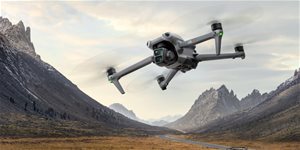
DJI Mavic 4 Pro
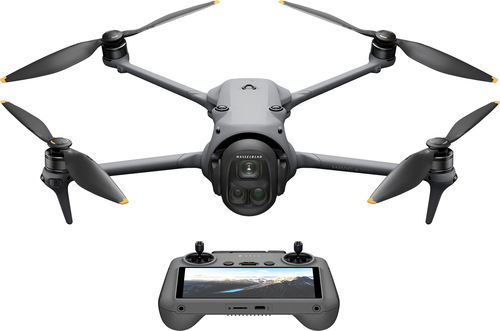
Drone – 6K (6016x3384) camera, transmission range of 30000 m, operation time of 51 min, maximum speed of 90 km/h, 64GB internal memory 1000GB, weight: 1063g, package includes remote control, drone, charging cable, screwdriver, screws and propeller
Show full description
1,959 €
 Installment calculator
4,9%
interest
from 45.06 € monthly
Installment calculator
4,9%
interest
from 45.06 € monthly
Shop faster with pickup at AlzaBox or in-store.
Warranty 21 months
Code:
DJI2543HU
Producer's Website:

DJI Mavic 4 Pro
1,959 €
As good as new - in stock 1 pcs
Buy
DJI Mavic 4 Pro

DJI Mavic 4 Pro is a fully functional product in very good condition. The product shows minor signs of use. Almost always supplied with all accessories. The packaging may be opened, damaged, replaced or missing. 21-month warranty. Detailed information here.

DJI Mavic 4 Pro Drone
Spin your world
DJI introduces a new drone featuring three high-quality lenses. It boasts a 100MP main Hasselblad camera, a pair of large CMOS telephoto lenses, a superb gimbal with 360° rotation, omnidirectional obstacle sensing in night mode at 0.1 lux, and O4+ video transmission. All of this, combined with excellent flight characteristics, intuitive controls, and long battery life, makes the DJI Mavic 4 Pro the absolute top of its class. This flagship triple-camera drone will change the way you create content and discover new horizons, not just in aerial photography.

Key Features of the DJI Mavic 4 Pro Drone
- 100MP 4/3 CMOS Hasselblad camera with 6K/60fps HDR video
- 1/1.3″ and 1/1.5″ large CMOS telephoto lenses
- Infinity Gimbal with 360° rotation for dynamic camera movements
- Omnidirectional obstacle sensing at 0.1 lux in night mode
- Up to 51 minutes of flight time
- DJI O4+ video transmission with 10-bit HDR up to 30km

100MP 4/3 CMOS Hasselblad Camera

Omnidirectional obstacle sensing at 0.1 lux in night mode

1/1.3″ and 1/1.5″ large CMOS telephoto lenses

Infinity Gimbal with 360° rotation for dynamic camera movements

DJI O4+ video transmission with 10-bit HDR up to 30km
The DJI Mavic 4 Pro uses a triple-camera system
The drone excels in every area of photo and video capture, thanks to its advanced triple-camera system. All cameras on the DJI Mavic 4 Pro use Dual Native ISO Fusion technology, which combines the advantages of low and high ISO sensitivity to capture breathtaking detail. The drone makes it easy to unleash your creativity by allowing you to layer up to 5 high-resolution RAW images and use features like Free Panoramas and Subject Focusing with all lenses. The drone's cameras support 4K/60fps HDR video recording. The main Hasselblad camera takes this even further with the ability to shoot in 6K/60fps HDR with an impressive dynamic range of up to approximately 16 stops of exposure. The medium telephoto lens offers a 14-stop range, and the telephoto lens offers 13 stops. The main Hasselblad camera and the medium tele-camera can shoot in 4K/120fps, while the telephoto lens records video in 4K/100fps. Slow-motion footage from the drone's telephoto lens adds dramatic tension and visual impact to your recordings. All cameras on the DJI Mavic 4 Pro support 10-bit D-Log, D-Log M, and HLG colour profiles.

Three focal lengths – exceptional perspective
- Main Hasselblad Camera with 4/3 CMOS – The precisely engineered 100MP sensor supports the Hasselblad Natural Colour Solution (HNCS) for unparalleled colour fidelity. The lens has been redesigned to meet the demands of the 100MP sensor, while the f/2.0 to f/11 aperture enables clear night shots.
- Medium Telephoto Lens – The 1/1.3″ sensor with an f/2.8 aperture uses a new image processor that ensures improved image quality. The 70mm focal length creates compressed perspectives and highlights subjects.
- Telephoto Lens – The 50MP 1/1.5″ sensor with a bright f/2.8 aperture uses an optimised gimbal algorithm for the telephoto lens, ensuring unique image quality and stability during long-range photography. The extended reach dramatically flattens the perspective, perfectly isolating subjects.

A top-tier gimbal lets you capture the world in motion
With the DJI Mavic 4 Pro, you can push the boundaries of your creativity with the revolutionary Infinity Gimbal. This special design allows the DJI drone to capture shots up to 70° upwards and a full 360° rotation, opening up entirely new perspectives. The DJI Mavic 4 Pro can handle dramatic camera tilts directly from the air or create a smooth, almost gravity-defying visual style.
The DJI Mavic 4 Pro now has an even more powerful ActiveTrack 360° system
The drone will navigate effortlessly even in low-light conditions, at dusk, or under city lighting. The even more advanced ActiveTrack 360° system ensures smooth, cinematic tracking with improved stability. Once the drone locks onto the desired subject, it keeps it consistently in focus, even if the lower half of the body is partially obscured by bushes or if a person is standing on a bridge. The drone can also recognise vehicles up to 200 metres away, enabling professional car cinematography thanks to its directional orientation. With Nightscape Vision, the omnidirectional night mode, the DJI Mavic 4 Pro can safely detect and avoid obstacles at speeds of up to 18 m/s in low light. In environments with almost absolute darkness (below 0.1 lux), the Mavic 4 Pro also uses its front-facing LiDAR sensor to detect obstacles and stop in time to prevent a collision. Using real-time visual positioning and environmental map reconstruction technologies, the DJI Mavic 4 Pro can remember its flight path if there is sufficient lighting. This allows for a safe return even if the drone took off from a location without a GPS signal.

Thoughtful compact design and excellent battery life
Fly the DJI Mavic 4 Pro for longer and stay connected. It can stay in the air for up to 51 minutes on a single battery. The precisely engineered and compact aerodynamic design allows the drone to reach speeds of up to 90km/h. For even easier control, the Mavic 4 Pro comes with the DJI RC 2 remote controller. As soon as you unfold the drone's arms, it automatically turns on. Thanks to its advanced flight path memory, it also automatically updates its home point, even without a GPS connection.

The DJI Mavic 4 Pro has large internal storage for your footage
The DJI drone comes equipped with a 64GB storage module as standard, so you can start shooting immediately without needing to purchase high-capacity external memory cards. With the QuickTransfer feature, you don't even need to take the drone and controller out of the bag—simply wake up the Mavic 4 Pro remotely via the DJI Fly app and transfer files at speeds of up to 80MB/s over Wi-Fi 6. To transfer footage to your computer, just connect the drone using a compatible USB cable.


What's in the box for the DJI Mavic 4 Pro
- 1× DJI Mavic 4 Pro
- 1× DJI RC 2
- 1× DJI Mavic 4 Pro Intelligent Flight Battery
- 1× DJI Mavic 4 Pro Spare Propellers (pair)
- 1× DJI Mavic 4 Pro Storage Cover
- 2× USB-C to USB-C Data Cable
- 1× DJI 100W USB-C Power Adapter
*All videos and photos on this page were taken by professionals using the DJI Mavic 4 Pro in strict compliance with local laws and regulations and subsequently edited in post-production. Videos and images are for reference only. Actual results may vary. Always comply with local laws and regulations and ensure the aircraft has the relevant permissions and certifications for the flight space. All footage involving wildlife was taken in compliance with wildlife protection regulations.
**All data on this page was tested with a production model DJI Mavic 4 Pro in a controlled environment. Actual results may vary depending on the environment, usage, and firmware version. DJI Mavic 4 Pro must be activated through the DJI Fly app before use.
***It is recommended to use the ActiveTrack 360° function in open spaces without obstacles. Please refer to the user manual for scenarios that are not supported or may interfere with recording. In complex environments with many obstacles, use Auto mode with caution to ensure flight safety and the protection of people.
**** All images, videos, and product displays on this page are for reference only. The actual product (including but not limited to its colour, size, and appearance) and display screen content (including but not limited to the background, UI, and illustrations) may vary.
Specifications
Manufacturer and model
Manufacturer
Model
Type
Construction
Use
Flight
Operation
Max. height
Maximum speed
Max. flight time
Transmission Range
Transmission range (CE)
Flight functions
Maximum wind strength
Maximum operating temperature
Minimum operating temperature
Camera
Camera type
f/2.8
6,400
Max. video resolution
Max. photo resolution
Digital zoom
Camera functions
Memory
Internal memory
Yes
Max. SD Card Size
Compatible memory cards
Battery
Drone battery type
Number of batteries for drone operation
Battery capacity
Charging time
Battery control type
Dimensions
Width (folded)
Length (folded)
Height (folded)
Width (unfolded)
Length (unfolded)
Height (unfolded)
Weight
Weight
Package contents
Package contents
EASA regulations
Label
More Specifications

Beryko s.r.o., Pod Vinicemi 931/2, Plzeň, 30100, CZ, [email protected], +420 603 763 566
DJI Enterprise: TELINK, spol. s r.o., Na Zlatě 2835/3, 158 00 Praha 13, [email protected], +420 602 395 889
Note:
Specifications can be changed without notice. Images are for illustrative purposes only.
More Information
