


Kidizoom magic studio
- Reviews 3
- Help and manuals
- Specifications
- Photos & Videos 10
- Alternatives 8
- Accessories and suggested products

Kidizoom magic studio

Kidizoom magic studio baby camera
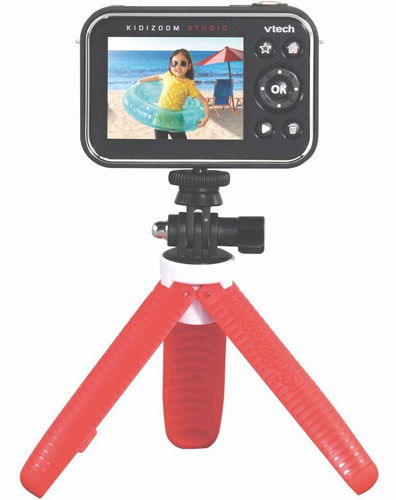
Vtech's popular Kidizoom Magic Studio is equipped with a built-in trick studio that offers full support in both English and Slovak with easy switching between languages. Kidizoom camera teaches you to create original digital photos, apply stylish built-in photo effects and record videos with sound. You can create unique self-portraits, fun group photos or videos. The Kidizoom features a timer that allows you to set a delay for the picture, so you don't need anyone else to take a picture of you or your group. It can also detect a face to take a picture automatically. In addition, it has expandable memory with SD cards, allowing you to store more photos and videos. The flip-up lens makes it ideal for taking great selfies.

Key features of the Kidizoom magic studio camera
- Colour TFT LCD display 2.4" (6.1 cm)
- Tiltable lens for taking selfies
- Intuitive control via physical buttons; navigation in the menu is facilitated by Czech language (Slovak and UK English can also be selected)
- The baby camera records sound and the audio track can be edited
- Front camera resolution: 2560×1920 (5.0 MP) for normal photos and 1600×1200 (2.0 MP) for stills and effects shooting
- Video: 360p (640×360) when using internal memory, 720p HD (1280×720) when using a memory card
- To pass the time, children can play one of three games
- Video length is 29 minutes and 59 seconds or up to 2 GB file size
- Focus range: from 46 cm to ∞
- The Vtech Kidzoom magic studio has 256MB of internal memory, which can be expanded with an SD card from 1-32GB
- Captured file formats: AVI for video and JPEG for photos
- The camera uses a rechargeable Li-ion polymer battery for operation
- Tripod/selfie stick included
The camera offers three games and is easy to use
When your child wants to take a break from taking photos and videos, they can shorten their time by playing one of three games that can be controlled by simply moving the camera. The Vtech Kidizoom Magic Studio is also very easy to use thanks to intuitive control via physical buttons and a clear 2.4" colour LCD display. The Driver Lock allows you to limit the amount of time you can play games or disable the feature completely.

Give your child's creativity free rein with a host of features and templates
The Vtech Kidizoom Magic Studio can add amazing trick effects to your videos. For example, you can swim with sharks, win prestigious car races, lead a jungle expedition or explore the depths of space - all from the comfort of your living room or child's bedroom. The tricks in Kidizoom Magic Studio allow you to levitate objects, create a twin, or conjure or unconjure friends. The package also includes a green fabric background (1.46 × 0.91 m) and more than 20 funny video motifs.

Examples of possible tricks of the Vtech Kidzoom magic studio baby camera


Specifications
Type and function
Sensor
Video
Display
Memory and storage
Battery
Colour
Package contents
Power outlet type
Lens
Colour
Battery
Age and intended use

MENUG s.r.o., B. Martinů 59, 602 00 Brno, Czech Republic +420565321695, [email protected]
Specifications can be changed without notice. Images are for illustrative purposes only.
