



Try our cookiesAlza.cz a. s., Company identification number 27082440, uses cookies to ensure the functionality of the website and with your consent also to personalisage the content of our website. By clicking on the “I understand“ button, you agree to the use of cookies and the transfer of data regarding the behavior on the website for displaying targeted advertising on social networks and advertising networks on other websites.
We use 8 categories of cookies on our website:
Technical cookies
These are strictly necessary for the functioning of the website and the features you choose to use. Without them, our website would not work; you wouldn't be able to log in to your user account, for example.
Functionality cookies
These cookies allow us to remember your basic choices and improve the user experience. These include remembering your preferred language or allowing you to stay logged in permanently.
Social media cookies
These cookies allow us to easily link you to your social media profile and, for example, allow you to share products and services with your friends and family.
Content personalisation
These cookies allow us to show you content and ads according to the information we have about you to best meet your needs. This includes what content you have viewed, or on what device you are accessing our website.
Non-personalised advertising
These cookies allow us to show you general ads for products and services.
Personalised advertising
Thanks to these cookies, we and our partners can offer you relevant products and services based on your purchases, your shopping behaviour and your preferences.
Audience metrics
These cookies allow us to optimise our site for your convenience based on how you use it. The aim is to remember or anticipate your choices. This includes, for example, the use of features, their location, or the behaviour on the page.
Third party cookies
These are third party cookies, and you can find out more about them and our partners here.
By giving your consent to the processing of cookies, functionality and analytical cookies will be installed on the device you use to browse the website (click on the "I understand" button for both categories, or you can select only one of the categories by clicking on the "Settings" button). We always install technical cookies on your device, even without your explicit consent, because without them our website would simply not work.
You can revoke your consent to the processing of cookies. In connection with our company's cookie processing, you also have the following rights: the right to access cookies, delete, modify, supplement and correct them, restrict processing and the right to lodge a complaint with the Office for Personal Data Protection. Read more about your rights.
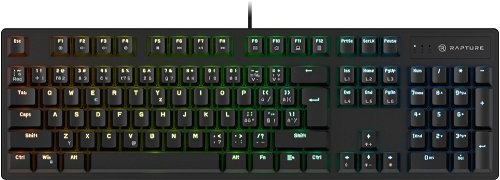
Specifies the field of use of the keyboard. Normal office keyboard, for example, offers a classic key layout, while the game models are equipped with a backlit, color-coded keys or have a modern...
A 36-month / 3-year or 48-month / 4-year warranty refers to the total duration of the warranty from the date of receiving the goods. Compared to standard statutory rights, this gives you an additional 12 months / 1 year or 24 months / 2 years, respectively, to file a claim.
Note:
Unless otherwise indicated, keyboards are equipped with CZ keys.
Dobrý deň viem prepnúť na klávesnici aby mali prioritu multimediálne klávesnice pred klávesami F1-F12 teda aby som nemusel stačiť FN keď chcem napríklad stíšiť zvuk alebo prepnúť pesničku.
Ďakujem.
Dobrý deň viem prepnúť na klávesnici aby mali prioritu multimediálne klávesnice pred klávesami F1-F12 teda aby som nemusel stačiť FN keď chcem napríklad stíšiť zvuk alebo prepnúť pesničku.
Ďakujem.
Dobrý den, je k tomu nějaký doplňkový software např na nastavení RGB ? Našel jsem jedne program, ale vůbec mi to nedetekuje zařízení, i když na něm normálně pracuju.
Děkuji za odpověď.
Toninger
Dobrý den, je k tomu nějaký doplňkový software např na nastavení RGB ? Našel jsem jedne program, ale vůbec mi to nedetekuje zařízení, i když na něm normálně pracuju.
Děkuji za odpověď.
Toninger
Dobrý večer,
Potřebuje tato klávesnice nainstalovat do Pc makro?
Nejdou mi klávesy Ctrl+C a Ctrl+V a hodně jsem si na ně zvykl :)
Při připojení klávesnice jsem nezaregistroval žádnou instalaci ovladače do pc.
Děkuji za nahozený link :)
Dobrý večer,
Potřebuje tato klávesnice nainstalovat do Pc makro?
Nejdou mi klávesy Ctrl+C a Ctrl+V a hodně jsem si na ně zvykl :)
Při připojení klávesnice jsem nezaregistroval žádnou instalaci ovladače do pc.
Děkuji za nahozený link :)
Dobrý den,
asi před rokem jsem si tuto klávesnici koupil a ze začátku fungovala dobře, ale po nějaké době používání se po stisku klávesy ESC stiskla dvakrát. Poté to začaly dělat klávesy P a M. Většinou se to napíše jenom jednou, ale občas dvakrát a je to dost otravné při psaní. Můžu ji reklamovat nebo stačí vyměnit spínače, jestli je to možne? Děkuji za odpověď.
Dobrý den,
asi před rokem jsem si tuto klávesnici koupil a ze začátku fungovala dobře, ale po nějaké době používání se po stisku klávesy ESC stiskla dvakrát. Poté to začaly dělat klávesy P a M. Většinou se to napíše jenom jednou, ale občas dvakrát a je to dost otravné při psaní. Můžu ji reklamovat nebo stačí vyměnit spínače, jestli je to možne? Děkuji za odpověď.
Dobrý den, začala se mi zasekavat klávesa alt. nejsem si vědom nějakého znečistění jako vylite piti nebo tak něco, ale presto se chci zeptat jak se dá vyčistit? po sundání klávesy se dovnitř nedostanu, jak postupovat? děkuji.
Dobrý den, koupil jsem si klávesnici Rapture X-Ray a nainstaloval software stažený ze stránek. Klávesnici mám připojenou kabelem, ale v aplikaci mi to píše, že zařízení nebylo připojeno. Je třeba udělat ještě něco navíc? Abych viděl zařízení?
Prosím pěkně, jak se znovu zapne podsvícení poté, co se po klávesnici proběhla kočka a nějak se jí povedlo podsvícení vypnout.
Zkoušel jsem Fn + klávesy L1 - L6 i další, ale bez účinku.
Při zapnutí klávesnice hezky zabliká ale nerozsvítí se.
Prosím pěkně, jak se znovu zapne podsvícení poté, co se po klávesnici proběhla kočka a nějak se jí povedlo podsvícení vypnout.
Zkoušel jsem Fn + klávesy L1 - L6 i další, ale bez účinku.
Při zapnutí klávesnice hezky zabliká ale nerozsvítí se.
