


Dobrý den, potřebuji poradit, zdali mohu tento AP použít, tak jak zamýšlím. Můj stávající wifi router FritzBox cable 6660 od poskytovatele internetu, vykazuje občasnou chybu ve schopnosti připojit mobily s Androidem, někdy i několik hodin. U PC s WIN vše funguje normálně. Kabelové rozvody fungují bezchybně. Chtěl jsem po správcovi, aby aktualizoval systém ( Fritz jich už vydal několik), ale správce se k ničemu nemá a radí restartovat. Chci to tedy vyřešit tak, že si zřídím vlastní wifi prostřednictvím AP. Na routeru vypnu wifi a nový AP propojím kabelem s routerem. Bude to prosím takto fungovat? Případně doporučte jiný AP, hlavně nic složitého na nastavení, používám pouze doma. Díky za radu.
TP-Link EAP615-wall, Omada
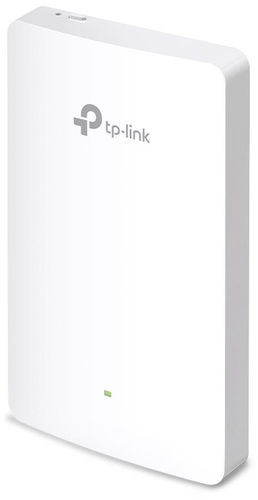
WiFi Access Point and WiFi 6, 802.11and/g/n/ac/ax up to 1775 Mb/s, Dual-band (2,4 GHz 574 Mb/s + 5 GHz 1201 Mb/s ), WPA2, WPA-PSK, WPA2-PSK, WPA-Enterprise and WPA2-Enterprise, Access via cloud
Show full description
102.90 €
Shop faster with pickup at AlzaBox or in-store.
Warranty 60 months
Code:
TP23_046
Producer's Website:

TP-Link EAP615-wall, Omada
102.90 €
Unsealed - in stock 1 pcs
Buy
TP-Link EAP615-wall, Omada

TP-Link EAP615-wall, Omada is an almost new item, in perfect condition, and comes with a full warranty. However, someone opened the original packaging before you. Why? It could have been an unwanted gift. For detailed information, click here.
The TP-Link EAP615 Wall Omada dual-band wall-mounted WiFi Access Point brings modern Wi-Fi 6 (802.11ax) connectivity to both business and home environments. It operates on two bands and delivers a total transfer speed of up to 1775Mb/s, split between 1201Mb/s on the 5GHz band and 574Mb/s on the 2.4GHz band. To optimise performance with a high number of connected devices, it integrates advanced features. MU-MIMO and OFDMA technologies increase network efficiency and reduce latency, which is crucial for the smooth operation of bandwidth-intensive applications. Its slim profile, measuring 2×8.6×14.3cm, allows for discreet wall mounting in a standard EU or 86mm electrical box, and full integration with the Omada SDN platform enables centralised management of the entire network.

Dual-band
Type
WiFi 6
WiFi type
1775Mb/s
WiFi transfer speed
Key features of the TP-Link EAP615 wall Omada WiFi Access Point
- Uses MU-MIMO and OFDMA technologies for efficient data transfer
- Integration with the Omada SDN platform supports seamless roaming
- Signal coverage reaches an area of 50m²
- Serves over 120 connected devices
- Four gigabit ports, one with PoE OUT functionality
- Operates in access point mode
- Network protected by WPA3 security and Captive Portal authentication
- Managed via the Omada platform and mobile app
Wi-Fi 6 performance and speed
The access point uses the Wi-Fi 6 (802.11ax) standard and is backward compatible with 802.11a/g/n/ac standards. It operates on two frequency bands, which optimises performance for different devices and reduces interference. On the 5GHz band, it reaches speeds of 1201Mb/s, and on the 2.4GHz band, 574Mb/s. Technologies like Beamforming and 2×2 MIMO actively direct the signal straight to clients, improving throughput and connection stability. At the same time, OFDMA allows multiple clients to be served on a single channel, reducing latency and increasing overall network efficiency, especially in high-density environments.

Centralised management
Full integration into the Omada SDN platform provides centralised management of the entire network from a single interface. Management can be done via cloud access, a dedicated hardware controller (e.g., Omada OC200/OC300), or a locally installed software controller. The seamless roaming feature maintains a stable connection as users move between access points within a single network. The access point can handle more than 120 simultaneously connected clients over an area of up to 50m². For simple initial setup and ongoing monitoring, use the Omada mobile app.

Advanced security and network segmentation
The wireless network is protected by modern encryption standards and advanced access control features. It supports the newer WPA3 Personal/Enterprise protocol, which strengthens security against attacks, while maintaining backward compatibility with WPA2 and WPA. Captive Portal authentication enhances security and control on guest networks, for example, in hotels, cafés or office spaces. It also enables network segmentation using VLANs, isolation of individual clients to prevent them from communicating with each other, and MAC address filtering. It also includes rogue access point detection.

Connectivity and power
The access point is equipped with a total of four gigabit Ethernet ports. One port (uplink) is used to connect to the backbone network and to power the device itself via the 802.3af/at PoE+ standard. The remaining three ports (downlink) are used for wired connection of end devices such as computers or printers. One of the downlink ports also supports PoE OUT, which can power another device, such as an IP phone or camera (requires the AP to be powered via 802.3at PoE+). Thanks to its slim design and compatibility with common 86mm and standard EU electrical boxes, installation is quick and does not disrupt the interior's appearance.

Technical specification
- Wi-Fi standard: 802.11ax/ac/n/g/a (Wi-Fi 6)
- Frequency bands: 2.4GHz / 5GHz
- Ports: 4× Gigabit Ethernet (1× PoE+ IN, 1× PoE OUT)
- Security: WPA / WPA2 / WPA3
- Operating modes: Access Point
- Operating temperature: 0°C to 40°C
Package contents
- TP-Link EAP615 Wall WiFi Access Point
- Mounting bracket
Specifications
Standards and frequency
Functions
Features
Use
Speed
WiFi transmission speed
Speed at 2.4GHz
Speed at 5GHz
Security
Connectors
4 ×
Antenna features
Advanced parameters
Advanced functions
Maximum SSID count
Number of LAN ports
Number of LAN ports with 1 Gbit speed
Dimensions and weight
Width
Height
Depth
Package contents
Package contents
PoE charging
More Specifications

TP-LINK Czech s.r.o., Pekařská 10a, 15500 Praha 5, Česko, [email protected], www.tp-link.com
TP-LINK Czech, s. r. o., Pekařská 695/10, Jinonice, 155 00 Praha 5, CZ +420 212 812 622 / SK +421 233 006 532, [email protected]
Note:
Specifications can be changed without notice. Images are for illustrative purposes only.
