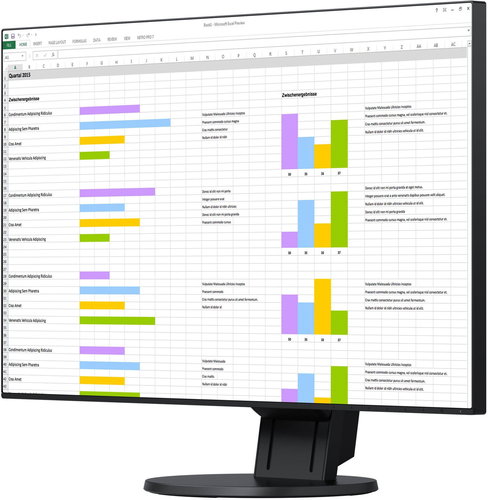
The EIZO EV2451 model is part of an energy-saving EV (EcoView) series and comes with a new attractive design in the form of an ultra-slim bezel, just 1mm thick. It has an IPS panel offering a high-quality display, which is also equipped with an elaborate matt anti-reflective mask with virtually zero screen glittering. The 23.8" diagonal with Full HD resolution always guarantees well-readable text from the most commonly used office applications as well as correct colour display thanks to the colour range of the monitor, which corresponds with the sRGB IEC61966-2.1 photographic standard.
Vypnuto
Good-Bye to Tired Eyes
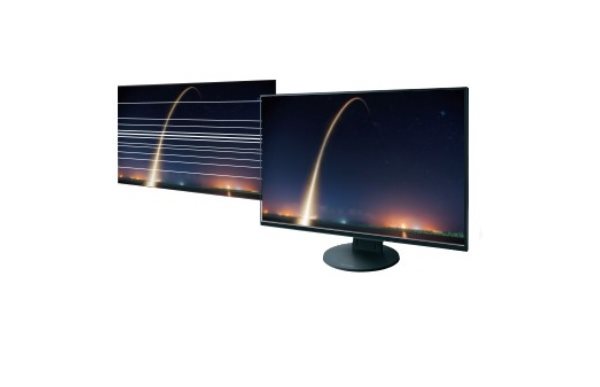
The brightness of LCD panels can be controlled, for instance, by adjusting the brightness of their LED backlighting system. Manufacturers often choose simpler brightness control circuits to achieve the lowest price, but these only result in a limited range of brightness control (e.g. 30-100% of the maximum possible brightness of the monitor) and some users can even have at certain brightness levels the impression of fast-vibrating image.
The fine-tuned LED automatic backlight control system for EIZO monitors not only reduces the power consumption, which does not exceed 13W in normal operation, but also enables a completely stable and non-blinking setting of the desired brightness level.
Automatic Brightness Control
The monitor uses a unique, optimised control with non-linear characteristics to automatically adjust the brightness of the monitor to ambient lighting. In comparison with a simple and commonly used linear control, this can better respond to light changes so that they are more in accordance with how the human eye perceives the brightness of the monitor. There are even two control curves - for winter and summer. Therefore, the brightness of the monitor is for the observer always balanced with the intensity of ambient light, which means the monitor affects the viewer's eyesight basically in a similar way to looking at paper.
Automatic White Intensity Control
An interesting innovation is automatic white intensity control when reading / writing documents with a large proportion of white space. For the purpose of colour reproduction of photographs, it is naturally possible to turn off this function and perfectly simulate the bright white colour of photo papers.
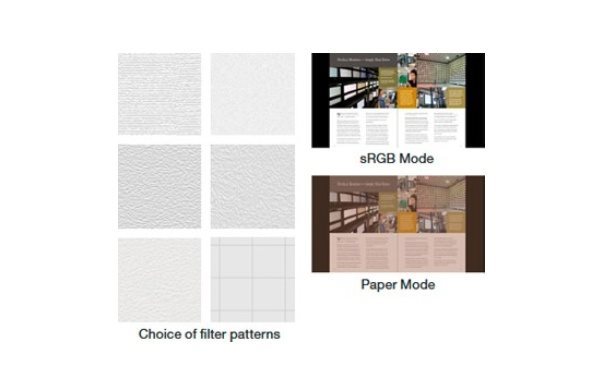
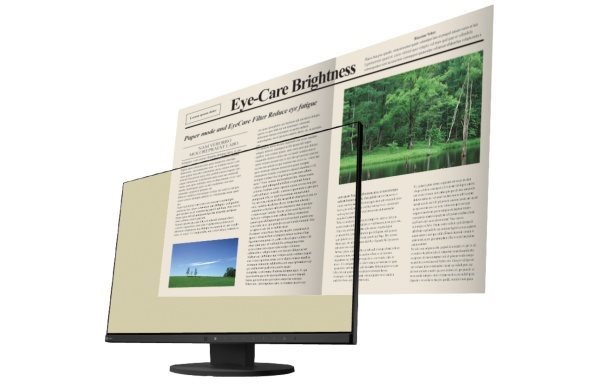
Based on their preferences, all users can also choose a software-adjustable image area "filter" to minimise visual fatigue from long-term reading on white background.
Vypnuto
Vypnuto
Monitor as a Reader & "Paper Mode"
For longer reading of electronic documents, the monitor has a preset "Paper" mode, in which the contrast ratio of the monitor drops up to 1:100 and can perfectly simulate the usual electronic "reading" devices.
Reducing the Ratio of "Blue" Light Component during the Night (Less Blue Light)
Monitor activated in "reading" mode can also automatically reduce the proportion of the blue component of the visible light radiation of the LED backlighting system, which ensures lower visual fatigue while working at night and in artificial lighting. Moreover, it also ensures proper melatonin release during the night (melatonin is a substance, whose proper release from human body prevents sleep disorders). The user may even set the time when the blue component of the visible light radiation of the LED backlighting system starts to decrease automatically and the time when its level automatically starts to gradually change to its original level.
Economical, powerful and noiseless
The almost 30% saving is also achieved by a unique technology of continuous histogram evaluation (brightness distribution) of the currently displayed scene. At the same time, the user will appreciate the noiselessness of the power supply, which is also independent of the currently set brightness of the monitor.
Amateur photography - no problem
The colour range of the monitor is close to the sRGB IEC61966-2.1 standard, so the monitor can right out of the box without any problems correctly display colour photographs with the colour range according to the sRGB standard, without having to calibrate it in any way and create its exact colour profile. Displaying images with the sRGB range is correct even in browsers without Colour Management Support (CMS), such as in internet browsers or other applications that were not originally intended for reproduction of colour photographs.
This is a great advantage especially for beginners or amateurs, who may not always be fully acquainted with colour reproduction issues on modern wide-screen monitors. For even more accurate colour reproduction of photographs according to the sRGB standard, there is the sRGB button, which also automatically sets suitable white point temperature and correct gradation curve.
Easy PC Connection
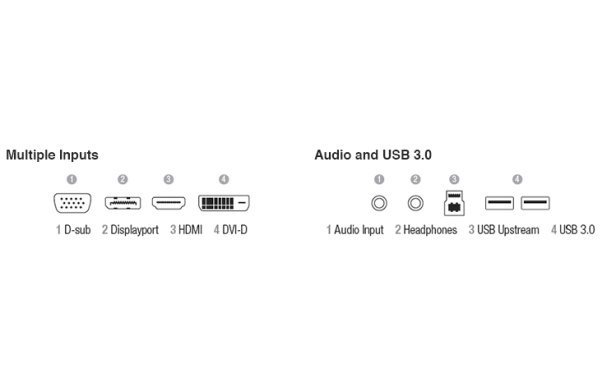
For trouble-free connection of modern computers, the monitor is equipped with four inputs - DisplayPort, HDMI, DVI-D and also VGA for connection to older laptops. By means of an integrated 2×USB (3.0) hub, it is possible to connect directly to your monitor some basic peripherals - flash drives, keyboards, mouse and others.
Naturally, there is also support for both analogue (3.5mm jack) and digital (DisplayPort) audio stereo channel and integrated 2x1W speakers.
Vypnuto
Excellent Ergonomics - New Flexible Stand
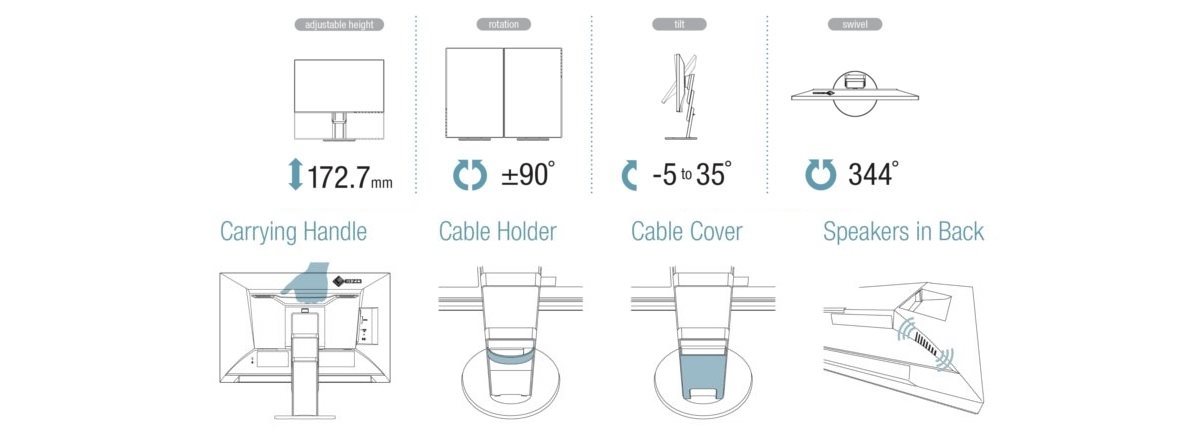
With a new stand, it is possible to easily manipulate the 24" panel under any circumstances and for every single user. The stand supports height adjustment between 10 and 183mm (which means the total range up to 173mm), turning by 344°, tilting by up to +35°/-5° and also rotating the panel by 90° - i.e. turning the panel to the "portrait" position (pivot function) for comfortable viewing of "long" web pages. More comfort when adjusting the monitor is provided by a touch panel with automatic display of function help above the "pressed" button.
Vypnuto
Není vyplněn Alternativní text k fotografii!
Vypnuto
EIZO Monitor Configurator for Administrators
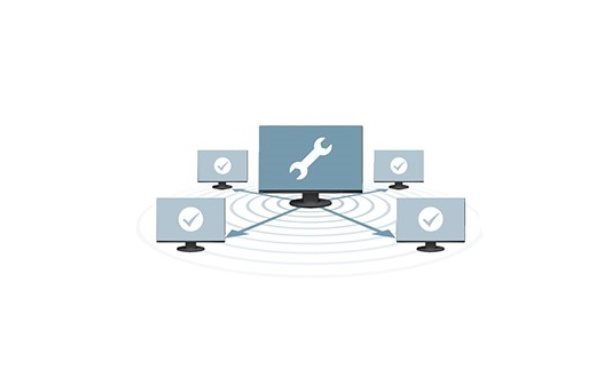
Allows easy management and configuration of multiple monitors connected to local PCs that are connected via enterprise network. The administrator does not have to go to the particular workplaces and set each monitor separately, but can set multiple monitors the same way at the same time.
Zero Tolerance
Each pixel of the LCD monitor is made up of three so called RGB sub-pixels. EIZO guarantees with their monitors zero tolerance of faulty permanently lit or permanently unlit image pixels or sub-pixels.
Thanks to the high quality of all the components used when producing the monitor, the manufacturer provides a 5-year warranty for this model, including the warranty for the LCD panel and its backlighting system.
Vypnuto
Additional information:
Screen: Surface: matt layer with zero glittering and hardened 3H surface Point size: 0.275mm Contrast (static): 1000:1 Viewing angles (horizontally / vertically): 178° / 178° Number of colours: 16.7 million Preset video modes: User1, User2, Movie, sRGB, Paper, DICOM (for X-ray images)
Special functions & features: Auto EcoView – ambient light sensor for automatic brightness control EcoView Optimizer II – automatic "white" intensity optimisation Electric power saving by evaluating the histogram of the displayed scene Software control of the monitor via USB-channel (Screen InStyle and Admin-Configurator – quick coordination of multiple monitors at the same time)
Connectors: 1× DisplayPort v1.1a (with HDCP encoded video support) 1× HDMI v1.3 (with HDCP encoded video support) 1× Dual-Link DVI-D (with HDCP encoded video support) 1× D-Sub15 1× analogue audio transmission 2×1W (jack 3.5mm) input/output (headphones) 1x digital audio transmission 2×1W (DP/HDMI) video input 2× USB 3.0 hub (for connecting low-power peripherals)
Stand: +35°/-5° tilting, 344° turning 90° rotating (pivot) Height adjustability in the range of 173mm Support of VESA 100×100mm standard for mounting on the wall or ergonomic holders
Other functions: Security lock slot (Kensington) In accordance with standards: TCO Displays 6.0, ECO Sense Gold (US), EPA Energy Star, TUV/Ergonomics (including ISO9241-307), TUV/GS, CE, CB, FCC-B, RoHS, WEEE
Design, dimensions, weight: Dimensions without stand: 538×313×45.5mm Dimensions with stand: 538×323~495×190mm Weight without stand: 3.5 kg Weight with stand: 5.5 kg Recommendend ambient operating temperature: 5–35°C
Standard accessories: Cables: power supply cable, 1× DP/DP video cable, USB cable CD disk: EIZO Utility Disk (PDF user manual, Screen InStyle)
Denotes the distance between the lower left and upper right corner of the screen. It is quoted in inches,while 1 "= 2.54 cm. How big a diagonal measurement to choose with which device and what are the benefitsand the disadvantages?
The monitor resolution type refers to the number of pixels that can be displayed on the monitor screen. Choosing the right resolution type can have a significant impact on the overall experience of using your monitor, whether it's for work, gaming or watching movies.
Monitor resolution refers to the number of pixels on the monitor screen, expressed as width × height. Higher resolutions provide a more detailed and clearer image, while lower resolutions may be suitable for smaller monitors or to save power.
Denotes the distance between the lower left and upper right corner of the screen. It is quoted in inches,while 1 "= 2.54 cm. How big a diagonal measurement to choose with which device and what are the benefitsand the disadvantages?
The monitor resolution type refers to the number of pixels that can be displayed on the monitor screen. Choosing the right resolution type can have a significant impact on the overall experience of using your monitor, whether it's for work, gaming or watching movies.
Monitor resolution refers to the number of pixels on the monitor screen, expressed as width × height. Higher resolutions provide a more detailed and clearer image, while lower resolutions may be suitable for smaller monitors or to save power.
The monitor connection type refers to the interface that is used to transmit the video signal from the source (e.g. computer) to the monitor. Different connection types support different resolutions and refresh rates and can affect the quality and performance of the display on the monitor.
Specifications can be changed without notice. Images are for illustrative purposes only.
Dobrý den,
je možno tento monitor připevnit na stolní držák monitorů - jedná se o ramena, kterými mohu měnit výškovou polohu monitoru. Nebo je tento monitor "použitelný" pouze v návaznosti na dodávaný stojan.
Děkuji za informaci
FK
Dobrý den,
je možno tento monitor připevnit na stolní držák monitorů - jedná se o ramena, kterými mohu měnit výškovou polohu monitoru. Nebo je tento monitor "použitelný" pouze v návaznosti na dodávaný stojan.
Děkuji za informaci
FK
Dobrý den,
chci se zeptat na zkušenosti s automatickou regulací jasu a automatickou regulaci barevného odstínu.
Je to plynulé jako na mobilech? Není problém s přílišným nebo naopak nedostatečným ztmavením?
Dobrý den,
chci se zeptat na zkušenosti s automatickou regulací jasu a automatickou regulaci barevného odstínu.
Je to plynulé jako na mobilech? Není problém s přílišným nebo naopak nedostatečným ztmavením?
Dobrý den, váhám mezi EIZO Flexscan EV2451 a Dell U2515 pro použití v amatérské fotografii. Vím, že ani jeden monitor nesplňuje profesionální parametry pro tuto práci, ani jeden nepokrývá AdobeRGB, přesto se chci v této cenové hladině zeptat, který z obou monitorů vidíte kvalitnější co se týče šíře a věrnosti pokrytí alespoň sRGB. Děkuji za odpověď. Jan V.
Dobrý den, váhám mezi EIZO Flexscan EV2451 a Dell U2515 pro použití v amatérské fotografii. Vím, že ani jeden monitor nesplňuje profesionální parametry pro tuto práci, ani jeden nepokrývá AdobeRGB, přesto se chci v této cenové hladině zeptat, který z obou monitorů vidíte kvalitnější co se týče šíře a věrnosti pokrytí alespoň sRGB. Děkuji za odpověď. Jan V.
Try our cookiesAlza.cz a. s., Company identification number 27082440, use cookies and other data to ensure the proper functioning of the website and, with your consent, also, among other things, to personalize advertising and the content of our websites. By clicking on the “I understand“ button, you agree to the use of cookies and the transfer of data regarding the behavior on the website for displaying targeted advertising on social networks and advertising networks on other websites.
We use 8 categories of cookies on our website:
Technical cookies
These are strictly necessary for the functioning of the website and the features you choose to use. Without them, our website would not work; you wouldn't be able to log in to your user account, for example.
Functionality cookies
These cookies allow us to remember your basic choices and improve the user experience. These include remembering your preferred language or allowing you to stay logged in permanently.
Social media cookies
These cookies allow us to easily link you to your social media profile and, for example, allow you to share products and services with your friends and family.
Content personalisation
These cookies allow us to show you content and ads according to the information we have about you to best meet your needs. This includes what content you have viewed, or on what device you are accessing our website.
Non-personalised advertising
These cookies allow us to show you general ads for products and services.
Personalised advertising
Thanks to these cookies, we and our partners can offer you relevant products and services based on your purchases, your shopping behaviour and your preferences.
Audience metrics
These cookies allow us to optimise our site for your convenience based on how you use it. The aim is to remember or anticipate your choices. This includes, for example, the use of features, their location, or the behaviour on the page.
By giving your consent to the processing of cookies, functionality and analytical cookies will be installed on the device you use to browse the website (click on the "I understand" button for both categories, or you can select only one of the categories by clicking on the "Settings" button). We always install technical cookies on your device, even without your explicit consent, because without them our website would simply not work.
You can revoke your consent to the processing of cookies. In connection with our company's cookie processing, you also have the following rights: the right to access cookies, delete, modify, supplement and correct them, restrict processing and the right to lodge a complaint with the Office for Personal Data Protection. Read more about your rights.